

 MicrosoftDocs
LUN number and HCTL output
It reads:
Here, sdc is the disk that we want, because it is 50G. If you add multiple disks, and aren't sure which disk it is based on size alone, you can go to the VM page in the portal, select Disks, and check the LUN number for the disk under Data disks. Compare the LUN number from the portal to the last number of the HTCL portion of the output, which is the LUN
Yet looking at the output shown above this comment there would appear to be multiple HCTL output all with LUN 0:
sda     0:0:0:0      30G
├─sda1             29.9G /
├─sda14               4M
└─sda15             106M /boot/efi
sdb     1:0:1:0      14G
└─sdb1               14G /mnt
sdc     3:0:0:0      50G
E.g the last number of the HTCL appears to be 0 in all of the cases shown - so what does it mean exactly?
Document Details
⚠ Do not edit this section. It is required for learn.microsoft.com ➟ GitHub issue linking.
- ID: 2036c044-4fbd-6016-c026-fea724b530d6
- Version Independent ID: dde369ae-7a34-0753-5dfe-3720bf69e996
- Content: Add a data disk to Linux VM using the Azure CLI - Azure Virtual Machines
- Content Source: articles/virtual-machines/linux/add-disk.md
- Service: storage
- Sub-service: disks
- GitHub Login: @roygara
- Microsoft Alias: rogarana

I'm trying to develop a script that I could execute as a script extension to a newly deployed VM, that will run unattended to create a partition and format it (from the newly attached disk). The only thing I know in advance is LUN number of the attached disk.
I have multiple instances of VM's that have attached the same (shared) disk, and in most cases the shared disk - which always has LUN 0, ends up being sdc
However in one instance, the shared disk on one of the VM's is reported as sda
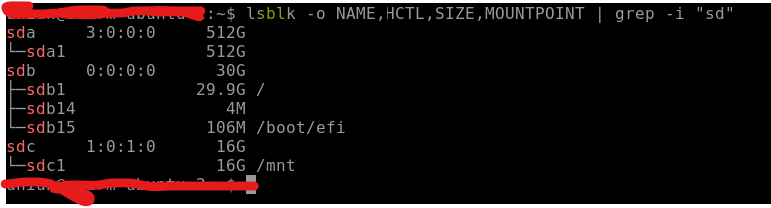
So I can't assume that the disk is always under sdc for example.
For example here is a command that will give me the name of the disks (filters out partitions) with a specific size. However suppose the disk being attached happened to be same size as the OS disk, how would I know which is which - given both HTCL's end with 0 (as shown in my previous comment above)

@dazinator Thanks for your feedback! We will investigate and update as appropriate.

@dazinator Firstly, Apologies for the delay response! I'd recommend posting your question in https://azure.microsoft.com/en-us/support/community/ since it's not directly related to the documentation. We'll follow up there. We will now proceed to close this thread. If there are further questions regarding this matter, please tag me in your reply. We will gladly continue the discussion and we will reopen the issue.

@SumanthMarigowda I think this does relate directly to the documentation.. I've quoted the portion of the documentation that is misleading or untrue - but let me put it here again, it states:
Here, sdc is the disk that we want, because it is 50G. If you add multiple disks, and aren't sure which disk it is based on size alone, you can go to the VM page in the portal, select Disks, and check the LUN number for the disk under Data disks. Compare the LUN number from the portal to the last number of the HTCL portion of the output, which is the LUN
Yet look at the screenshot I posted - multiple disks have 0 as the last portion of the HCTL so how can this be true?