
obsidian-file-path-to-uri
 obsidian-file-path-to-uri copied to clipboard
 MichalBures
Convert file path to uri for easier use of links to local files outside of Obsidian
File path to URI (an Obsidian.md plugin)


This plugin lets you convert a local path to a file url link that can be used to link to files or folders that are located outside of your Obsidian vault.

Use Obsidian's native behaviour ❗
AFAIK this plugin isn't really needed anymore since you can drag any file or folder into your note while holding Ctrl and Obsidian will paste it as a link.
C:\Users\Obsidian\Documents will be pasted as [Documents](file:///C:%5CUsers%5CObsidian%5CDocuments)
How to use this plugin
Convert written path
- Select the whole path you want to convert.
- Use the default hotkey
Ctrl/Cmd + Alt + Lor pressCtrl/Cmd + Pto open the command palette and search forFile path to URI: Toggle selected file path to URI and back. - The selected path will toggle between file path and file url.
Convert path from clipboard
- Copy any path such as
C:\Users\Obsidian\Documentsor\\network\folder\to your clipboard - Use the default hotkey
Ctrl/Cmd + Alt + Shift + Lor pressCtrl/Cmd + Pto open the command palette and search forFile path to URI: Paste file path as file uri. - The converted path will be pasted into the editor (that is either
file:///C:/Users/Obsidian/Documentsorfile:///%5C%5Cnetwork/folder/in this example)
Convert path from clipboard to link
- Copy any path such as
C:\Users\Obsidian\Documentsor\\network\folder\to your clipboard - Press
Ctrl/Cmd + Pto open the command palette and search forFile path to URI: Paste file path as file uri link. There is no default hotkey for this command so if you want to use a keyboard shortcut you can set a custom one in Obsidian settings. - The converted path will be pasted into the editor (that is either
[C:\Users\Obsidian\Documents](file:///C:/Users/Obsidian/Documents)or[\\\\network\folder\](file:///%5C%5Cnetwork/folder/)in this example)
Convert path from clipboard to link with only the name as title
- Copy any path such as
C:\Users\Obsidian\Documentsor\\network\folder\to your clipboard - Press
Ctrl/Cmd + Pto open the command palette and search forFile path to URI: Paste file path as file uri link - Name only. There is no default hotkey for this command so if you want to use a keyboard shortcut you can set a custom one in Obsidian settings. - The converted path will be pasted into the editor (that is
either
[Documents](file:///C:/Users/Obsidian/Documents)or[folder](file:///%5C%5Cnetwork/folder/)in this example)
How to change the hotkey
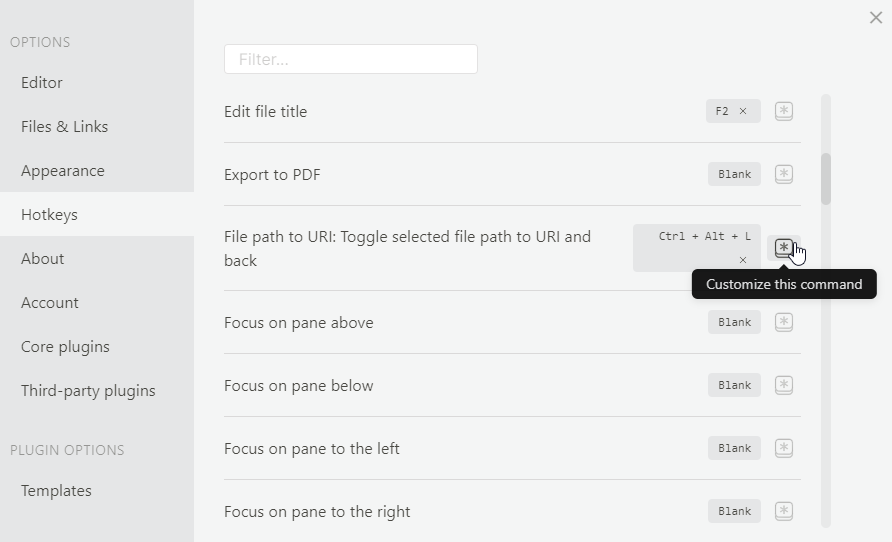
You can change the hotkey combination in Obsidian settings under Hotkeys. Look for File path to URI: Toggle selected file path to URI and back and File path to URI: Paste file path as file uri.
Transforms
-
C:\Users\Obsidian\Documents<->file:///C://Users//Obsidian//Documents -
\\network\folder\<->file:///%5C%5Cnetwork/folder/ -
"C:\Users\Obsidian\Documents"->file:///C://Users//Obsidian//DocumentsStrips the surrounding whitespace and double quotation marks from the selection
Version History
1.0.0 (2021-01-17)
- Initial release
1.1.0 (2021-02-11)
- Add support for network paths and trim whitespace and quotation marks from selection
1.2.0 (2021-04-22)
- Add command to paste converted file path from clipboard as file uri
1.3.0 (2021-07-25)
- Add command to paste converted file path from clipboard as file uri link
1.4.0 (2022-07-01)
- Add another command that pastes converted file path from clipboard as file uri link but the link title is only the file/folder name
1.4.1 (2022-09-04)
- Fix '%20' instead of spaces in file/folder names only links
Credits
Code and readme inspired by https://github.com/agathauy/wikilinks-to-mdlinks-obsidian
Metadata
Owner
 MichalBures
Metadata
Convert file path to uri for easier use of links to local files outside of Obsidian