

 Metaxal
Colour selector triggers error on macOS Catalina 10.15.7
notes: old version of macOS - need to test on recent version
../../../Applications/Racket v8.3/collects/racket/contract/private/blame.rkt:346:0: set-pen: contract violation
  expected: (or/c (is-a?/c color%) string?)
  given: #f
  in: the 1st argument of
      the 2nd case of
      (case->m
       (-> (is-a?/c pen%) void?)
       (->
        (or/c (is-a?/c color%) string?)
        real?
        (or/c
         'transparent
         'solid
         'xor
         'hilite
         'dot
         'long-dash
         'short-dash
         'dot-dash
         'xor-dot
         'xor-long-dash
         'xor-short-dash
         'xor-dot-dash)
        void?))
  contract from: (class dc%)
  blaming: <pkgs>/gui-lib/mred/private/wx/cocoa/canvas.rkt
   (assuming the contract is correct)

When does this happen precisely: a) when right-clicking on a color, b) after right-clicking, when clicking on "Ok" to select the color, or c) after clicking on "Ok" and drawing in the canvas?

Interesting question!
for the other controls to select I left click - right-click does not have a known action if I right click I get the colour picker - it does not select the colour I right clicked (defaults to black) if I left-click I get the error above
in testing this I noticed that mac does not pic up the control-click event that lets you set key bindings (tried ctrl, alt, command keys)
Interesting question!
for the other controls to select I left click - right-click does not have a known action if I right click I get the colour picker - it does not select the colour I right clicked (defaults to black) if I left-click I get the error above
That's weird!
in testing this I noticed that mac does not pic up the control-click event that lets you set key bindings (tried ctrl, alt, command keys)
Try to go to Keymap|Buttons|New Shortcut, double-click on the only item (or click+enter), then do a ctrl-left-click in the event listener, click on ok.
Then try ctrl-left-click on a button
it consistently doesn't register the ctrl key.
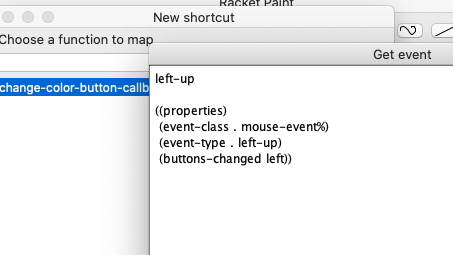 windows behaves as expected and shows control:left-up instead
Wow, wut?
Can you check "full event", "control", "rcontrol", and try again?