

 Metabolix
Signing HackBGRT.
Hi. I know this isn't an issue, but is there any good, easy or just any way to sign HackBGRT as correct EFI application. Or is there any good tutorial out there? I once again apologize for posting it here, but it is very important for me to keep secure boot on.


You can self sign any software or file you desire. Though there aren't many tutorials out there. A few months ago I forked this repo and signed the EFI executables so others, including me, can use it with secure boot. See here: https://github.com/icedterminal/HackBGRT-signed
There is one caveat: Most OEM computers (Dell, Lenovo, etc) do not offer a way to import certificates into the motherboard database. Since these motherboards are 100% custom firmware by the OEM. They do not use the same standards that other hardware maker use for DIY motherboards. This means you need to use SHIM and MOK. There is a great tutorial on how to use these tools covered by the creator of rEFInd. See here: https://www.rodsbooks.com/refind/secureboot.html

Okey, so let say I have a Dell Laptop. Will I have to import a certificate or not?
The more important question is what is the model of the laptop? If you provide that I can look up the manual to determine if the firmware supports importing custom certificates.
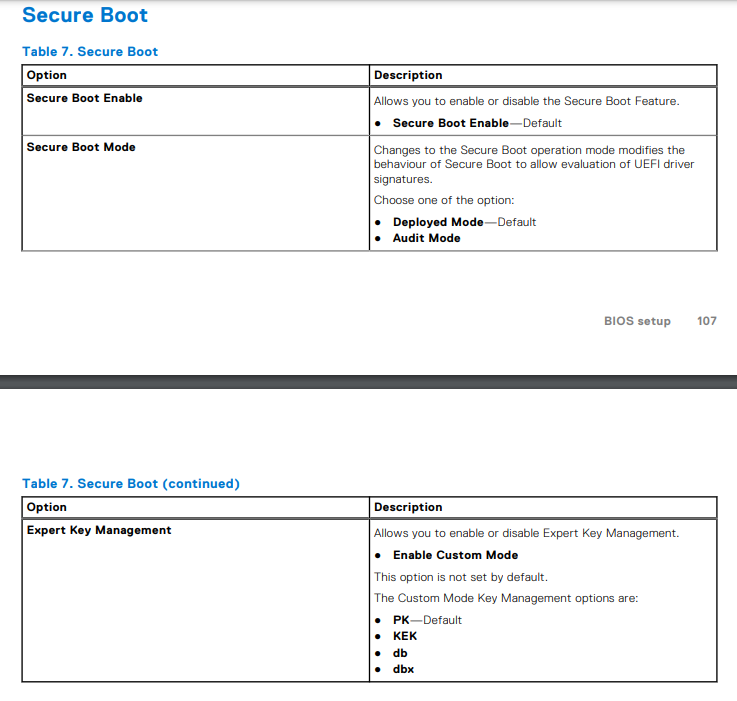
Good news. I don't even need to read the manual. Haha. Workstation laptops are more permissive in nature. You can import custom certificates here.
Edit: Might as well add a screenshot from the manual. Just in case this helps you.
Thanks you, I am going to try import them tomorrow, but one more question because I got confused. Which and from where I am supped to get a correct certificate?
If you visit the repo I linked you in my first comment, I signed the EFI executables with my own certificate. That certificate is included in the zip. That's the one you import into the firmware database.
Okay, thanks. EDIT: I completely forgot about this issue I posted here xD Finally someone who knows a lot more than others.
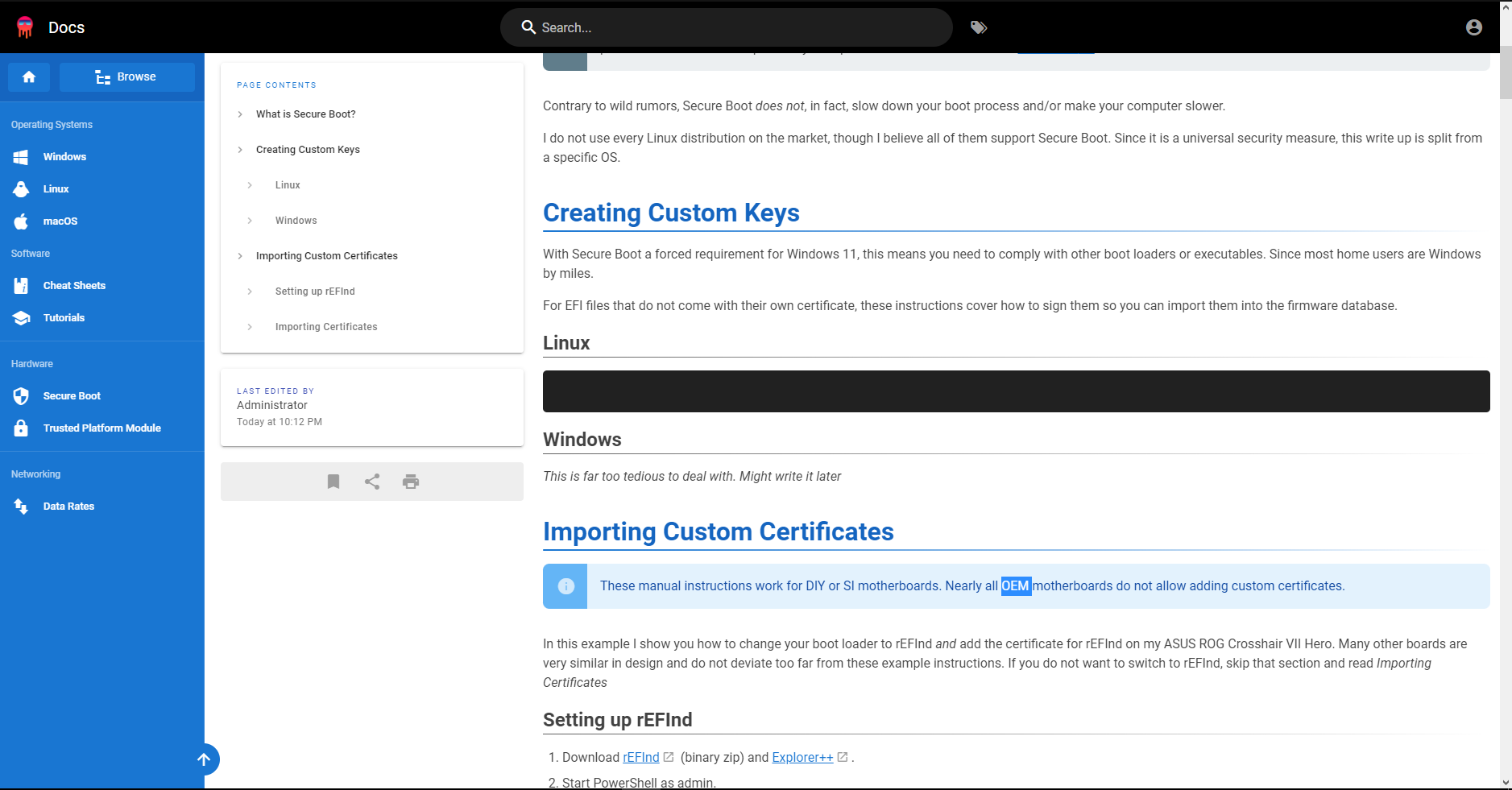
Idk, if you have noticed, but if you look at our docks linux command it is not displaying. And it copies nothing to clipboard.
 Btw, I want ask why most of OEM motherboards do not allow custom certificates and what mean that motherboard is OEM.
Edit: Same behavior on: Opera GX, Firefox, MS Edge-S**t
Btw, I want ask why most of OEM motherboards do not allow custom certificates and what mean that motherboard is OEM.
Edit: Same behavior on: Opera GX, Firefox, MS Edge-S**t
It's not displaying because there isn't actually anything there. Just an empty code block. I am completely rewriting into a separate tutorial for OpenSSL in general. This site is still very much under construction and content moves.
Edit: Completely forgot to address your other questions.
Most OEM motherboards prohibit adding new keys, not by wanting to control you, but rather reduce the potential for confusion or user error. The average end user will have no clue. Much less boot into firmware. I work with end users and 90% of them have no idea motherboard firmware exists, what it does and what things in there mean. The firmware is loaded with the default certificates and left that way. Because OEMs simply think "Who's going to mess with this anyway?"
OEM means Original Equipment Manufacturer. Dell is an OEM. They manufacture the entire computer. Excluding the CPU which is purchased from Intel or AMD. Where as my computer is DIY, Do It Yourself. I have assembled my computer form parts I purchased on Newegg.
Edit 2: I have updated the page and finally published the OpenSSL tutorial. I procrastinated hard. But since this was discussed I went ahead and finished it up. You can follow that tutorial to sign the EFI files yourself if you wish.
There is one caveat: Most OEM computers (Dell, Lenovo, etc) do not offer a way to import certificates into the motherboard database. Since these motherboards are 100% custom firmware by the OEM. They do not use the same standards that other hardware maker use for DIY motherboards. This means you need to use SHIM and MOK. There is a great tutorial on how to use these tools covered by the creator of rEFInd. See here: https://www.rodsbooks.com/refind/secureboot.html
@icedterminal Have you tried the MOK way by any chance? Booting a self-signed HackBGRT from grub with the key enrolled does not seem to be working.

Booting a self-signed HackBGRT from grub with the key enrolled does not seem to be working.
The certificate is enrolled with Grub? It should work without issue. If not, the OEM has a non-standard EFI (which is common), there is a bug in the firmware (not unheard of), or Chain of Trust is enforced and doesn't like what's going on. In fact Rod has had issues with janky firmwares:
Some Secure Boot implementations are just plain flaky. For instance, I've had problems launching some binaries built with GNU-EFI on an ASUS P8H77-I motherboard
You could have a firmware thats not playing nice. As my motherboard is DIY it's unnecessary for me to use Shim or MOK. I have previously used it on a 2015 Dell laptop for rEFInd. But I no longer have it.
If you have not tried MOK, it is very easy to setup.
Yea, MOK itself seems to be working great - I enrolled the key with mokutil and mokutil --list-enrolled does show it. The chain then is supposed to go like this:
shim -> grub -> hackbgrt --> another grub --> linux
This setup works with secure-boot disabled, but as this is a customer-facing single-app device, I'd like to get rid of the big red warning about secure boot being disabled.
Surface devices have Microsoft's unique UEFI.
Since you said this is a customer facing device you'll want to enroll it in the Enterprise Management Mode.
https://docs.microsoft.com/en-us/surface/surface-enterprise-management-mode
You can secure it and add your own CA directly to the firmware.
https://docs.microsoft.com/en-us/surface/manage-surface-uefi-settings
I've been following this, and I found the setting in my UEFI to import user certificates. From what I gather I need to import it into DB. However when i go to find the file (on the root of my c drive right now) the only location it will let me select is somewhere inside the EFI partition. I feel really dumb for asking this but how do I get the certificate file into the efi partition, so I can import it?

@Corgano Are you sure you can't get to your C drive?
So then if I remember correctly you should type in cmd (I think it should be as admin) montvol /S.
It should mount your EFI partition then (still using cmd) copy your crtificate to EFI.
WARNING! If you delete/modify anything there that is not yours your system will almost certainty became unbootable.
the only location it will let me select is somewhere inside the EFI partition.
The firmware may not have the capability to read NTFS directly (requires licensing). FAT32 is what the EFI partition uses. It doesn't have this restriction. Anyone can use it. To mount your EFI partition, use diskpart. Using mountvol is not ideal as that tool is only useful while booted into Windows. Should your EFI partition become damaged, you can correct that with diskpart. Which is usable from a WinPE, WinRE and Windows. It's unnecessary to learn commands that are only useful in one scenario. Here is an example of what to do using PowerShell admin
PS C:\> diskpart

DISKPART> list volume

  Volume ###  Ltr  Label        Fs     Type        Size     Status     Info
  ----------  ---  -----------  -----  ----------  -------  ---------  --------
  Volume 0         WINEFI       FAT32  Partition    100 MB  Healthy    System
  Volume 1         Recovery     NTFS   Partition   1000 MB  Healthy    Hidden
  Volume 2     C   Windows      NTFS   Partition    464 GB  Healthy    Boot

DISKPART> select volume 0

Volume 0 is the selected volume.

DISKPART> assign letter=Y

DiskPart successfully assigned the drive letter or mount point.

DISKPART> exit

PS C:\> copy C:\Users\yourname\Desktop\HackBGRT.crt Y:\HackBGRT.crt

PS C:\> diskpart

DISKPART> select volume 0

Volume 0 is the selected volume.

DISKPART> remove letter=Y

DiskPart successfully removed the drive letter or mount point.

DISKPART> exit
I'll give that a try. I used a few different methods to mount the efi volume, I got as far as being able to see it, but actually accessing it I get prompts that I need to get permissions, and trying to adding myself or everyone permissions always fails with access is denied. Maybe windows 11 ramped up security I'll try again later
Alternatively, could I just like format an SD card or USB stick correctly and then install the certificate from that? I'm new to the world of uefi so I'm not really understanding what formatting it expects and if it will be able to see like SD cards and usb drives or not
On Tue., Apr. 19, 2022, 5:13 a.m. icedterminal, @.***> wrote:
the only location it will let me select is somewhere inside the EFI partition.
The firmware may not have the capability to read NTFS directly (requires licensing). FAT32 is what the EFI partition uses. It doesn't have this restriction. Anyone can use it. To mount your EFI partition, use diskpart. Using mountvol is not ideal as that tool is only useful while booted into Windows. Should your EFI partition become damaged, you can correct that with diskpart. Which is usable from a WinPE, WinRE and Windows. It's unnecessary to learn commands that are only useful in one scenario. Here is an example of what to do.
PS C:> diskpart
DISKPART> list volume
Volume ### Ltr Label Fs Type Size Status Info
Volume 0 WINEFI FAT32 Partition 100 MB Healthy System Volume 1 Recovery NTFS Partition 1000 MB Healthy Hidden Volume 2 C Windows NTFS Partition 464 GB Healthy Boot
DISKPART> select volume 0
Volume 0 is the selected volume.
DISKPART> assign letter=Y
DiskPart successfully assigned the drive letter or mount point.
DISKPART> exit
PS C:> copy C:\Users\yourname\Desktop\HackBGRT.crt Y:\HackBGRT.crt
PS C:> diskpart
DISKPART> select volume 0
Volume 0 is the selected volume.
DISKPART> remove letter=Y
DiskPart successfully removed the drive letter or mount point.
DISKPART> exit
— Reply to this email directly, view it on GitHub https://github.com/Metabolix/HackBGRT/issues/88#issuecomment-1102516992, or unsubscribe https://github.com/notifications/unsubscribe-auth/AAGSARIUNWRYSPUIO2AP53TVF2IOPANCNFSM5JPCVHMA . You are receiving this because you were mentioned.Message ID: @.***>
but actually accessing it I get prompts that I need to get permissions, and trying to adding myself or everyone permissions always fails with access is denied. Maybe windows 11 ramped up security
You will always be denied from accessing the EFI partition using Windows File Explorer. This is a permission restriction by design. It's been this way since Windows 8. It helps reduce the risk of damage if one does not know what it is for or what the files do.
Alternatively, could I just like format an SD card or USB stick correctly and then install the certificate from that?
You can try. Any USB drive formatted as FAT32 should work. I have yet to come across any motherboard firmware that won't let you or can't.
This is a permission restriction by design. It's been this way since Windows 8.
But this restriction is for explorer only. Using cmd you can enter there like normal.
But this restriction is for explorer only.
Perhaps you missed where I specifically pointed that out in my response.
Version 2.2.0 includes a signed shim from Debian to support Secure Boot. For security reasons, I'd recommend against enrolling other peoples' personal certificates (that's nearly as good as disabling Secure Boot), but in case someone still wants to do that, HackBGRT is now also self-signed.
