

 Metabolix
Bootloop when loading directly | Unknown Directive when Chainloading
I've done 2 tests:
- Booting directly
- Chain loading Windows Boot Manager with Clover
Both gave me some strange error.
-> First one (UEFI - Directly to Windows):
- Normal installation (using setup.exe)
- Kept Active (Not disabled)
Result:
Bootloop
 ^ I kept trying to boot. ^
 ^ I pressed cancel but is still blocked in a bootloop. ^
-> Second one (Clover EFI):
- Normal installation (using setup.exe)
- Kept Active (Not disabled)
- As README.MD I've set boot=\EFI\Microsoft\Boot\bootmgfw.efi
- On Clover EFI: Pointed to HackBGRT's bootx64.efi
Result:
Unknown directives (I don't know)...
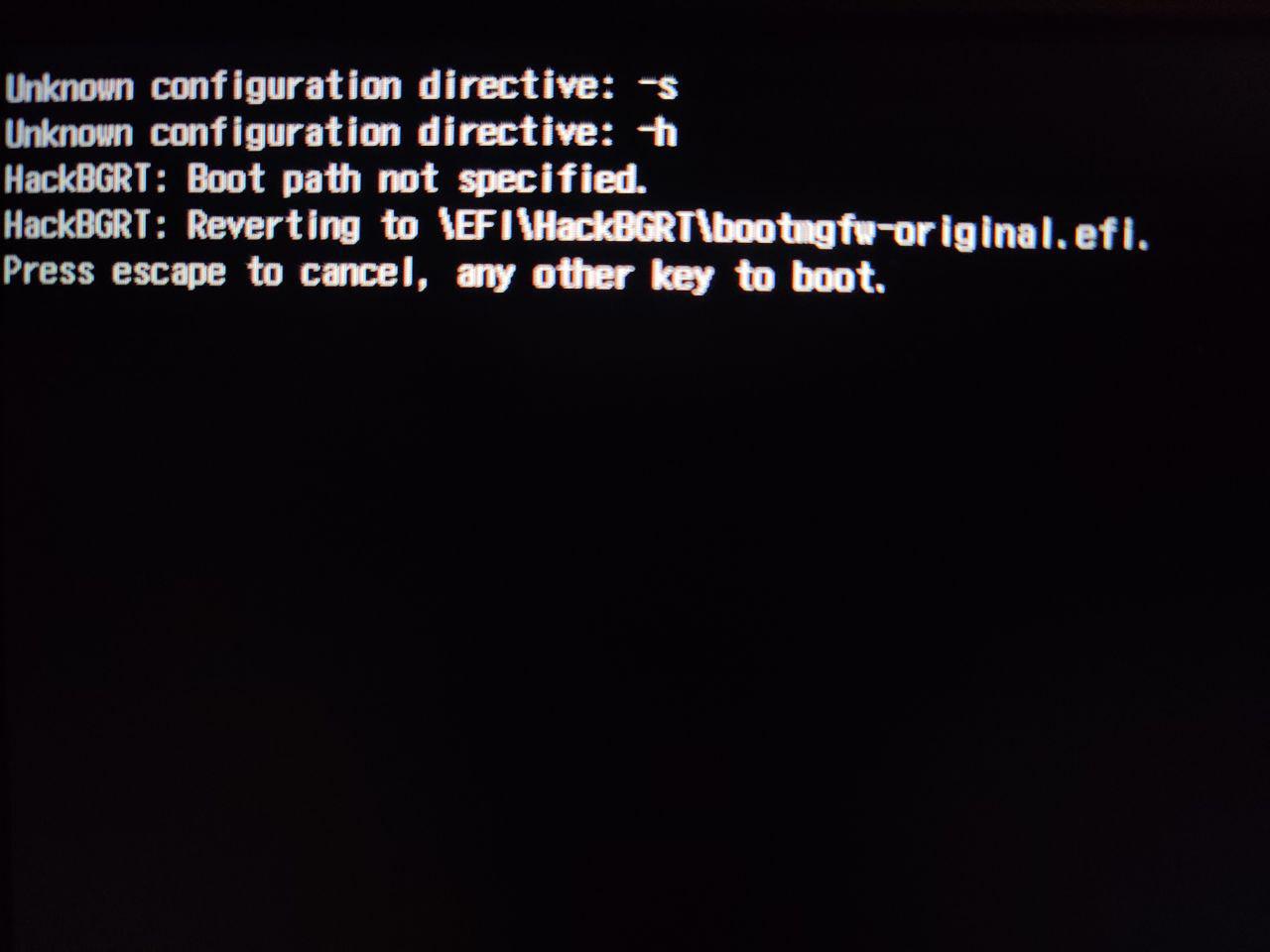 ^ But still I can load up the backup by pressing enter. ^
 ^ But the logo is placed on top left corner. ^
There's no problem about recovering the original settings, I can easily access to windows and revert all.
HP Laptop.

Fixes with the first method: Just use boot=\EFI\HackBGRT\bootmgfw-original.efi (the backup file)
But still I want to chainload with clover, but doesn't work
Same here concerning chain loading clover. However this method has some promise https://forum.amd-osx.com/viewtopic.php?t=7515.

The problem is the version of Clover and what he changed in the .efi File to make that adjustment... I'll check it as soon as possible then...
If not maybe I can try multi chainloading... Like: Clover -> rEFInd -> BGRT
Let me know when you're done. I'm still tuning my hybrid hackintosh atm.
On Sun, 29 Dec 2019, 6:46 AM Nebulino, [email protected] wrote:
If not maybe I can try multi chainloading... Like: Clover -> rEFInd -> BGRT
— You are receiving this because you commented. Reply to this email directly, view it on GitHub https://github.com/Metabolix/HackBGRT/issues/48?email_source=notifications&email_token=AGM4H55B5J3R5CMMRWVUCH3Q3CEZDA5CNFSM4JZC4URKYY3PNVWWK3TUL52HS4DFVREXG43VMVBW63LNMVXHJKTDN5WW2ZLOORPWSZGOEHY5SOQ#issuecomment-569497914, or unsubscribe https://github.com/notifications/unsubscribe-auth/AGM4H524RUCULGXMHCIIGGLQ3CEZDANCNFSM4JZC4URA .
Let me know when you're done. I'm still tuning my hybrid hackintosh atm. … On Sun, 29 Dec 2019, 6:46 AM Nebulino, @.***> wrote: If not maybe I can try multi chainloading... Like: Clover -> rEFInd -> BGRT — You are receiving this because you commented. Reply to this email directly, view it on GitHub <#48?email_source=notifications&email_token=AGM4H55B5J3R5CMMRWVUCH3Q3CEZDA5CNFSM4JZC4URKYY3PNVWWK3TUL52HS4DFVREXG43VMVBW63LNMVXHJKTDN5WW2ZLOORPWSZGOEHY5SOQ#issuecomment-569497914>, or unsubscribe https://github.com/notifications/unsubscribe-auth/AGM4H524RUCULGXMHCIIGGLQ3CEZDANCNFSM4JZC4URA .
It works, I tried rEFInd and GRUB with success... so for now I'll stick with chainloading... keep in mind you have to nullify the count down and make HackBGRT the default. It also means you have to sacrifice a whole boot manager just to make "a bridge" from clover to the .efi...
It's not a fix but at least it works for now.
I have zero experience with Clover, but logically you should be able to chainload it in the other order: set HackBGRT as the default loader and set boot=\path\to\clover.efi.

I can't remember if I tried that. Surely I have to do that again if not. By doing that makes the boot logo showing before CLOVER?
For now I'm happy with my setup thought. The PC boots directly to CLOVER without any Windows Logo / Manufacturer. Arch Linux looks fine and his logo is managed by plymouth. Windows boots with a custom logo using BGRT but putting a middle boot-manager. Mac OS have the normal Apple Logo.
Maybe I'm going to try that in a new PC build.
I can't remember if I tried that. Surely I have to do that again if not. By doing that makes the boot logo showing before CLOVER?
HackBGRT does not show the image. It only loads the image, so that Windows boot loader can show it. So running HackBGRT first and Clover second will only cause the minimal delay of loading the image before starting Clover, nothing more.
If there's a further issue with Clover, please open a new bug report with the latest HackBGRT release.