
Google-Assistant-Unofficial-Desktop-Client
 Google-Assistant-Unofficial-Desktop-Client copied to clipboard
 Melvin-Abraham
[🐛 Bug]:
What went wrong?
Not able to take my input voice! Even my microphone driver is set right !
What did you expect to happen?
No response
Steps to reproduce the bug
Not taking voice
App Version
v1.0.0
OS Version
Windows 10 education
Relevant Assets
:information_source: Platform Info
Running on Windows_NT x64 10.0.19044
Pre-submission Checklist
- [X] I have checked the issue tracker and didn't find any duplicate issue
- [X] I have checked the Frequently Asked Questions (FAQs) and can confirm that there's no fixes or workarounds for this issue
- [X] This issue only covers one particular bug or issue


@Clixon28 Can you add more description regarding the issue and update the title accordingly as mentioned above to reflect the issue?

I am facing the same issue, and I don't think its related to #472.
The assistant never asked for permission to use the microphone, I guess it should? I checked "System Preferences" and didn't find the Google Assistant name under Privacy & Security -> Microphone. When I try to use the microphone, it doesn't respond to my voice, so far I have just been communicating by typing in commands which is not as fun :(
Platform: MACOS 12.3.1 Application: v1.0.0
Please let me know if more information is required to debug, happy to help :)

Update: I just tried "Restart session with default settings (Fallback Mode)", the application restarted and asked for microphone permissions. I granted the permission and the microphone now works perfectly (and responds to "Hey Google" as well).
Even after getting out of the Fallback Model back to normal mode, the microphone continues to work.
@Clixon28 maybe you can try this as well (if its still not working for you)?
Update: I just tried "Restart session with default settings (Fallback Mode)", the application restarted and asked for microphone permissions. I granted the permission and the microphone now works perfectly (and responds to "Hey Google" as well).
Yup. I did the same and go this permission:
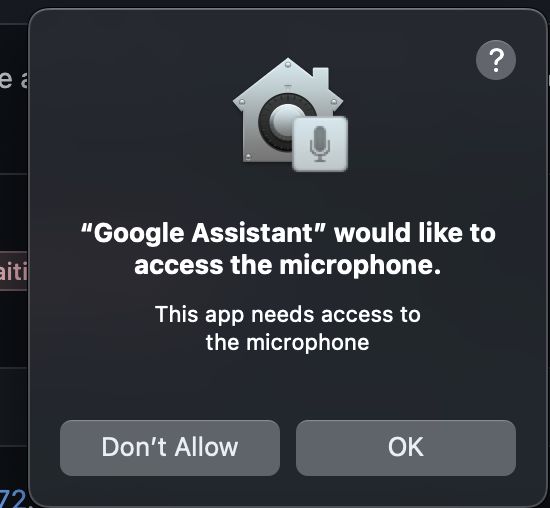
And now my mic works!
