

 Megabit
Multiple Modals/ MessageService on top of Modal should "Hide" the Modal beneath
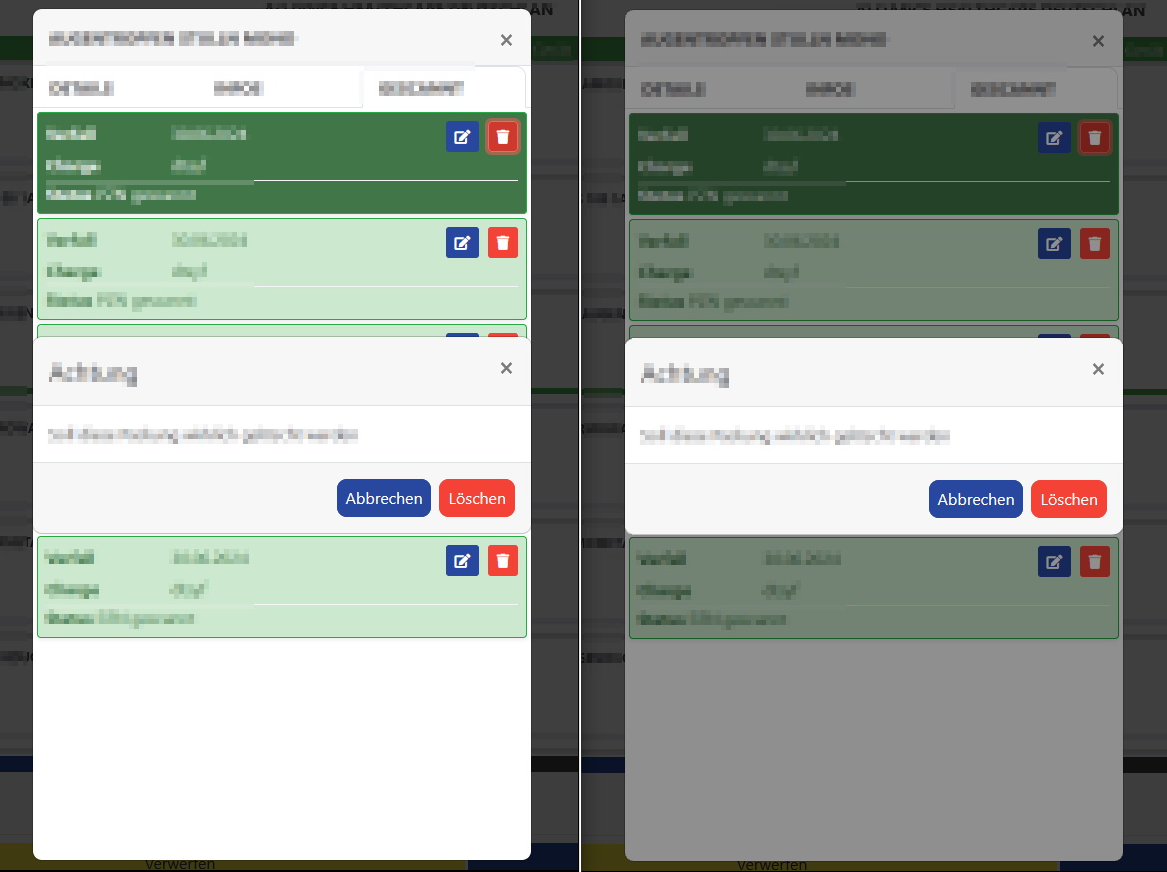
Describe the bug Message Service/Modal won't hide a Modal beneath. To Reproduce Open a Modal and then an MessageService.Confirm
Expected behavior See right screenshot.
Screenshots
Left how it looks. Right how it should look(made with paint.net).

@stsrki I just noticed this ticket. Is it the same issue as mine?
I have tried to apply some z-indexing (z-index: 10000000 !important;) to the issue but with no results at all.. Is there a way to do it outside of Blazorise with CSS?

@sturlath It might be a similar problem, but I don't know how ABP modal/menu is structured. Maybe they have a z-index that is higher than the modal.
Appling custom CSS should work. The easiest solution I can think of is to assign a custom classname to the Modal component. eg <Modal Class="my-second-modal">.
Then in CSS
.my-second-modal.modal{
  z-index: 1051;
}

.my-second-modal.modal + .modal-backdrop{
  z-index: 1041;
}
Note: default bootstrap values are 1050 for modal and 1040 for backdrop.

Thanks for the answer but it didn´t work (I also tried higher values).
So I added this hack to move the menu down. Values over 1 move it over. Nb I had also your css
div.card > div > div > div.col-3 > ul {
    z-index: 1
}
I guess somebody at abp needs to help answering this