
Blazorise
 Blazorise copied to clipboard
 Megabit
AutoComplete multiple checkbox

There are some conflicts so I think you should be the one to fix them. Or I could accidentally break something. Agree?

There are some conflicts so I think you should be the one to fix them. Or I could accidentally break something. Agree?
Yep
SuggestMultipleCheckbox seems strange to me. I think it would be better to have something like enum MultipleSelectionMode with Checkbox, Default, and values. Or just SelectMultipleWithCheckbox.
SuggestMultipleCheckboxseems strange to me. I think it would be better to have something likeenum MultipleSelectionModewith Checkbox, Default, and values. Or justSelectMultipleWithCheckbox.
It's like an enhancement over SuggestSelectedItems :
 Hence maintaining same prefix.
The enum MultipleSelectionMode is a good idea, I'd probably prefer to rework some stuff to be:
enum SelectionMode{
Default,
Multiple,
SuggestSelected, (this still bases itself off multiple mode behind the covers)
Checkbox (this still bases itself off multiple + suggestselected mode behind the covers)
}
What do you think? It would be breaking change tough. We could schedule an issue with this, and for now leave it like it is?
The
enum MultipleSelectionModeis a good idea, I'd probably prefer to rework some stuff to be:enum SelectionMode{ Default, Multiple, SuggestSelected, (this still bases itself off multiple mode behind the covers) Checkbox (this still bases itself off multiple + suggestselected mode behind the covers) }What do you think? It would be breaking change tough. We could schedule an issue with this, and for now, leave it like it is?
Having SuggestSelected in the enum doesn't make sense. It can easily be a boolean because it is not a new mode per-se, just a modification of the existing Multiple selection mode.
Checkbox can be part of the SelectionMode.
The
enum MultipleSelectionModeis a good idea, I'd probably prefer to rework some stuff to be:enum SelectionMode{ Default, Multiple, SuggestSelected, (this still bases itself off multiple mode behind the covers) Checkbox (this still bases itself off multiple + suggestselected mode behind the covers) }What do you think? It would be breaking change tough. We could schedule an issue with this, and for now, leave it like it is?
Having
SuggestSelectedin the enum doesn't make sense. It can easily be a boolean because it is not a new mode per-se, just a modification of the existing Multiple selection mode.
Checkboxcan be part of the SelectionMode.
You could argue the same for Checkbox then... not a new mode per-se... modification/enhancement of the existing....
True, but SuggestSelected can change the behavior of both Multiple and Checkbox modes. That's why it is better to make it a separate thing.
Default, Multiple,
Eitherway it's best to keep it for a future milestone right? Multiple is already implemented as a bool
Default, Multiple,
Eitherway it's best to keep it for a future milestone right?
Multipleis already implemented as a bool
Do you mean to keep new enum for the future? I would add it now in v1.1, and then mark Multiple as obsolete and to be removed in v2.0.
Default, Multiple,
Eitherway it's best to keep it for a future milestone right?
Multipleis already implemented as a boolDo you mean to keep new enum for the future? I would add it now in v1.1, and then mark
Multipleas obsolete and to be removed in v2.0.
Ok seems good to me then. just have to take note, that currently if AutoComplete is set to Default and Multiple is set to true, it will override it. :)
Attempt other proposed enhancements if time available.
There should also be a search bar in the dropdown, before the first Item in the List.
(Investigate this one, might not make sense with our current component)
There should be an Arrow/Chevron on the right side of the mainbar, so its more Intuitive for the User, that you can open a dropdown.
(seems like it wouldn't be too hard and makes sense)
From #3867
There should be an Arrow/Chevron on the right side of the mainbar, so its more Intuitive for the User, that you can open a dropdown.
(seems like it wouldn't be too hard and makes sense)
From #3867
Don't underestimate it. Adding any up-down button can be a real pain. I know about it when I did the NumericEdit step buttons. And it's really hard to do it for all providers.
There should be an Arrow/Chevron on the right side of the mainbar, so its more Intuitive for the User, that you can open a dropdown.
(seems like it wouldn't be too hard and makes sense) From #3867
Don't underestimate it. Adding any up-down button can be a real pain. I know about it when I did the NumericEdit step buttons. And it's really hard to do it for all providers.
hmm then i Might not loose anytime with this at all then haha
There should be an Arrow/Chevron on the right side of the mainbar, so its more Intuitive for the User, that you can open a dropdown.
(seems like it wouldn't be too hard and makes sense) From #3867
Don't underestimate it. Adding any up-down button can be a real pain. I know about it when I did the NumericEdit step buttons. And it's really hard to do it for all providers.
hmm then i Might not loose anytime with this at all then haha
Hey Guys, do I get it right and the suggested Checkbox wont be implemented?
Kind regards, Silas

There should be an Arrow/Chevron on the right side of the mainbar, so its more Intuitive for the User, that you can open a dropdown.
(seems like it wouldn't be too hard and makes sense) From #3867
Don't underestimate it. Adding any up-down button can be a real pain. I know about it when I did the NumericEdit step buttons. And it's really hard to do it for all providers.
hmm then i Might not loose anytime with this at all then haha
Hey Guys, do I get it right and the suggested Checkbox wont be implemented?
Kind regards, Silas
Checkbox is currently in testing and should be available in v1.1.0 we were wondering if we had time to squeeze more features like the arrow indicator, which we probably won't yet.
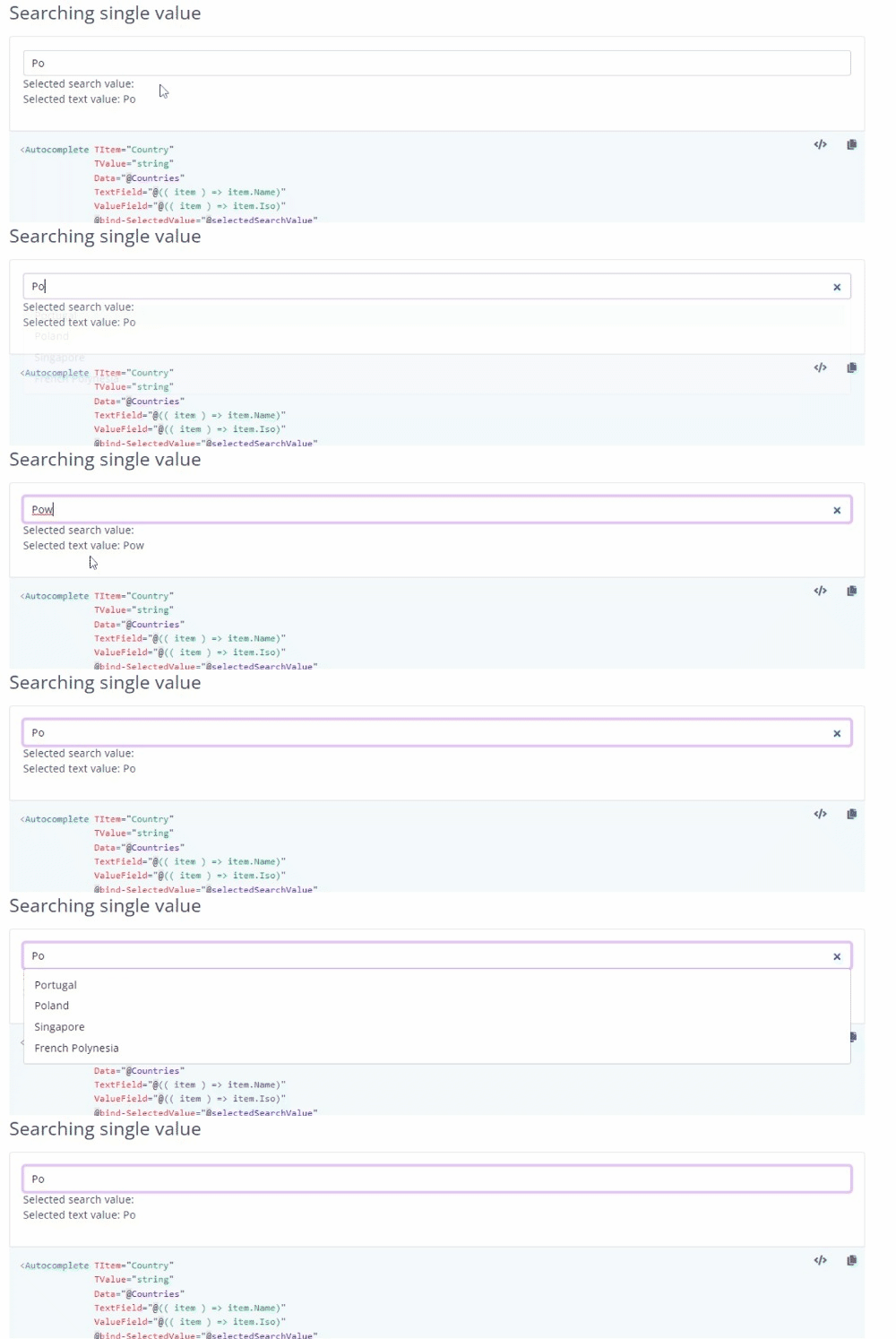
@glutio Freetype an item, go back to typing a value that results in options, first item is no longer auto pre selected
 .
.
@glutio would you be willing to briefly write up your notable changes on the v1.1 release page? AutoSelectFirstItem && the keyboard interaction. Just let us know if you'd rather that we write them instead.
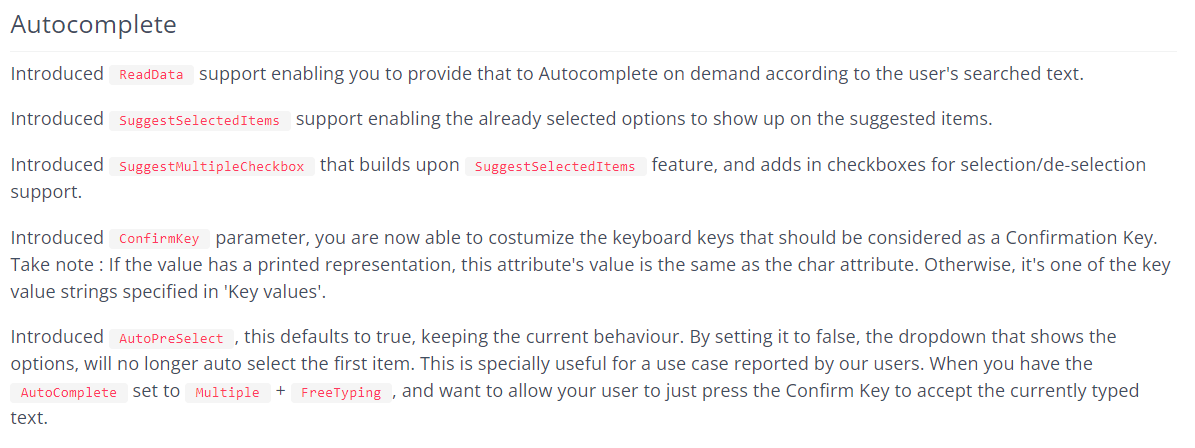
You can add a mention to your github tag as having contributed. :)

Again, appreciated your hard work on this. :)
Note to self
Release notes / Docs:
Touch upon the new SelectionMode parameter
SuggestMultipleCheckbox parameter no longer exists
How about we make Autocomplete a separate page in the demo app? Seems like it has grown quite a bit.
How about we make Autocomplete a separate page in the demo app? Seems like it has grown quite a bit.
Right could probably condense the options into a single autocomplete like we do for Datagrid

first item is no longer auto pre selected
Cannot repro
https://user-images.githubusercontent.com/22550674/185979878-a4749d3f-628b-42f3-a116-167521e31c48.mp4
About release notes, on second thought, I would need to create a separate branch but one of you could probably update the release notes directly in master, so maybe for simplicity I'll leave it to you to update it. I would write something like this, feel free to edit:
-
Improved keyboard support. You can now select items and remove selection using keyboard alone. Use navigation arrows to select an item in the dropdown. In multi-select mode use Backspace to remove most recently selected item or use [Shift-]Tab and Enter key to remove any previously selected item.
-
Introduced AutoSelectFirstItem property for single-select mode. Use this property to automatically select the first item from Data during Autocomplete initialization.
Thanks!
first item is no longer auto pre selected
Cannot repro
Blazorise.Autocomplete.component.and.9.more.pages.-.Work.-.Microsoft.Edge.2022-08-22.10-09-15.online-video-cutter.com.mp4
I'm not home yet. But from your video I think you missed the actual commit of the item by pressing enter or leaving the field. At least your video does not look exactly like my gif but I can detail the repro better later today.
About release notes, on second thought, I would need to create a separate branch but one of you could probably update the release notes directly in master, so maybe for simplicity I'll leave it to you to update it. I would write something like this, feel free to edit:
- Improved keyboard support. You can now select items and remove selection using keyboard alone. Use navigation arrows to select an item in the dropdown. In multi-select mode use Backspace to remove most recently selected item or use [Shift-]Tab and Enter key to remove any previously selected item.
- Introduced AutoSelectFirstItem property for single-select mode. Use this property to automatically select the first item from Data during Autocomplete initialization.
Thanks!
It's available in this branch, there's a docs project with the release notes. But we can go ahead and edit them with the texts you provided thanks.
but I can detail the repro better later today
nevermind, i was looking at this branch in my fork, which has old code...
i have the fix but i don't have permissions to push to this branch.. attached patch - git apply patch.txt patch.txt
AHHH, sorry completly forgot the branch is under the organization, haha, yes you'd need to submit a PR on top of this branch, right.
Ok thanks.