

 Megabit
ThemeBarOptions are ignored
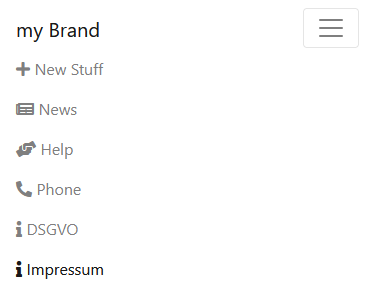
Describe the bug I am trying to set a Theme up for an web app but the ThemeBarOptions/Colors wont change.
To Reproduce Steps to reproduce the behavior: App.razor looks like this
<Blazorise.ThemeProvider Theme="@theme">
    <Router AppAssembly="@typeof(App).Assembly">
        <Found Context="routeData">
            <RouteView RouteData="@routeData" DefaultLayout="@typeof(MainLayout)" />
            <FocusOnNavigate RouteData="@routeData" Selector="h1" />
        </Found>
        <NotFound>
            <PageTitle>Not found</PageTitle>
            <LayoutView Layout="@typeof(MainLayout)">
                <p role="alert">Sorry, there's nothing at this address.</p>
            </LayoutView>
        </NotFound>
    </Router>
</Blazorise.ThemeProvider>

@code {
    private static string primaryColor = "#28489F"; // blue
    private static string secondaryColor = "#ED1C24"; // red


    private static string white = "#FFFFFF";
    private static string black = "#48484B";
    private static string red = "#ED1C24";

    private Theme theme = new Theme
        {
            //IsRounded = false,
            TextColorOptions = new ThemeTextColorOptions
            {
                White = white,
                Dark = black,
                Body = black,
            },
            BodyOptions = new ThemeBodyOptions
            {
                TextColor = black
            },
            BarOptions = new ThemeBarOptions
            {
                DarkColors = new ThemeBarColorOptions
                {
                    ItemColorOptions = new ThemeBarItemColorOptions
                    {
                        ActiveColor = secondaryColor,
                        ActiveBackgroundColor = white,
                        HoverColor = secondaryColor,
                        HoverBackgroundColor = white,
                    },
                    Color = secondaryColor,
                    BackgroundColor = white
                },
                LightColors = new ThemeBarColorOptions
                {
                    ItemColorOptions = new ThemeBarItemColorOptions
                    {
                        ActiveColor = secondaryColor,
                        ActiveBackgroundColor = white,
                        HoverColor = secondaryColor,
                        HoverBackgroundColor = white,
                    },
                    Color = secondaryColor,
                    BackgroundColor = white
                }
            },

            BackgroundOptions = new ThemeBackgroundOptions
            {
                Primary = primaryColor
            },
            ColorOptions = new ThemeColorOptions
            {
                Primary = primaryColor,
                Secondary = secondaryColor,
                Dark = black
                // other
            }

        };
}
my MainLayout.razor with the bar looks like
@inherits LayoutComponentBase

<PageTitle>Test</PageTitle>


<Layout>
    <LayoutHeader>
        <Bar Mode="BarMode.Horizontal"
             Breakpoint="Breakpoint.Desktop"
             ThemeContrast="ThemeContrast.Light">
            <BarBrand>
                my Brand
            </BarBrand>
            <BarToggler />

            <BarMenu>
                <BarStart>
                    <BarItem>
                        <BarLink To="">
                            <BarIcon IconName="Blazorise.Icons.FontAwesome.FontAwesomeIcons.Plus" />
                            New Stuff
                        </BarLink>
                    </BarItem>

                    <BarItem>
                        <BarLink To="https://somelink.de" Target="Target.Blank">
                            <BarIcon IconName="Blazorise.Icons.FontAwesome.FontAwesomeIcons.Newspaper" />
                            News
                        </BarLink>
                    </BarItem>
                    <BarItem>
                        <BarLink To="https://somelink.de" Target="Target.Blank">
                            <BarIcon IconName="Blazorise.Icons.FontAwesome.FontAwesomeIcons.HandsHelping" />
                            Help
                        </BarLink>
                    </BarItem>

                    <BarItem>
                        <BarLink To="">
                            <BarIcon IconName="Blazorise.Icons.FontAwesome.FontAwesomeIcons.PhoneAlt" />
                            Phone
                        </BarLink>
                    </BarItem>
                </BarStart>
                <BarEnd>

                    <BarItem>
                        <BarLink To="/dsgvo">
                            <BarIcon IconName="Blazorise.Icons.FontAwesome.FontAwesomeIcons.Info" />
                            DSGVO
                        </BarLink>
                    </BarItem>
                    <BarItem>
                        <BarLink To="/impressum">
                            <BarIcon IconName="Blazorise.Icons.FontAwesome.FontAwesomeIcons.Info" />
                            Impressum
                        </BarLink>
                    </BarItem>
                </BarEnd>
            </BarMenu>
        </Bar>
    </LayoutHeader>
    <LayoutContent>
        @Body
    </LayoutContent>
</Layout>
Expected behavior Active and Hover text should be red.
Screenshots
actual:
expected:
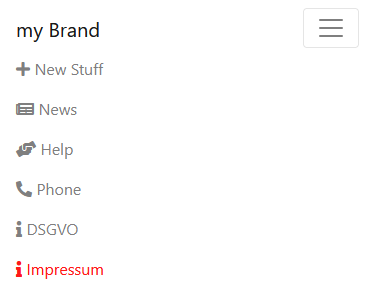
Additional context Blazorise.Bootstrap 1.0.2

Cant find any bug here. Is it a bootstrap issue?
This is working as expected.
app.razor
BarOptions = new ThemeBarOptions
            {
                HorizontalHeight = "64px",
                DarkColors = new ThemeBarColorOptions
                {
                    ItemColorOptions = new ThemeBarItemColorOptions { HoverColor = "#EE4B2B", ActiveColor = "#EE4B2B", },
                },
                LightColors = new ThemeBarColorOptions
                {
                    ItemColorOptions = new ThemeBarItemColorOptions{ HoverColor = "#EE4B2B", ActiveColor = "#EE4B2B", },
                }
            },

//mainlayout
Task OnThemeColorChanged(string value)
        {
            Theme.BarOptions.DarkColors.ItemColorOptions.HoverColor = "#FFFF00";
            Theme.BarOptions.LightColors.ItemColorOptions.HoverColor = "#FFFF00";
etc...
        }
Using bootstrap5
Blazorise v1.02
Blazor Server
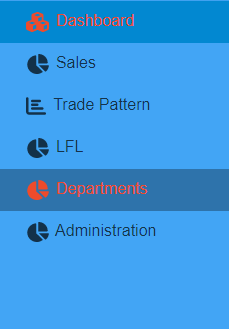

@Mr-Pearce The DarkColors and LightColors in the BarOptions are meant only for vertical bar mode. For a horizontal Bar you can only define Background and ThemeContrast on the Bar itself.

@Mr-Pearce The
DarkColorsandLightColorsin the BarOptions are meant only for vertical bar mode. For a horizontal Bar you can only defineBackgroundand ThemeContrast on the Bar itself.
So how am i supposed to theme the Horizontal Bar then? Background and ThemeContrast is kinda not enough.
At the moment you can do it with Style or by adding a custom class name and adjusting the CSS. Until we add it to the theming.