

 MatthewPierson
Unsupported Model (iPhone 6,1)
Describe the issue Vieux downgrade tool says always to my iPhone 5s (iPhone 6,1) that it is unsupported.
Screenshots
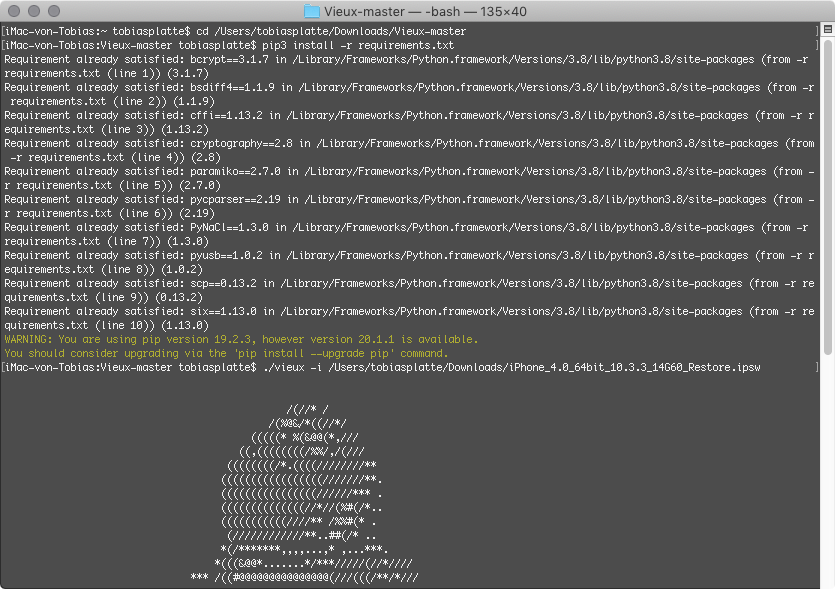
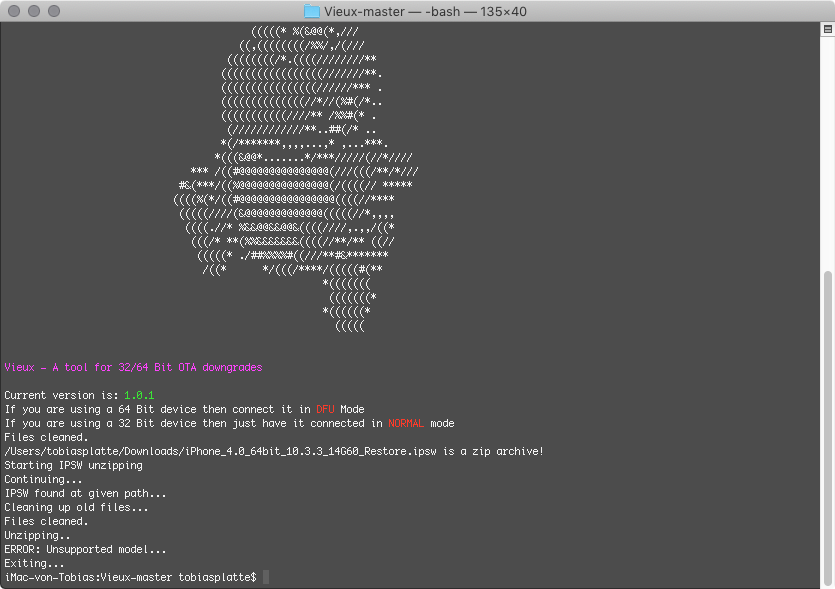
Computer
- Computer Model: iMac (27-inch, Late 2009, iMac 10.1)
- macOS Version: macOS Mojave 10.14.6 (18G5033) (Dosdude1 patcher tool)
- Python Version: Python 3.8.3 and Python 2.7.16
- Vieux Version: Commit (1.0.1)
iOS Device
- Device: iPhone 5s (iPhone 6.1)
- Desired Version: iOS 12.4.7 (same error with iOS 12.4.6, iOS 12.4.5, iOS 12.4.4)
Additional context I tried the tool a few times, but again and again failed it.


Did you check you are in DFU mode, not in restore mode ? Had he same issue.
Yes my iPhone 6.1 was always in DFU Mode ... how many attempts did you need for restoring to iOS 10.3.3?
So what, keep trying? I tried both global and GSM IPSW files, I thought all of them were mostly global. Which phones use GSM? I’m in US

So what, keep trying? I tried both global and GSM IPSW files, I thought all of them were mostly global. Which phones use GSM? I’m in US
I don’t try it again, sorry :/ ... I leave my old iPhone 6.1 on 12.4.8 and newer ... I’m in Europe. But if you have success please contact me and tell me how many attempts you needed. :) Greetings Tobias
I was trying to run from a folder on my desktop that was actually in my iCloud account. It was constantly uploading 2.5 gb IPSW into iCloud Drive files each time I ran the command... approximately 52 attempts, it gobbled up 128 GB of my remaining monthly bandwidth allotment... I barely have just under 200 GB left until the fifth of next month.
Not going to try again until I am damn sure that running the command isn’t also uploading the IPSW file into my iCloud drive...
Sent from my iPhone
On Jul 28, 2020, at 5:37 AM, MacToby [email protected] wrote:
So what, keep trying? I tried both global and GSM IPSW files, I thought all of them were mostly global. Which phones use GSM? I’m in US
I don’t try it again, sorry :/ ... I leave my old iPhone 6.1 on 12.4.8 and newer ... I’m in Europe. But if you have success please contact me and tell me how many attempts you needed. :) Greetings Tobias
— You are receiving this because you commented. Reply to this email directly, view it on GitHub, or unsubscribe.
I was trying to run from a folder on my desktop that was actually in my iCloud account. It was constantly uploading 2.5 gb IPSW into iCloud Drive files each time I ran the command... approximately 52 attempts, it gobbled up 128 GB of my remaining monthly bandwidth allotment... I barely have just under 200 GB left until the fifth of next month. Not going to try again until I am damn sure that running the command isn’t also uploading the IPSW file into my iCloud drive... … Sent from my iPhone On Jul 28, 2020, at 5:37 AM, MacToby @.***> wrote: So what, keep trying? I tried both global and GSM IPSW files, I thought all of them were mostly global. Which phones use GSM? I’m in US I don’t try it again, sorry :/ ... I leave my old iPhone 6.1 on 12.4.8 and newer ... I’m in Europe. But if you have success please contact me and tell me how many attempts you needed. :) Greetings Tobias — You are receiving this because you commented. Reply to this email directly, view it on GitHub, or unsubscribe.
Thanks for the report! I'll try it again tomorrow. I live in the MEZ Time Zone. My Desktop and Documents are also uploaded to the iCloud ... I had no problem with my 50GB iCloud Storage. Which Mac and macOS respectively OS X Version did you use? My iMac 10.1 (Late 2009, core2duo) is currently on macOS High Sierra (officially) and macOS Catalina (patcher, Dosdude1). I'll will try in Cat tomorrow! Last time I used macOS Mojave (patcher, Dosdude1).
I am using a Mac pro and I am stuck on 10.13 High Sierra, which may be a factor in the vieux failure, I can’t update to Mojave, it won’t let me because I don’t have a metal capable video card.
It’s not really the size of my iCloud storage, I had 50 GB and I had only about 5 GB used until I started trying to use vieux, Then the next morning when I checked my usage I was looking at it and wondering where 128 GB came from and it was definitely from my iCloud use it didn’t use up my iCloud storage but it was a lot of uploading and downloading that was happening because I was moving files back-and-forth between my desktop and my.then the next morning when I checked my usage I was looking at it and wondering where 128 GB came from and it was definitely from my iCloud use it didn’t use up my iCloud storage but it was a lot of uploading and downloading that was happening because I was moving files back-and-forth between my desktop and my downloads folder. It doesn’t leave me with much I can do before the fifth of next month. Because somebody earlier this month got into my Apple TV 4K and gobbled up 514 GB for me somehow. I know it is some hacker because they started doing this to me back in February. They figure it out someway of piggybacking on my devices and I can’t detect Wi-Fi usage on an Apple TV 4K, there is no way to do it. On all of my PCs I have programs that monitor every bite of data coming in and out, all that I know is that somehow somebody is getting into my ATV 4K and gobbling up massive amounts of data like in one day this will happen. It’s really pissing me off.
Sent from my iPhone
On Jul 28, 2020, at 1:44 PM, MacToby [email protected] wrote:
I was trying to run from a folder on my desktop that was actually in my iCloud account. It was constantly uploading 2.5 gb IPSW into iCloud Drive files each time I ran the command... approximately 52 attempts, it gobbled up 128 GB of my remaining monthly bandwidth allotment... I barely have just under 200 GB left until the fifth of next month. Not going to try again until I am damn sure that running the command isn’t also uploading the IPSW file into my iCloud drive... … Sent from my iPhone On Jul 28, 2020, at 5:37 AM, MacToby @.***> wrote: So what, keep trying? I tried both global and GSM IPSW files, I thought all of them were mostly global. Which phones use GSM? I’m in US I don’t try it again, sorry :/ ... I leave my old iPhone 6.1 on 12.4.8 and newer ... I’m in Europe. But if you have success please contact me and tell me how many attempts you needed. :) Greetings Tobias — You are receiving this because you commented. Reply to this email directly, view it on GitHub, or unsubscribe.
Thanks for the report! I'll try it again tomorrow. I live in the MEZ Time Zone. My Desktop and Documents are also uploaded to the iCloud ... I had no problem with my 50GB iCloud Storage. Which Mac and macOS respectively OS X Version did you use? My iMac 10.1 (Late 2009, core2duo) is currently on macOS High Sierra (officially) and macOS Catalina (patcher, Dosdude1). I'll will try in Cat tomorrow! Last time I used macOS Mojave (patcher, Dosdude1).
— You are receiving this because you commented. Reply to this email directly, view it on GitHub, or unsubscribe.