

 MattWade-MS
Second Endpoint Health Report - Not showing video details
Hi,
I am checking the QER v4.7 and I have noticed that the Video details are not populating for the Second Endpoint Health Report on the
I can see the Audio details for both the First and Second Endpoint Health Report. But only the Video for the First Endpoint Health Report.
I know I had my video on for this call. I can see that in the Meeting Details.
Can you take a look at this please? I have looked at the details/filters but can't see a reason why.
Thanks,
Damian
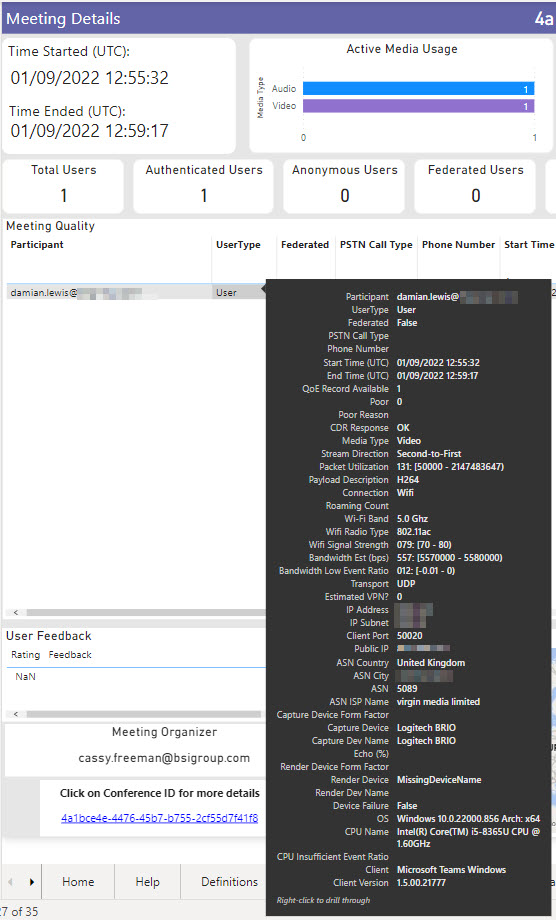
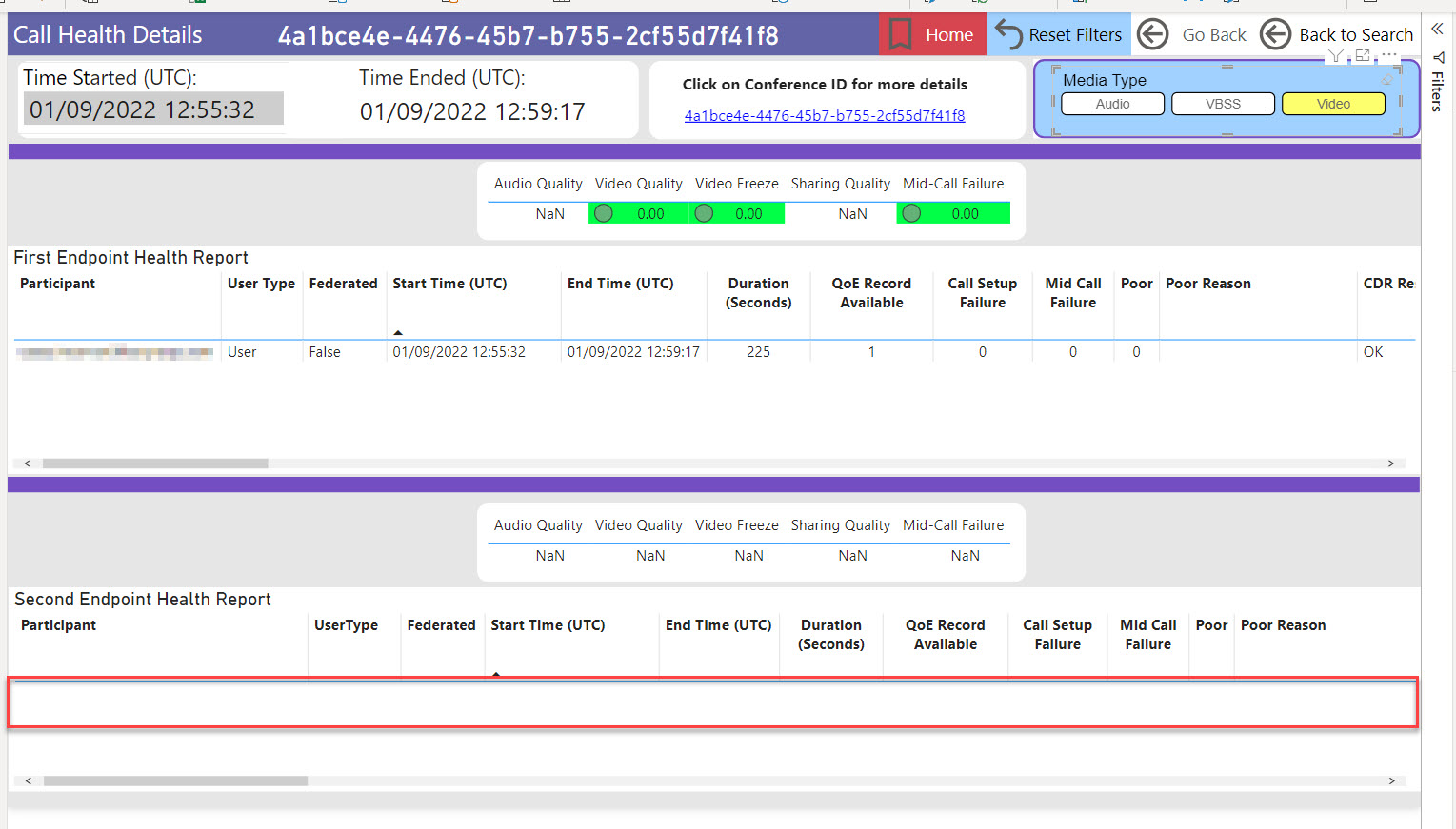


Ok so in a meeting the QER will only show the information for the second endpoint. The first endpoint is always MS. This is a p2p call you are looking at, not a meeting. So in this case, the Meeting report will not show all the data and this is by design.
The P2P (call) health report will show both the first and second endpoint. You only see Audio because you have the Audio filter applied (audio icon is lit up yellow).

Hi Matt,
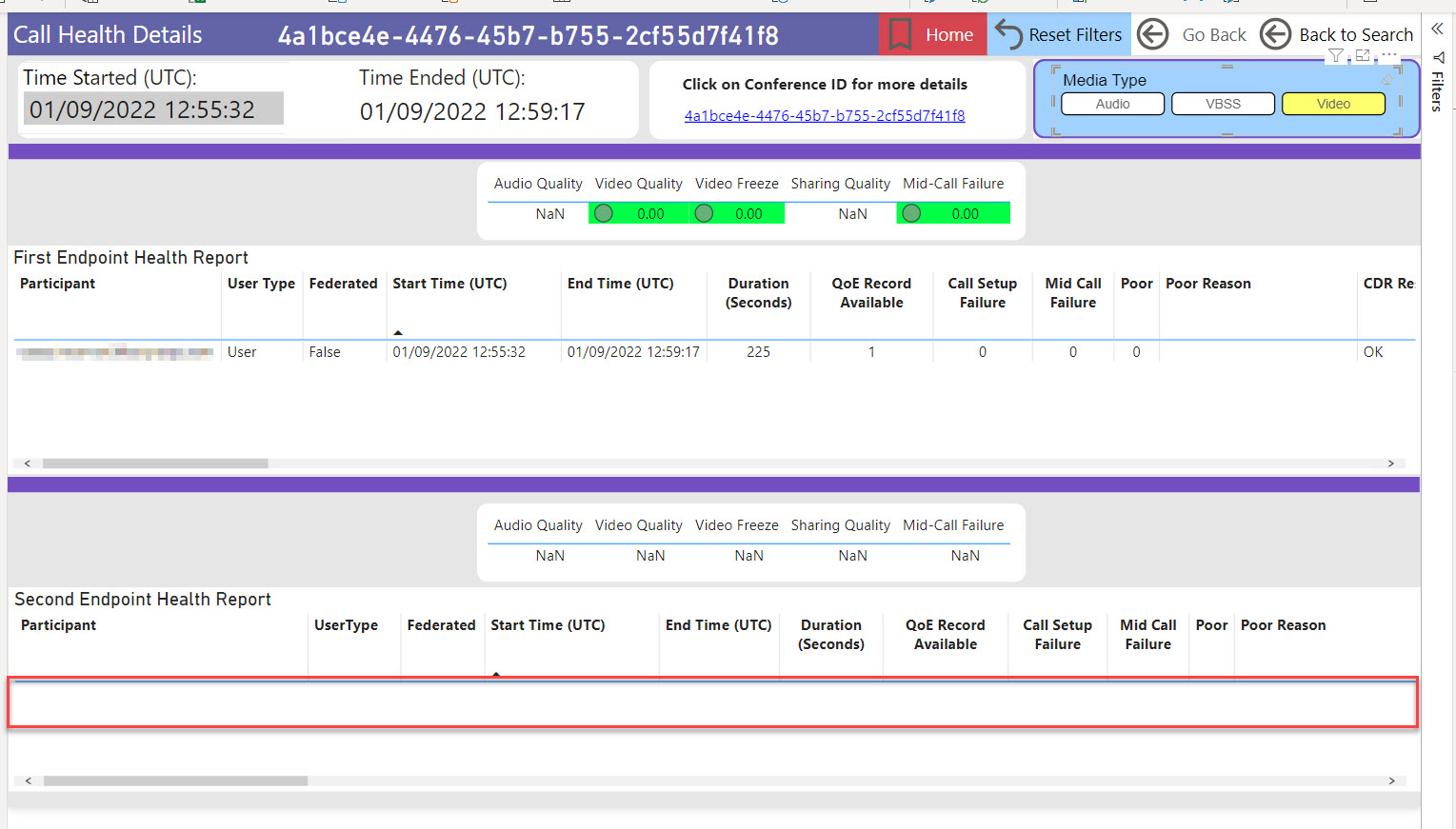
Yes its a P2P call. However on the image with video selected (see below) I would have expected to see an entry on the Second Endpoint Health Report. I know on this call I had my video on, so I was expecting to see an entry, as when I have the Audio selected.
Does that make sense?
If I see a 1st and 2nd for Audio, I would expect the same when selecting Video.
Thanks
Damian
So this typically means that only one person had video enabled during the call. Video does not automatically create two streams like audio does. The stream will only exist if someone has actually turned on video during the call.
Public
Hi Matt,
In the example I gave I know the videos where on for both people.
Regards,
Damian Lewis Digital Workplace Specialist M: +44 (0) 7585 402196
@.@.[Logo Description automatically generated with medium confidence][Logo Description automatically @.@.@.@.@.[Logo Description automatically generated][Logo Description automatically generated][Logo Description automatically generated][Logo Description automatically generated] [Logo Description automatically generated][A picture containing logo Description automatically generated][A picture containing logo Description automatically generated][Logo Description automatically generated][A picture containing diagram Description automatically generated][A picture containing text Description automatically generated] [Logo Description automatically generated with low confidence] @. [Logo Description automatically generated] [Logo Description automatically generated] [Logo Description automatically generated with low confidence] [Logo Description automatically generated] [Logo Description automatically generated]
@.***
Inspiring trust for a more resilient world
BSI, 389 Chiswick High Road, London, W4 4AL, UK bsigroup.comhttp://www.bsigroup.com/ | Twitterhttps://twitter.com/BSI_UK | LinkedInhttps://www.linkedin.com/company/bsi @.***
From: Matthew Wade @.> Sent: 21 February 2023 19:34 To: MattWade-MS/QER @.> Cc: Damian Lewis @.>; Manual @.> Subject: Re: [MattWade-MS/QER] Second Endpoint Health Report - Not showing video details (Issue #16)
- This message originated from outside of BSI. Please treat hyperlinks, attachments and instructions in this email with caution. *
So this typically means that only one person had video enabled during the call. Video does not automatically create two streams like audio does. The stream will only exist if someone has actually turned on video during the call.
Reply to this email directly, view it on GitHubhttps://eur03.safelinks.protection.outlook.com/?url=https%3A%2F%2Fgithub.com%2FMattWade-MS%2FQER%2Fissues%2F16%23issuecomment-1438992181&data=05%7C01%7Cdamian.lewis%40bsigroup.com%7C7805508d8744473bf88708db1442a31a%7C54946ffc68d34955ac70dca726d445b4%7C0%7C0%7C638126048659179455%7CUnknown%7CTWFpbGZsb3d8eyJWIjoiMC4wLjAwMDAiLCJQIjoiV2luMzIiLCJBTiI6Ik1haWwiLCJXVCI6Mn0%3D%7C3000%7C%7C%7C&sdata=o%2BmnGxqCrNv%2BoHl2a3H%2Be3L%2B%2BxXjZst1QoHoI9UgSOg%3D&reserved=0, or unsubscribehttps://eur03.safelinks.protection.outlook.com/?url=https%3A%2F%2Fgithub.com%2Fnotifications%2Funsubscribe-auth%2FAVIC7UO3IYWTPI5EMEU4IXDWYUKD7ANCNFSM6AAAAAAQDL4GE4&data=05%7C01%7Cdamian.lewis%40bsigroup.com%7C7805508d8744473bf88708db1442a31a%7C54946ffc68d34955ac70dca726d445b4%7C0%7C0%7C638126048659179455%7CUnknown%7CTWFpbGZsb3d8eyJWIjoiMC4wLjAwMDAiLCJQIjoiV2luMzIiLCJBTiI6Ik1haWwiLCJXVCI6Mn0%3D%7C3000%7C%7C%7C&sdata=KvMRQlUD0rbOk3LDhPZTO2yjz%2BZkjIgNaNdLS6tyNdM%3D&reserved=0. You are receiving this because you are subscribed to this thread.Message ID: @.@.>>
Visit the BSI website at www.bsigroup.com
This email may contain confidential information and/or copyright material. This email is intended for the use of the addressee only. Any unauthorised use may be unlawful. If you receive this email by mistake, please advise the sender immediately by using the reply facility in your email software.
The British Standards Institution is incorporated by Royal Charter.
This email has been scanned for all known viruses.