
MaterialDesignInXamlToolkit
 MaterialDesignInXamlToolkit copied to clipboard
Published
20 hours ago •
 MaterialDesignInXAML
MaterialDesignInXAML
Setting HorizontalContentAlignment to Right/Center on a MaterialDesignFloatingHintTextBox leads to shifting Hint during text entry
Below is a short example illustrating the issue. As long as your Text is shorter than your Hint, all is well. But when your Text exceeds your Hint, the Hint begins shifting to stay with the start of the text. I've also provided a screenshot.

<TextBox
	Style="{StaticResource MaterialDesignFloatingHintTextBox}"
	materialDesign:HintAssist.Hint="Some Hint Text"
	HorizontalContentAlignment="Right"
	Text="Short" />

<TextBox
	Style="{StaticResource MaterialDesignFloatingHintTextBox}"
	materialDesign:HintAssist.Hint="Some Hint Text"
	HorizontalContentAlignment="Right"
	Text="Longer, more verbose text" />

I think you should use FlowDirection="RightToLeft" instead of HorizontalContentAlignment="Right".
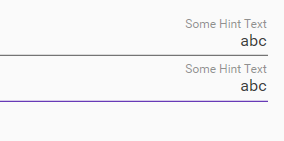
Is this what you are looking for?
