MaterialDesignInXamlToolkit
 MaterialDesignInXamlToolkit copied to clipboard
Published
20 hours ago •
 MaterialDesignInXAML
MaterialDesignInXAML
oversize canvas cause radiabutton path render as oval
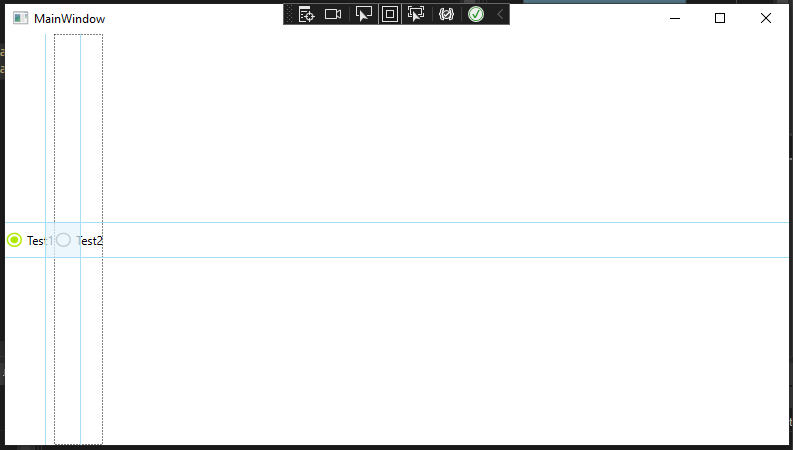
In MaterialDesignTheme.RaidoButton.xaml file, the canvas is large than viewbox, it will cause multi radio button look like oval, not circle.
three radio in uniform grid with 3 columns

                        <Viewbox Width="18" Height="18"  VerticalAlignment="{TemplateBinding VerticalContentAlignment}">
                            <Canvas Width="24" Height="24">
                                <Path x:Name="Graphic"
                                      Data="M12,20A8,8 0 0,1 4,12A8,8 0 0,1 12,4A8,8 0 0,1 20,12A8,8 0 0,1 12,20M12,2A10,10 0 0,0 2,12A10,10 0 0,0 12,22A10,10 0 0,0 22,12A10,10 0 0,0 12,2Z"
                                      Fill="{DynamicResource MaterialDesignCheckBoxOff}" />
                                <Ellipse x:Name="InteractionEllipse" Fill="{TemplateBinding Foreground}" Width="0" Height="0" Canvas.Top="12" Canvas.Left="12" Opacity="0" RenderTransformOrigin="0.5,0.5" >
                                    <Ellipse.RenderTransform>
                                        <TransformGroup>
                                            <ScaleTransform/>
                                            <SkewTransform/>
                                            <RotateTransform/>
                                            <TranslateTransform/>
                                        </TransformGroup>
                                    </Ellipse.RenderTransform>
                                </Ellipse>
                            </Canvas>
                        </Viewbox>
I wonder if there a easy way to fix it, such as just changing some property like uselayoutround. However, it's not working. Another way is change all canvas size to fix size 18*18, but it will not work properly in large radio button. So, I think that replacing canvas to grid with 2 ellipse maybe a solution(just do as MahApps.Metro).
ref:
                        <Grid x:Name="PART_CHECKBOX">
                            <Rectangle Margin="-6 0" Fill="{DynamicResource TransparentWhiteBrush}" />
                            <Ellipse x:Name="normal"
                                     Width="18"
                                     Height="18"
                                     Fill="{TemplateBinding Background}"
                                     Stroke="{TemplateBinding BorderBrush}"
                                     StrokeThickness="{TemplateBinding BorderThickness}" />
                            <Ellipse x:Name="Checked1"
                                     Width="10"
                                     Height="10"
                                     Fill="{DynamicResource HighlightBrush}"
                                     Opacity="0" />
                            <Ellipse x:Name="disabled"
                                     Width="18"
                                     Height="18"
                                     Fill="{DynamicResource SemiTransparentWhiteBrush}"
                                     Opacity="0"
                                     StrokeThickness="{TemplateBinding BorderThickness}" />
                        </Grid>
Regards.


@Xaalek
<Window
    x:Class="WpfApp1.MainWindow"
    xmlns="http://schemas.microsoft.com/winfx/2006/xaml/presentation"
    xmlns:x="http://schemas.microsoft.com/winfx/2006/xaml"
    xmlns:d="http://schemas.microsoft.com/expression/blend/2008"
    xmlns:local="clr-namespace:WpfApp1"
    xmlns:mc="http://schemas.openxmlformats.org/markup-compatibility/2006"
    Title="MainWindow"
    Width="800"
    Height="450"
    mc:Ignorable="d">
    <Grid>
        <StackPanel Orientation="Horizontal">
            <RadioButton Content="Test1" Style="{DynamicResource MaterialDesignAccentRadioButton}" />
            <RadioButton Content="Test2" Style="{DynamicResource MaterialDesignAccentRadioButton}" />
        </StackPanel>
    </Grid>
</Window>