
MaterialDesignInXamlToolkit
 MaterialDesignInXamlToolkit copied to clipboard
Published
20 hours ago •
 MaterialDesignInXAML
MaterialDesignInXAML
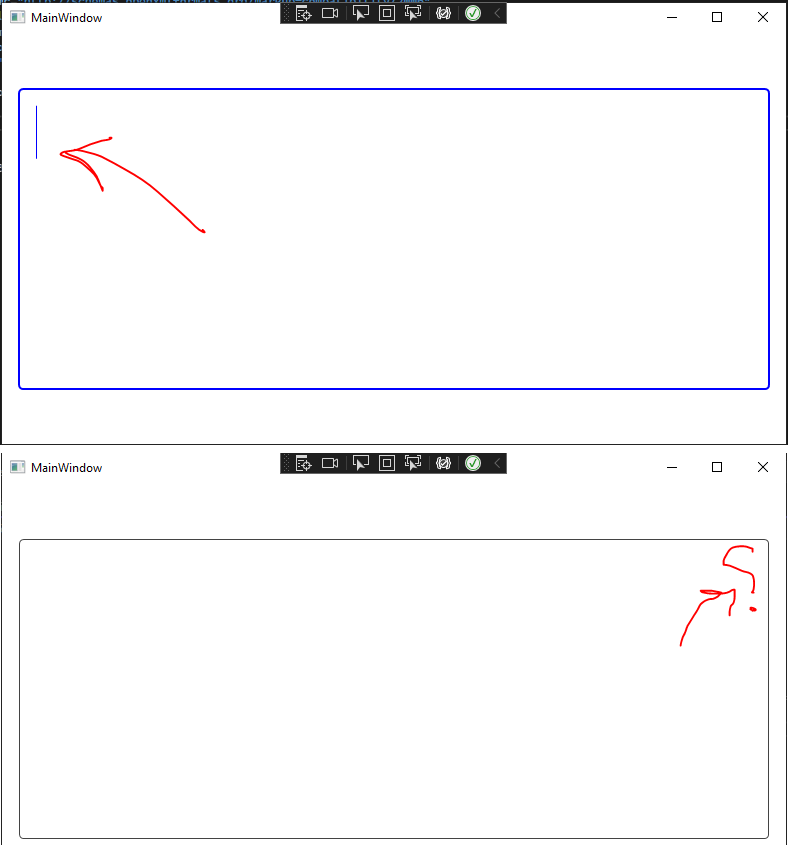
Insertion point hides at the start of line while using right to left flow direction in "MaterialDesignOutlinedTextBox" style
### Bug explanation
I had a problem while I was using a text box in "MaterialDesignOutlinedTextBox" style in my program. it works okay when I using left to right flow direction, but when I use the right to left flow direction the insertion point at start of line isn't displayed. this is my sample code:
<TextBox Grid.Column="0" x:Name="FeedbackTextBox" Width="750" FontWeight="Bold"
                             materialDesign:ScrollViewerAssist.IsAutoHideEnabled="True"
                             FlowDirection="RightToLeft"
                             ScrollViewer.PanningMode="VerticalOnly"
                             Style="{DynamicResource  MaterialDesignOutlinedTextBox}" >
</TextBox>
there a point that this works okay on window 11 and the problem happeneds on windows 10.
I tried to change font weight of insertion point but I couldn't find any way.
any help would be appreciated.
Version
4.5.0
