MaterialDesignInXamlToolkit
 MaterialDesignInXamlToolkit copied to clipboard
Published
20 hours ago •
 MaterialDesignInXAML
MaterialDesignInXAML
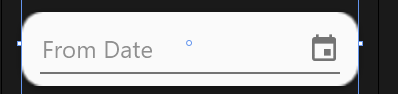
Hide Decoration, Underline in other controls.
This is related to Hide underline in textbox #212
Is it possible to implement same/similar solution for combobox and datepicker.
Im adding them into color zone (find it easier and better looking that working with borders etc. The problem is that underline is messing with the looks :)
I Hoped that : materialDesign:TextFieldAssist.DecorationVisibility="Hidden" would work, unfortunately it didn't :)
                <materialDesign:ColorZone   CornerRadius="10"
                                            BorderThickness="1"
                                            Margin="0 10 0 0"
                                            Padding="8 5"
                                            Effect="{StaticResource MaterialDesignShadowDepth1}">
                    <DatePicker SelectedDate="{Binding SelectedPerson.ToDate}"
                                DisplayDateStart="{Binding LowestDate}"
                                DisplayDateEnd="{Binding HighestDate}"
                                materialDesign:TextFieldAssist.DecorationVisibility="Hidden"
                                Width="150"
                                materialDesign:HintAssist.Hint="From Date">
                    </DatePicker>
                </materialDesign:ColorZone>
For now i have below work around:
                    <StackPanel Orientation="Horizontal">
                        <TextBox    Text="{Binding SelectedPerson.FromDate, StringFormat=d, Mode=TwoWay, UpdateSourceTrigger=PropertyChanged}"
                                    BorderBrush="{x:Null}"
                                    IsReadOnly="True"
                                    VerticalAlignment="Center"
                                    materialDesign:HintAssist.Hint="From date"
                                    materialDesign:TextFieldAssist.DecorationVisibility="Collapsed"
                                    materialDesign:TextFieldAssist.HasClearButton="True"
                                    Width="140"/>
                        <Button Margin="0 0 0 0"
                                Style="{StaticResource MaterialDesignToolButton}"
                                Content="{materialDesign:PackIcon Kind=Calendar}"
                                Command="{x:Static materialDesign:DialogHost.OpenDialogCommand}">
                            <Button.CommandParameter>
                                <Grid Background="{x:Null}">
                                    <Grid.RowDefinitions>
                                        <RowDefinition Height="Auto" />
                                        <RowDefinition Height="Auto" />
                                    </Grid.RowDefinitions>
                                    <Calendar   Margin="0 -10 0 10"
                                                SelectedDate="{Binding SelectedPerson.FromDate, UpdateSourceTrigger=PropertyChanged, ValidatesOnExceptions=True}"/>
                                    <StackPanel Grid.Row="1"
                                                Margin="8"
                                                HorizontalAlignment="Right"
                                                Orientation="Horizontal">
                                        <Button Style="{StaticResource MaterialDesignFlatButton}"
                                                Command="{x:Static materialDesign:DialogHost.CloseDialogCommand}"
                                                Panel.ZIndex="1"
                                                CommandParameter="1"
                                                Content="OK"/>
                                    </StackPanel>
                                </Grid>
                            </Button.CommandParameter>
                        </Button>
                    </StackPanel>

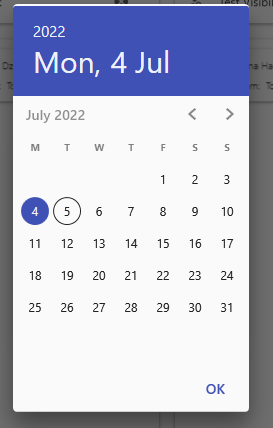
But i have to set the calendar margin to Margin="0 -10 0 10" otherwise it's misaligned, but it shows for a split second during opening.
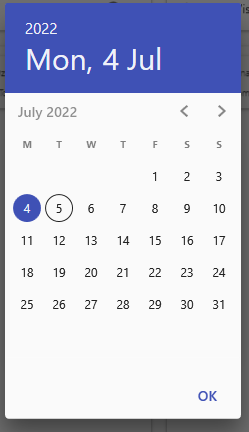
When margin is dropped.