
MaterialDesignInXamlToolkit
 MaterialDesignInXamlToolkit copied to clipboard
 MaterialDesignInXAML
Incorrect foreground color in the DropDownMenu of DataGridComboBoxColumn
Bug explanation
See: https://github.com/MaterialDesignInXAML/MaterialDesignInXamlToolkit/pull/2728
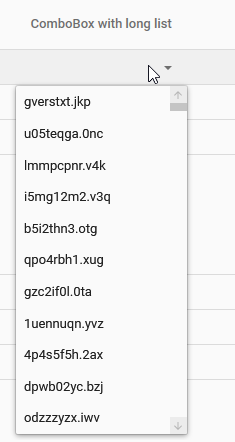
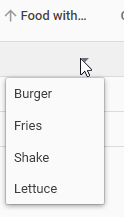
The foreground color seems incorrect in the DropDownMenu of DataGridComboBoxColumn when the ScrollBar is visible.
It can be observed in the demo application.
With ScrollBar:
Without ScrollBar:
Version
4.5.0

This could help to solve the issue:
https://stackoverflow.com/questions/2567822/why-does-itemspresenter-override-my-datagrids-foreground-style
It says that ItemsPresenter could cause the issue.
In our case, here is where ItemsPresenter is located:
https://github.com/MaterialDesignInXAML/MaterialDesignInXamlToolkit/blob/master/MaterialDesignThemes.Wpf/Themes/MaterialDesignTheme.DataGrid.ComboBox.xaml#L197
@Xaalek I don't think there is a problem with the foreground color as such. If you inspect the elements with snoop, you can see that both the elements in the "food dropdown" and the elements in the "random filename dropdown" apply the same (inherited) foreground:

What I think is causing the problem is Windows ClearType text trying to manipulate how the text is displayed. I don't know the details of how that algorithm works, but I have seen some funny things with it before.
If you disable ClearType text on your Windows box, you should probably see the problem disappear (but most likely other undesirable visual artifacts appear). This is of course not a good approach as the toolkit has no control over this.
One option, which I don't think is a really good option, is to simply disable the ClearType text in code for that particular ItemsPresenter. This can be done by adding the following to the ItemsPresenter element:
TextOptions.TextRenderingMode="Aliased"
However, this may or may not mean that the text becomes harder to read compared to your normal Windows settings where you (at least sometimes) have calibrated the ClearType text to match your personal preference on a per-monitor basis.
I have encountered a similar issue before, where the crux of the issue turned out to be the opacity (or alpha-channel) applied to the SolidColorBrush used for the Foreground. If the opacity is not 1 (or alpha-channel is not FF), then ClearType seems to try to accommodate for that semi-transparency in some cases. One approach to "fix" that is to not use opacity/alpha-channel on the Brush, but apply it on the TextBlock containing the text. In this case, you can fake a similar thing by adding these two lines to the ItemsPresenter element:
TextBlock.Foreground="#FF000000" Opacity="0.86"
This will "fix" the issue in the demo tool by applying a fully opaque black foreground, and then using opacity on the container to obtain the same visual appearance. This works - in the demo tool - because the content of the ItemsPresenter is merely strings, but if you have other custom content in it, then this will not be a great solution.
I don't really have a good idea for solving the problem in a general way. One option I was contemplating was to use a custom DataTemplateSelector which in case of string (or TextBlock) could apply the first option above to the presented TextBlock, but I was not able to get that to work in the short time I spent looking at it...

@nicolaihenriksen Thanks for the answer ! It sounds more complicated than I thought... We have to remember that we can alternate between light and dark themes. So the solution has to take that into account.
@Xaalek Yes naturally the themes need to be supported! Fully agree. My comment was meant to showcase one approach at solving it, but it definitely needs some work in order to be "production ready".