

 MaterialDesignInXAML
Expanders in ListView broken when using VirtualizingPanel
Since version 3.2.0, collapse an expander in ListView hide items after this expander. I configured VirtualizingPanel in the list view.
Demonstration of the bug
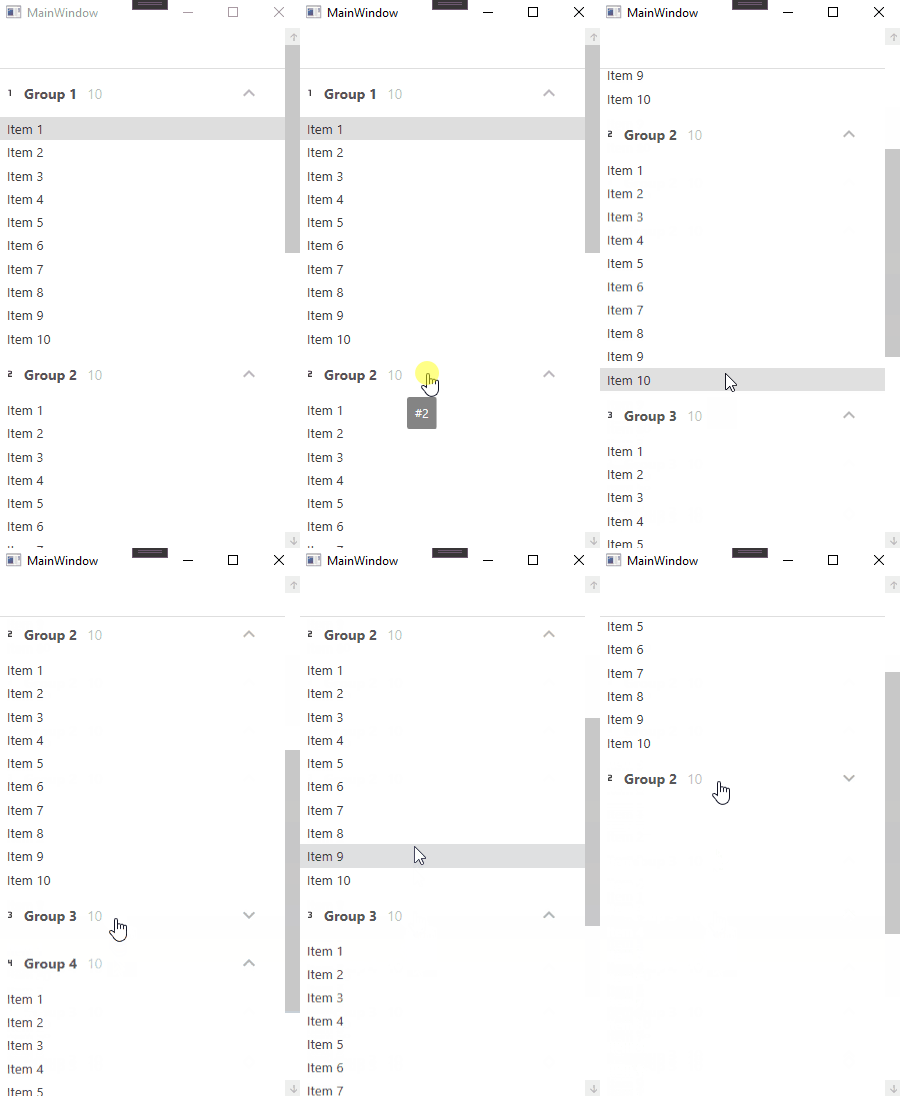
Sample of the bug
I created a repository on GitHub here with 2 projects:
-
[email protected]that useMaterialDesignThemesat version3.1.3 -
[email protected]that useMaterialDesignThemesat version3.2.0Theses projects contain same code but with differentMaterialDesignThemesversions.
There is no bug with MaterialDesignThemes at version 3.1.3.
In MainWindow.xaml when I remove VirtualizingPanel lines, it work fine.
13          <ListView x:Name="ListView" ItemsSource="{Binding ElementName=Control, Path=CollectionView}"
14                    ScrollViewer.HorizontalScrollBarVisibility="Disabled"
15 -                  VirtualizingPanel.IsVirtualizingWhenGrouping="True"
16 -                  VirtualizingPanel.IsVirtualizing="True"
17 -                  VirtualizingPanel.IsContainerVirtualizable="True"
18                    Padding="0"
19                    SelectionMode="Single">

Very well written bug. Thank you!
For historical reference here is the zip of the above reference projects. MaterialDesignSamples-main.zip

I'm curiously having some of the same behavior in a DataGrid with virtual rows and grouping. If I use snoop then it seems like the next Group's DataContext gets set to DisconnectedItem: https://source.dot.net/#PresentationFramework/System/Windows/Data/BindingExpressionBase.cs,71f3b982041c21ce,references

I've spent some time tracking this down, and it seems like the VirtualizingStackPanel does not play nice with 'ScaleY' transforms. It seems like there's a bug in VirtualizingStackPanel where it thinks that items that appear after the scaled item are no longer visible, so it removes them.
I've fixed this locally by removing the ScaleY transforms in MaterialDesignTheme.Expander.xaml. Just search for 'ScaleY' and you'll find three DoubleAnimation elements with TargetProperty="(ScaleTransform.ScaleY)". Comment those out and the problem goes away.
This has the side effect of removing the shrink effect when you collapse an item. That honestly doesn't bother me, but I didn't want to create a Pull Request as I'm not sure if that's acceptable. Also, there may be a better solution that retains the shrinking effect that I'm not aware of.
It appears as if this was introduced with these changes: https://github.com/MaterialDesignInXAML/MaterialDesignInXamlToolkit/pull/1986
EDIT: You can see the changes that I made here: https://github.com/philpowers/MaterialDesignInXamlToolkit/commit/12f24c980c2d23ab9cb69a48b77cc7de54cfe2ba

Hey @w-syss, since you worked on that and it might be fresh in your memory still, would you take a look at this to see if you can make sense of it?
Much appreciated


I tried adding the code from the author to the demo application (latest from master branch) to see if I could repro and fix the issue. I am however not able to reproduce the issue. Has this issue been fixed by some other fix?
I have a branch available here with the code added to the demo application: https://github.com/nicolaihenriksen/MaterialDesignInXamlToolkit/tree/fix2188
@w-syss you indicated that you were going to look at it. Do you have an update? if you can remember that far back :-)

This issue is marked stale because it has been open 30 days with no activity. Remove stale label or update the issue, otherwise it will be closed in 14 days.
![github-actions[bot] avatar](https://avatars.githubusercontent.com/in/15368?v=4 "Published by a pub.dev verified publisher")
This issue was closed because it has been stalled for 14 days with no activity.