
MaterialDesignInXamlToolkit
 MaterialDesignInXamlToolkit copied to clipboard
Published
20 hours ago •
 MaterialDesignInXAML
MaterialDesignInXAML
ValidationAssist.PopupPlacement does not work as expected
I have the following in my Xaml:
<TextBox x:Name="FirstName"
         Grid.Row="0"
         Grid.Column="2"
         Width="300"
         HorizontalAlignment="Left"
         VerticalAlignment="Center"
         md:ValidationAssist.PopupPlacement="Right"
         md:ValidationAssist.UsePopup="True" />
I expect the popup to show up on the right of the TextBox. But instead I get the following:
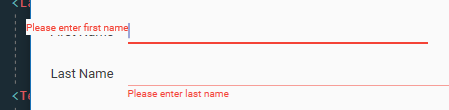
Results are the same with MaterialDesignInXaml v3.1.2 and v3.2.0-ci1479.
There is another issue too. Alignment by the top edge produces bad looking result. VerticalAlignment is required for side placement, and better default to Center.

I didn't realize Popup placement works back to front in Xaml and I have to use md:ValidationAssist.PopupPlacement="Left" instead.
It's quite confusing part and a wiki page for ValidationAssist would certainly help.
Vertical offset is still an issue though.