
MaterialDesignInXamlToolkit
 MaterialDesignInXamlToolkit copied to clipboard
 MaterialDesignInXAML
Custom palette hues does not match real colors
Hello, I am trying to implement my own custom palette hues, but as seen in the photo the real color only matches when I remove the style and explicitly set the background property (second button).
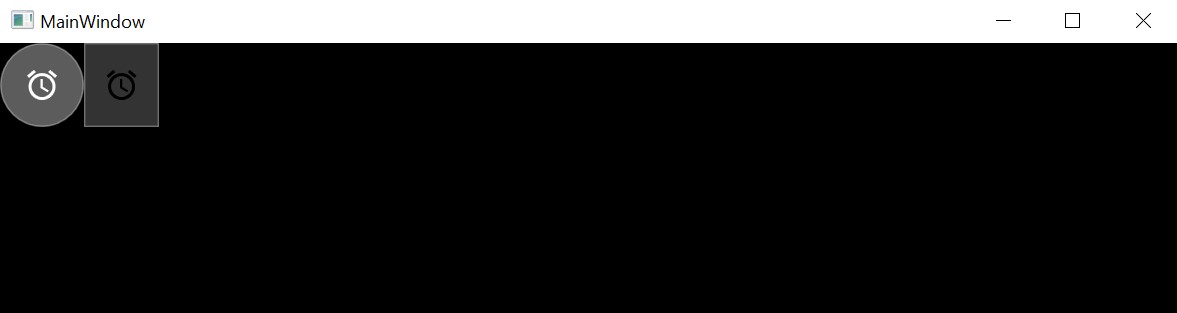
<Application.Resources>
        <ResourceDictionary>
            <ResourceDictionary.MergedDictionaries>
                <ResourceDictionary Source="pack://application:,,,/MaterialDesignThemes.Wpf;component/Themes/MaterialDesignTheme.Defaults.xaml" />
            </ResourceDictionary.MergedDictionaries>
            <SolidColorBrush x:Key="PrimaryHueLightBrush" Color="#744CE0"/>
            <SolidColorBrush x:Key="PrimaryHueLightForegroundBrush" Color="#FFFFFF"/>
            <SolidColorBrush x:Key="PrimaryHueMidBrush" Color="{DynamicResource SystemBaseLowColor}"/>
            <SolidColorBrush x:Key="PrimaryHueMidForegroundBrush" Color="{DynamicResource SystemBaseHighColor}"/>
            <SolidColorBrush x:Key="PrimaryHueDarkBrush" Color="#4D1DCF"/>
            <SolidColorBrush x:Key="PrimaryHueDarkForegroundBrush" Color="#FFFFFF"/>
            <SolidColorBrush x:Key="SecondaryAccentBrush" Color="#5C5B5E"/>
            <SolidColorBrush x:Key="SecondaryAccentForegroundBrush" Color="#FFFFFF"/>
            <SolidColorBrush x:Key="MaterialDesignPaper" Color="Black"/>
            <!-- The colors for PrimaryHueMid -->
            <Color x:Key="SystemBaseLowColor">#33FFFFFF</Color>
            <Color x:Key="SystemBaseHighColor">#FFFFFFFF</Color>
        </ResourceDictionary>
</Application.Resources>

<!--Not working-->
<Button Style="{StaticResource MaterialDesignFloatingActionButton}">
    <materialDesign:PackIcon Width="24" Height="24" Kind="Alarm" />
</Button>

<!--Working-->
<Button Style="{x:Null}" Background="{DynamicResource PrimaryHueMidBrush}" Width="50">
    <materialDesign:PackIcon Width="24" Height="24" Kind="Alarm"  />
</Button>
If I replace #33FFFFFF with #333333 I get the expected color.

The colors comes from a library which provides UWP colors (SystemBaseLowColor is just an example). Is there a way to make this work without overriding all the styles of the controls? Probably I am missing something obvious, but after trying to find a solution for a couple of days, opening an issue is my only chance. Thanks

Maybe this could help you https://github.com/MaterialDesignInXAML/MaterialDesignInXamlToolkit/wiki/MahAppsMetro-integration https://github.com/MaterialDesignInXAML/MaterialDesignInXamlToolkit/wiki/Overriding-Material-Design-Styles
