
MaterialDesignInXamlToolkit
 MaterialDesignInXamlToolkit copied to clipboard
 MaterialDesignInXAML
Button with drop down
Hi guys :)
So I was looking for anything similar in specification and looks like it isn't mentioned. What I want is a button that looks like this (taken from Gmail)
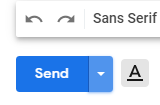

You can see how the Send button has an arrow you can press that provides alternative options. It's important to note that the Send button can also be pressed like a regular button, it's not required that the drop down is shown.
I wonder if it's possible to add support for something like this, given it's not in official specs, albeit IMO very useful. If not, do you know of any UI design pattern I can use to replace this?

Hi @Tyrrrz I would have to spend some time playing with it, but you might be able to get something working with some theming work on a button and a PopupBox. I am flagging this as an enhancement since I think something like this could be a nice addition to the library.

If it helps, the xceed extended wpf toolkit has such a control (in the free version): https://github.com/xceedsoftware/wpftoolkit/wiki/SplitButton

This has been implemented. See the buttons page in the demo app for more information.
