

 Martchus
Layout issues in tray app and plasmoid
Relevant components
- [ ] Standalone tray application (based on Qt Widgets)
- [x] Plasmoid/applet for Plasma desktop
- [ ] Dolphin integration
- [ ] Command line tool (
syncthingctl) - [ ] Integrated Syncthing instance (
libsyncthing) - [ ] Backend libraries
Environment and versions
- Versions of
syncthingtray,qtutilitiesandc++utilities: 1.1.18, 6.6.0, 5.14.0 - Qt version: 5.15.2
- C++ compiler (name and version): 10.2.1
- C++ standard library (name and version): 2.31-13+deb11u3
- Operating system (name and version): Debian stable, 11, bullseye (I am here before testing the bleeding edge, because most users are on stable)
Bug description The width of the tab bar is wider than the portal, and clicking on "History", far right tab, causes the portal to scroll. I believe this may be related:
file:///usr/share/plasma/plasmoids/martchus.syncthingplasmoid/contents/ui/FullRepresentation.qml:284:17: QML DevicesPage: Detected anchors on an item that is managed by a layout. This is undefined behavior; use Layout.alignment instead.
file:///usr/share/plasma/plasmoids/martchus.syncthingplasmoid/contents/ui/FullRepresentation.qml:287:17: QML DownloadsPage: Detected anchors on an item that is managed by a layout. This is undefined behavior; use Layout.alignment instead.
file:///usr/share/plasma/plasmoids/martchus.syncthingplasmoid/contents/ui/FullRepresentation.qml:290:17: QML RecentChangesPage: Detected anchors on an item that is managed by a layout. This is undefined behavior; use Layout.alignment instead.
file:///usr/share/plasma/plasmoids/martchus.syncthingplasmoid/contents/ui/FullRepresentation.qml:281:17: QML DirectoriesPage: Detected anchors on an item that is managed by a layout. This is undefined behavior; use Layout.alignment instead.
file:///usr/share/plasma/plasmoids/martchus.syncthingplasmoid/contents/ui/FullRepresentation.qml:284:17: QML DevicesPage: Detected anchors on an item that is managed by a layout. This is undefined behavior; use Layout.alignment instead.
file:///usr/share/plasma/plasmoids/martchus.syncthingplasmoid/contents/ui/FullRepresentation.qml:287:17: QML DownloadsPage: Detected anchors on an item that is managed by a layout. This is undefined behavior; use Layout.alignment instead.
file:///usr/share/plasma/plasmoids/martchus.syncthingplasmoid/contents/ui/FullRepresentation.qml:290:17: QML RecentChangesPage: Detected anchors on an item that is managed by a layout. This is undefined behavior; use Layout.alignment instead.
Steps to reproduce
- Install 1.1.18 from Debian packages (unreleased)
- Click on Syncthing Tray that automatically spawns in System Tray
The portal scrolling behaviour is also triggered when clicking on manually added plasmoid, but this does not produce console output.
Expected behavior No console warnings, no portal scrolling. The portal should be drawn correctly sized. Could this be cuased by using features not available in Qt 5.15.2?
Screenshots

Note how the Directories tab is truncated


By the way, on Qt 5.15.2+kde294, Plasma 5.24.4 and KF 5.93.0 as provided by openSUSE Tumbleweed it looks good. The same counts for KDE on Arch Linux. I can however reproduce the QML warnings.
Note that "2.31-13+deb11u3" is likely the glibc version you're using (and not the C++ standard library version). However, I don't think this does matter here anyways.
I've pushed a fix for the warnings. You can try it but I don't think it'll fix the positioning of the tab buttons (as it is about the positioning of the tab pages).
Martchus @.***> writes:
Which KDE Plasma version are you running it on?
5.20.5, Debian 11 (bullseye), stable release, because my intent is to provide a backport, and because KDE Plasma in sid/unstable and testing are not fun to track at all on a production system (likewise I've been burned too many times by rolling releases, but I digress). In other words, I believe accommodating users on LTS releases is unambiguously for the greatest good.
By the way, on Qt 5.15.2+kde294, Plasma 5.24.4 and KF 5.93.0 as provided by openSUSE Tumbleweed it looks good. The same counts for KDE on Arch Linux.
I wonder if this is a case if changed tab layout behaviour between 5.20.5 and 5.24.4? What is the Qt (OS package) version you're using on both Arch and Tumbleweed? If it's a Qt bug then there may be a patch available that would indicate this. I guess the bigger question is would you be willing to support a workaround for a Qt bug that doesn't exist in the rolling releases you track? Also, does OpenSUSE Leap exhibit the layout bug?
Hm, I just remembered "KDE limitations" in the README. I don't have a HiDPI display, but I wonder if the clipping bug could be related?
What is the Qt (OS package) version you're using on both Arch and Tumbleweed?
Like I said, it is Qt 5.15.2+kde294 on TW. It should be the same on Arch Linux except that they've already rebased patches from KDE's Qt fork against 5.15.3 (which didn't bring much new to the table).
However, I suppose your Plasma version is then simply too old. I recommend to use the version of Syncthing Tray that was current when your Plasma version was current. You may be able to use a version that's a little bit newer but I'd generally avoid combing old and new things in a way that was never tested by upstream. It makes only the user experience worse.
I guess the bigger question is would you be willing to support a workaround for a Qt bug that doesn't exist in the rolling releases you track?
I'm only willing to accept patches for compatibility if they're minor. I won't spent any effort into testing against older versions of dependencies before making releases (except for still supporting Qt 5 and except for older glibc versions).
Also, does OpenSUSE Leap exhibit the layout bug?
I don't know. I'm mainly using Tumbleweed on the desktop and haven't got any feedback from Leap users in a while. (In the past I had to do minor fixes for compatibility with Leap's old Plasma or Qt version but I really haven't tested it in a while.)
I don't have a HiDPI display, but I wonder if the clipping bug could be related?
Maybe. Note that I personally also don't have that much experience with Plasma development so my guesses are likely not much worth.
Also, does OpenSUSE Leap exhibit the layout bug?
No, because the Plasmoid doesn't work at all (at least not the current version) because Qt is too old (openSUSE Leap 15.3 has only Qt 5.12.7).
I'm surprised that this was your experience, because Qt 5.12.7 is newer than Debian 11 bullseye's version, my experiences with OpenSUSE Leap have been that it has an equally low or lower rate of KDE Plasma bugs to Debian stable, and that Leap is also a pleasure to develop for :) I wouldn't be interested in Syncthing Tray were it as fragile and non-portable as you're portraying it to be, so please be encouraged that this isn't the case:
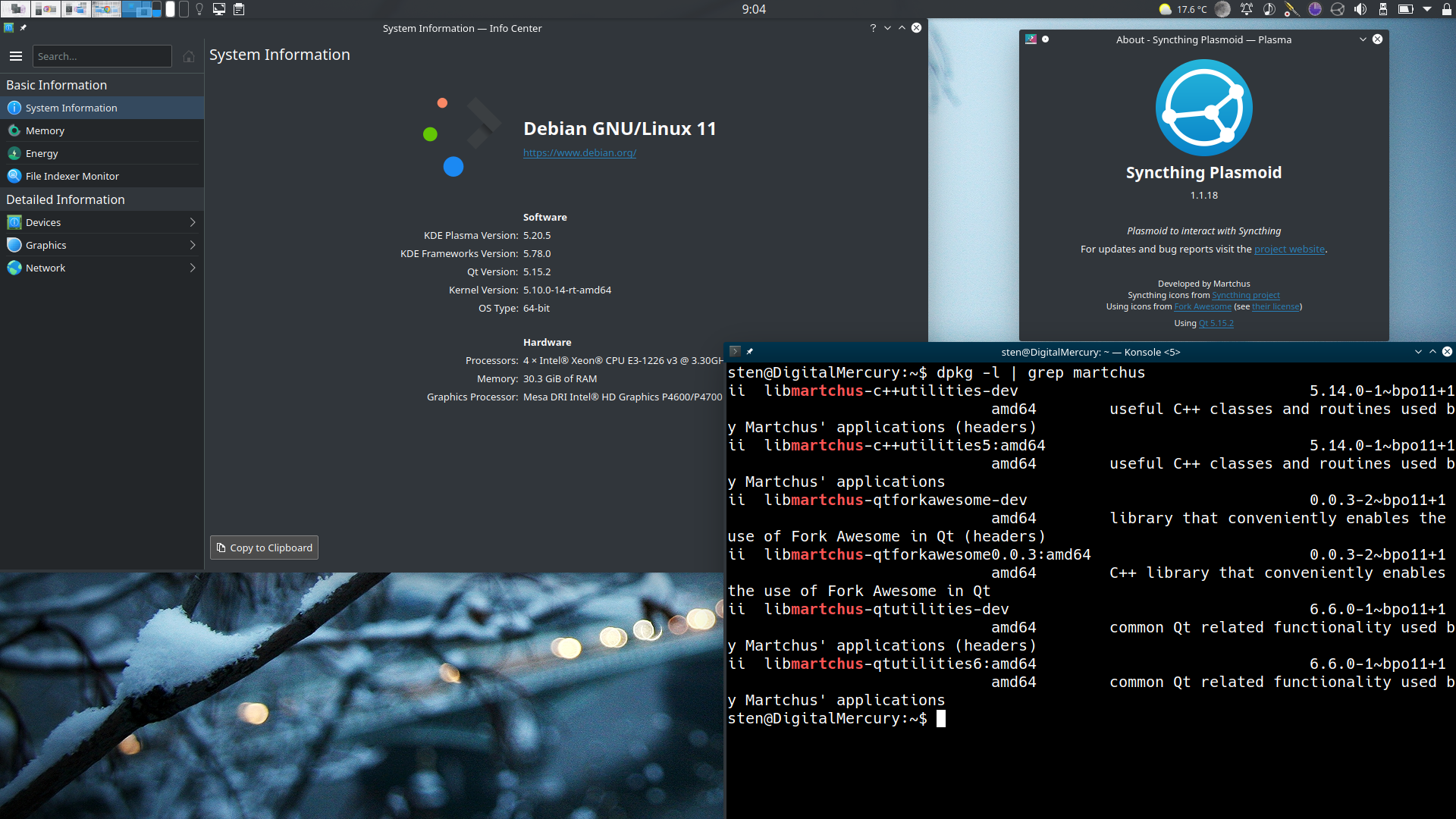
After having to restart Plasma as part of a kernel upgrade, I've now found that the layout bug no longer truncates the folder icon of the Directories tab; the tag area continues to be shifted to the left when the History tab is selected, and the degree of the shift now appears to be approximately the width of one lowercase letter; my default font size is configured as 10pt, and I use the Noto Sans proportional font. This makes me wonder if it might be something in Qt Forkawesome that is confusing the layout engine.
You'll also note that my Qt Forkawesome version is one version out-of-date, so I guess it's possible that the delta between 0.0.3 and 0.0.4 could potentially explain the difference in our experiences...but that shouldn't cause a difference of "works with a layout bug" vs "doesn't work at all".
I'm surprised that this was your experience, because Qt 5.12.7 is newer than Debian 11 bullseye's version
Not sure what Debian 11 ships but your screenshot shows 5.15.2 and that's newer than 5.12.7 which is what Leap 15.3 ships.
I wouldn't be interested in Syncthing Tray were it as fragile and non-portable as you're portraying it to be,
The Qt Widgets based version works even with Qt 5.6.x. The problem is only the KDE integration. Note that the Plasmoid is not fragile. I will not release it if it doesn't work with the currently latest Plasma version. If a new Plasma release breaks the Plasmoid I'll also try to release a fix as soon as possible. So as long as you update the Plasmoid and Plasma/KDE only together you should be fine. You normally also wouldn't upgrade a KDE-provided Plasmoid without also upgrading the rest of your Plasma/KDE libraries. (QML unfortunately doesn't allow one to have code paths for different versions via #ifdefs so keeping backwards compatibility isn't easily possible in contrast to normal C++ code.)
About the glitches: I'm afraid I'm also not that experienced with Qt Quick and Plasma's own additions to it. For me it is just trial and error and checking how official Plasmoids do it. So help in that regard would be welcome. (I'm currently also wondering how to use the non-deprecated scroll bars correctly and how to update icon colors without having to restart the shell.)
Qt Forkawesome is definitely not the culprit in your case. I only released 0.0.4 because of https://github.com/Martchus/qtforkawesome/commit/d6293b708452fb01b00dfb5fa73daca15c373fda which is not used in your builds at all.
Martchus @.***> writes:
I'm surprised that this was your experience, because Qt 5.12.7 is newer than Debian 11 bullseye's version
Not sure what Debian 11 ships but your screenshot shows 5.15.2 and that's newer than 5.12.7 which is what Leap 15.3 ships.
I wouldn't be interested in Syncthing Tray were it as fragile and non-portable as you're portraying it to be,
The Qt Widgets based version works even with Qt 5.6.x. The problem is only the KDE integration. Note that the Plasmoid is not fragile. I will not release it if it doesn't work with the currently latest Plasma version. If a new Plasma release breaks the Plasmoid I'll also try to release a fix as soon as possible. So as long as you update the Plasmoid and Plasma/KDE only together you should be fine. You normally also wouldn't upgrade a KDE-provided Plasmoid without also upgrading the rest of your Plasma/KDE libraries. (QML unfortunately doesn't allow one to have code paths for different versions via
#ifdefs so keeping backwards compatibility isn't easily possible in contrast to normal C++ code.)
Gotcha. As you mentioned previously, and now I see exactly why maintaining compatibility with the latest Plasma version (which is needed for Arch, Fedora, Tumbleweed, Debian sid and testing, and Ubuntu non-LTS users) takes priority. If Syncthing Tray became popular enough, I wonder how hard it would be to decouple the plasmoid from the main application? Were the popularity to occur in four of five years, I'd expect people would volunteer to help out with this ;)
Since it seems that plasmoid fixes will be to address breakage caused by upstream KDE Plasma, please mention what version you're providing a fix relative to in commit messages for these fixes. Otherwise it's likely I'll end up filing issues, since Plasma on Debian's unstable branch tends to be a little bit behind TW and Arch.
About the glitches: I'm afraid I'm also not that experience with Qt Quick and Plasma's own additions to it. For me it is just trial and error and checking how official Plasmoids do it. So help in that regard would be welcome. (I'm currently also wondering how to use the non-deprecated scroll bars correctly and how to update icon colors without having to restart the shell.)
I seem to remember asking a colleague to point me in the direction of documentation for these issues, for cases where the API documentation was insufficient, and he pointed me to upstream KDE Plasma developer forums I'd probably start here: irc://irc.libera.chat/kde-devel
For scroll bars I found, and I'm guessing you won't need/want to use the touch variant:
https://api.kde.org/frameworks/plasma-framework/html/classorg_1_1kde_1_1plasma_1_1components_1_1ScrollBar.html https://api.kde.org/frameworks/plasma-framework/html/qml_2ScrollBar_8qml_source.html
Also, the example I'd use for scrollbars in a plasmoid is the Clipboard, because it will almost certainly be a more simple read than the Notifications manager.
Which colours do you want to update? The system theme and schema controlled ones or the custom icon colouring? IIRC the system theme and color schema is either inherited scope or there's a changed theme/schema event that can be caught.
Cheers, Nicholas
so users on this system will not be able to use a hypothetical PPA.
They can still use the desktop-neutral Qt Widgets based version.
If Syncthing Tray became popular enough, I wonder how hard it would be to decouple the plasmoid from the main application? Were the popularity to occur in four of five years, I'd expect people would volunteer to help out with this ;)
It is already decoupled but the underlying libraries are not considered public APIs and therefore will break compatibility. So one still needed to adapt the legacy Plasmoid versions. I suppose the easiest way would be having distinct copies of the Plasmoid's QML directory and as switch in the build system to select the right one for the current Plasma version. I actually plan to do it this way when adapting the Plasmoid for Plasma 6. The old QML files for Plasma 5.x would basically be "archived" but would still be used when building against Plasma 5. This approach should also work for minor releases but I currently don't want to spend the effort implementing it (and testing it, which will also be time consuming).
I know the IRC channel. I suppose I'll have to ask them at some point.
Updating colors is about https://github.com/Martchus/syncthingtray/issues/126#issuecomment-1032523273= (also see previous comments for a bit more context).
Martchus @.***> writes:
so users on this system will not be able to use a hypothetical PPA.
They can still use the desktop-neutral Qt Widgets based version.
Neat, I had assumed that wouldn't be the case given that Qt was a fault, but great to know :)
If Syncthing Tray became popular enough, I wonder how hard it would be to decouple the plasmoid from the main application? Were the popularity to occur in four of five years, I'd expect people would volunteer to help out with this ;)
It is already decoupled but the underlying libraries are not considered public APIs and therefore will break compatibility. So one still needed to adapt the legacy Plasmoid versions. I suppose the easiest way would be having distinct copies of the Plasmoid's QML directory and as switch in the build system to select the right one for the current Plasma version. I actually plan to do it this way when adapting the Plasmoid for Plasma 6. The old QML files for Plasma 5.x would basically be "archived" but would still be used when building against Plasma 5. This approach should also work for minor releases but I currently don't want to spend the effort implementing it (and testing it, which will also be time consuming).
That's great news, and thank you for your willingness to continue to support Plasma 5 and for sharing your plan.
Neat, I had assumed that wouldn't be the case given that Qt was a fault, but great to know
Qt Widgets and Qt Quick are built on the same foundation but nevertheless they can be considered different GUI libraries (within the same framework). It makes a huge difference which of those libraries one is using. Qt Widgets is very well developed and new features are only added here and there as it is more or less "good enough" for quite a while now. Qt Quick on the other hand is definitely still a work-in-progress GUI library, especially when it comes to the desktop. Certain important features have only been implemented quite recently and "mistakes" are still frequently deprecated/replaced. Bottom-line: Qt is not Qt
Note that the minimum required Qt version for the different components of Syncthing Tray is documented here (I've just updated the version for the Plasmoid): https://github.com/Martchus/syncthingtray#further-dependencies=
(I'm currently also wondering how to use the non-deprecated scroll bars correctly and how to update icon colors without having to restart the shell.)
Just for the record, the problem with the scroll view should be fixed by https://github.com/Martchus/syncthingtray/commit/637bb39806eb4dfea2748cfc73bc65112cc1ae36 which is part of 1.1.20.
After the few adjustments, are there still and "apparent bugs" in 1.1.20? On Arch Linux and Tumbleweed it works quite nice (besides some details which are more a problem of the underlying frameworks).
Closing as I believe my adjustments should have helped and there was no further response.
Please give me at least two weeks to respond before closing issues, especially during summer. The bug is present in 1.2.2, but it presents as alignment glitches rather than truncation. 36e9e984240a11b25344ffa9300a65f1e14af7fa looks like it is likely to fix the issue, but I have not yet tested it. Please reopen.
The following screenshots were taken on an up-to-date Debian testing/bookworm/12 system. Qt 5.15.4, plasma-desktop 5.25.4. Syncthing Tray 1.2.2, and up to date deps, except qtforkawesome which is at 0.0.3. Hopefully the issues were fixed by recent work such as 36e9e98; the new approach seems less likely to trigger the truncation issues. Let me know whenever you'd like me to test a prerelease :) (probably it will be late Sept/Oct when I find free time)
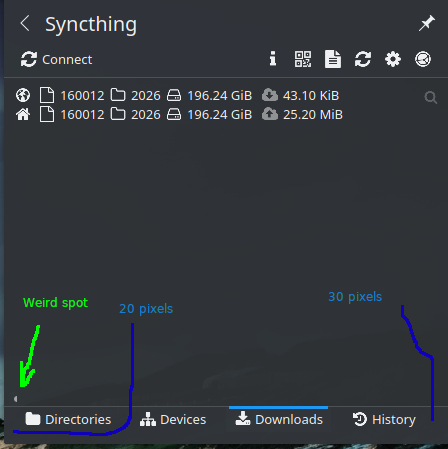
In 1.2.2 tray, note the truncated tabs with overflow buttons. The bug I originally reported in the 1.1.18 plasmoid is also present in the 1.2.2 plasmoid when using Plasma 5.20.5. What I find interesting is that clicking on the "History" tab in the 1.2.2 plasmoid (on Plasma 5.20.5) produces the same sliding motion as clicking download on the tray. Spacing between the right margin and black folder icon is also insufficient.
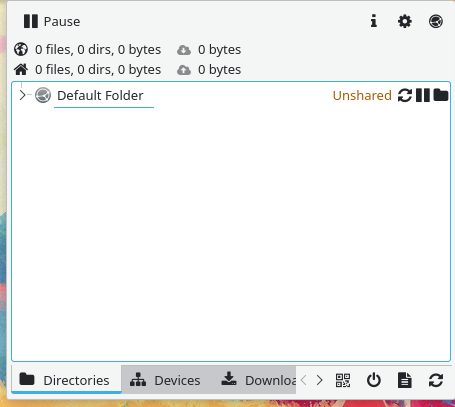
Maybe the whole windows needs to be wider to restore the experience you intended 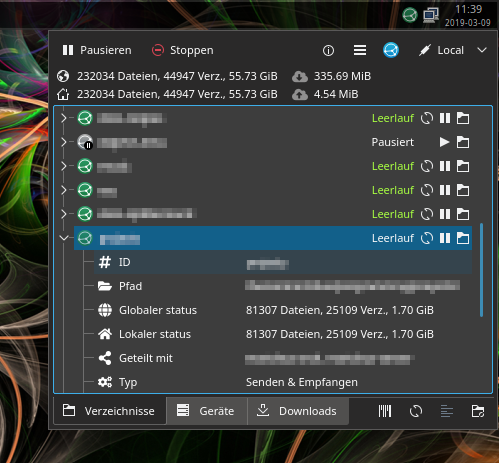 ?
?
Bottom left and right margins are unbalanced, which smells like a possible lurking layout bug.
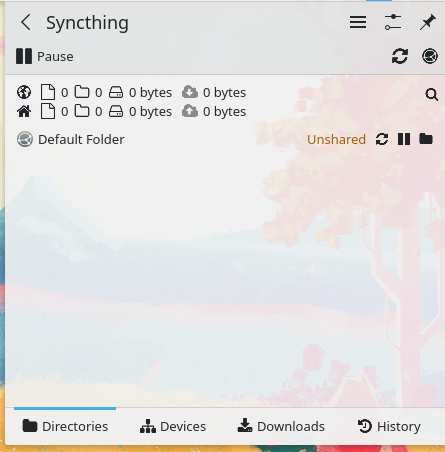
And finally, here is the 1.2.2 plasmoid on KDE Plasma 5.20.5. I've annotated the oddities that may be a factor in this bug. In terms of layers "weird spot" is on top of the text region and tab content. It bet that it's a horizontal scrollbar. As discussed previously, I understand old KDE Plasma versions are not a priority; this is just for informational purposes.
About the Qt Widgets based UI: Just configure the window size in the settings if you like all buttons to be visible. Overflow is generally handled well; you can access all buttons via the arrow icons. Maybe it makes still sense to increase the default size and show only icons if the size is below a certain value.
About the Plasmoid: The positioning of the tabs is unfortunately rather hacky. At some point I just had to settle for something that at least kind of works. Any ideas for improvements would be welcome as I'm not a Qt Quick / Plasma expert. I'm wondering why it looks worse in your case, though. Maybe some spacing and font sizing settings are different in your setup. The theme is the normal Plasma Breeze theme, right?
the new approach seems less likely to trigger the truncation issues.
And I can still do nothing about them in general. If you're using a very low resolution the issue is likely still there and I recommend to not show the Plasmoid within the system notifications Plasmoid then. Unfortunately Plasma/KDE apps in general are not so pleasant to use with a very low resolution at this point.
It shouldn't matter but I'm wondering how you're displaying the Plasmoid in your last screenshot. It partially looks like it is within the system tray Plasmoid but the icons are not collapsed into the settings menu.
Btw, on TW with the latest changes it looks like this:
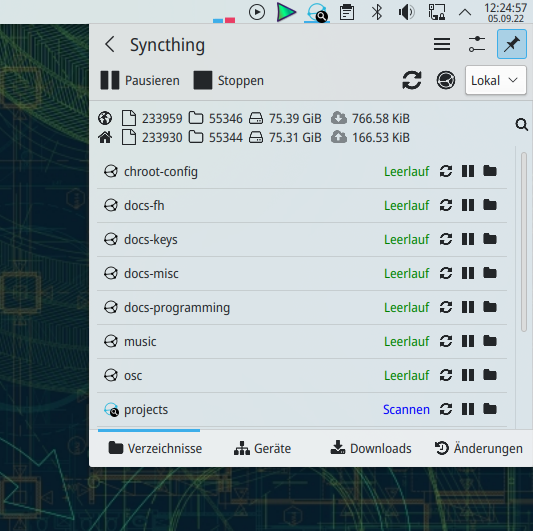
One can also see the button layout problem but otherwise it looks quite ok. Margin/padding and scroll bars look now consistent with other Plasmoids like the NM-Plasmoid.
By the way, I've mitigated the issue in the latest release. The layout problem of the Plasmoid's tab buttons is fixed by only showing icons on the tab buttons (the labels will then be shown as tooltips). If one really wants the labels back one can still enable them in the options. I increased the default size of the Qt Widgets based UI so the overflow of tab buttons is less likely (of course it still depends on the Qt Widgets style and font settings). If one wants to waste less space on the tab buttons they can now also be set to be icon-only (but I haven't made that the default like on the Plasmoid).
Martchus @.***> writes:
I've pushed a fix for the warnings. You can try it but I don't think it'll fix the positioning of the tab buttons (as it is about the positioning of the tab pages).
Thanks! I'll test it soon. My hypothesis is that the anchor issue is transitively triggering a layout bug that affects tabs...but as you say, that may be a long-shot ;)
Looks like the plasmoids are now finally resizable when shown as popup (as of Plasma 5.26.0, see https://bugs.kde.org/show_bug.cgi?id=332512). Being able to just make the plasmoids a little bit bigger should help here as well. Before it was only possible via a hack that didn't work when the plasmoids was shown within the system tray plasmoids. I suppose I can disable that hack on Plasma 5.26.0 or newer.
Oh, it actually works only if the plasmoid is shown within the system tray plasmoid. So if it is standalone it still needs either my previous hack or maybe I can further improve that (possibly like https://invent.kde.org/plasma/plasma-desktop/-/commit/23c4e82cdcb6c7f251c27c6eefa643415c8c5927 which would then require a recent version of Plasma Frameworks for https://invent.kde.org/frameworks/plasma-framework/-/merge_requests/500).
This should be fixed by showing only icons on tab buttons. In addition, when shown within the system tray Plasmoid one can now easily resize the Plasmoid and otherwise one can set the size within the settings. The description in the settings dialog has been updated accordingly.