

 MarlinFirmware
Wait for Bed Expansion [wip]
Description
With most "bed slinger" 3D-printers, a compromise has to be made between thermomechanical stability and weight of the heated bed. On top of that, mounting such a compromised bed to an axis and slinging it around with reasonable acceleration and jerk values requires the bed to be mounted in a statically defined way, meaning that the bed has to be fully constrained. In that case, thermal expansion will cause the bed to buckle and deform. This process will find an equilibrium after some time, which common dwell timers seek to perform.
To illustrate the issue, I used the probe accuracy test M48 to sample the center of a 400x400mm bed during heat-up:
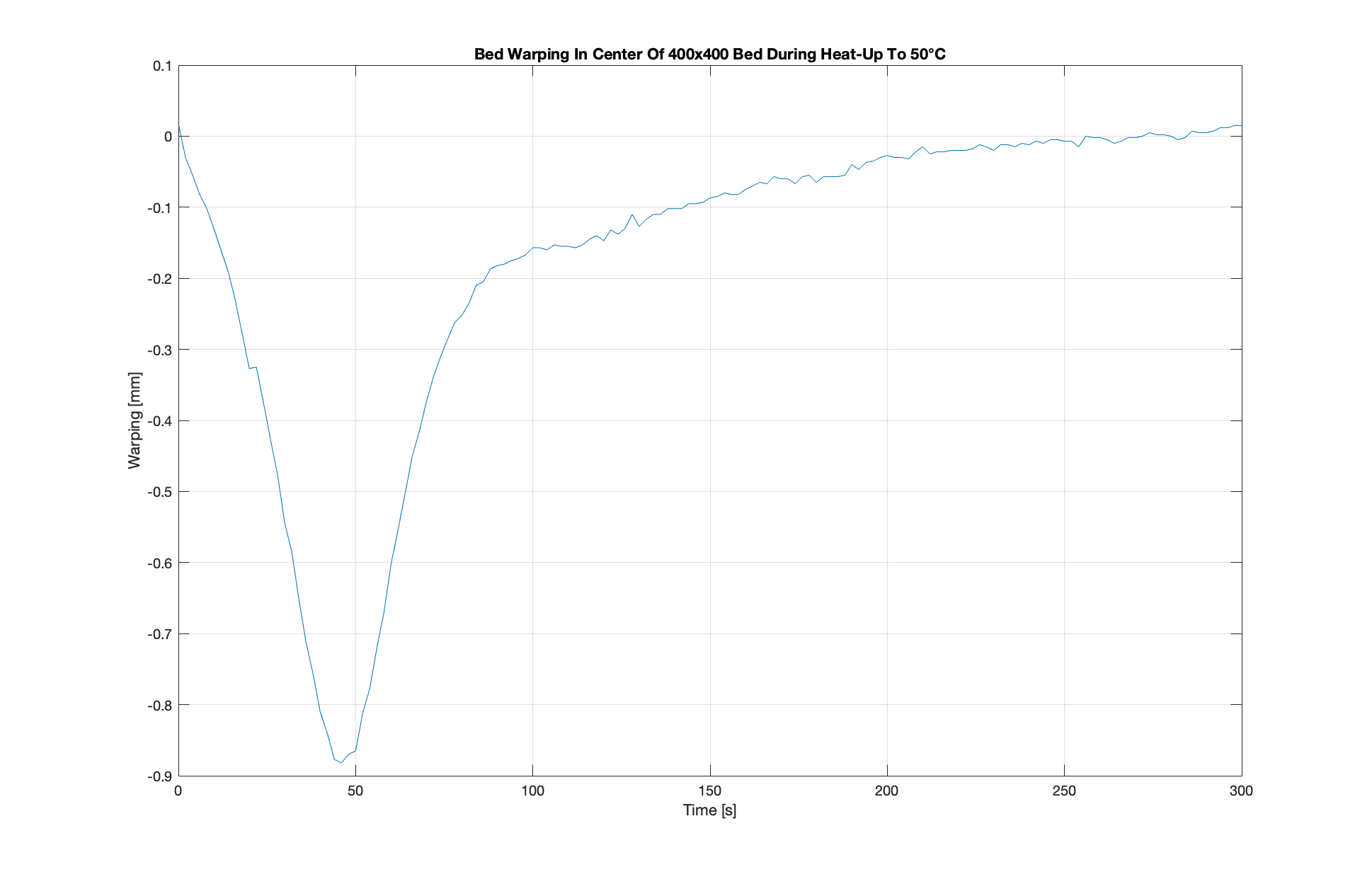
Unfortunately, the curve of this graph is highly variable and depends on ambient temperature, start temperature, end temperature and when the bed was last wiped with isopropanol. The standard dwell timer just doesn't suffice.
Function
A new GCode (M998 for now) can be used as part of the start GCode. It continuously probes the bed and calculates its regression over time. Measurements stop once
- the moving avg of the regression is close to 0, or
- a maximum dwell time has been reached
The measurements are plotted as such: YouTube
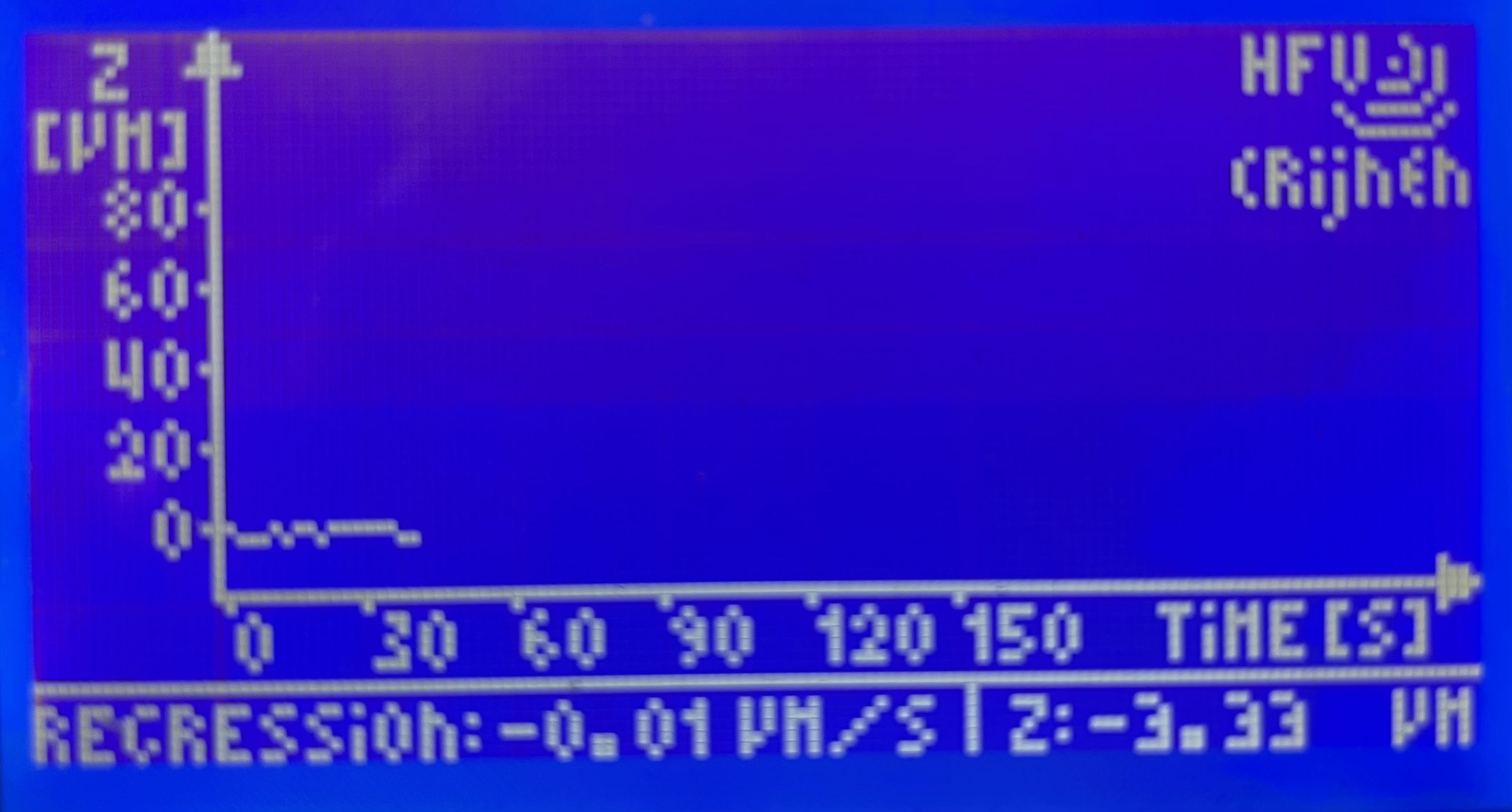 The logo and my name in the top-right corner are removed for this PR.
Benefits
- Totally fail-safe
- Works in all conditions
- Interesting to see how touching the bed will drastically change the plot
- Cuts down on unnecessary waiting
- Makerspaces:
- Users will see that the printer is actually doing something instead of just sitting around doing nothing
- Users will learn the benefits of preheating
Current Requirements
- 128x64 Pixel Monochrome Screen
- BLTouch
EEPROM_SETTINGS
ToDo
- [x] Create working prototype
- [ ] Clean up code (it's a mess... I'm sorry!)
- [ ] Redo
lcd_plotfunction as a screen handler (link) - [ ] Timer based probing instead of delay based probing
- [ ] Redo
- [ ] Make plot axis scale automatically to acquired data points
- [ ] Add compatibility for other screens
- [ ] Add compatibility with other probes
- [ ] ...
Related Issues
[FR] Wait for bed warp to settle #16295

Almost there! The lcd_plot function will need to be redone as a screen handler, which is done by calling ui.goto_screen pointing to the plotter function. The MarlinUI code will call the plotter function at regular intervals and the plotter function can decide whether it wants to redraw or just leave the contents of the screen untouched. This way it only ends up redrawing the screen when there is a new sample. The ui.capture method is called to prevent any user interaction with the screen, and it should also prevent a timeout back to the status screen.
I'll continue to tweak this more –as time allows– to get the screen handler into proper shape.

Thanks for the input! The UI gave me the hardest time. I just didn't understand why it kept interfering with the plot until I found the workaround to defer the UI.
