

 MapServer
OWSRequest for MapServer is crashing the IIS instance
With the GDAL/OGR version 3.5 and the Mapserver version 7.6.4 from gisinternals.com I have created a C# WebAPI REST server (one for dot.net 4.8 and one other for net core 6.0) each one with 2 endpoints (GET and POST). This endpoints are forwarding the querystring (GET) or the body content (POST) to the mapserver with an OWSRequest and are returning the result. And it seems to work, but not very stable. If I stress the webserver with lots of requests (don't matter which kind of request, for example ?SERVICE=WMS&VERSION=1.3.0&REQUEST=GetCapabilities) the IIS process is crashing from time to time with the following exception:
System.AccessViolationException HResult=0x80004003 Message=Attempted to read or write protected memory. This is often an indication that other memory is corrupt. Source=<Cannot evaluate the exception source> StackTrace: <Cannot evaluate the exception stack trace>
I get no inner exception.
Any idea what's going wrong ?
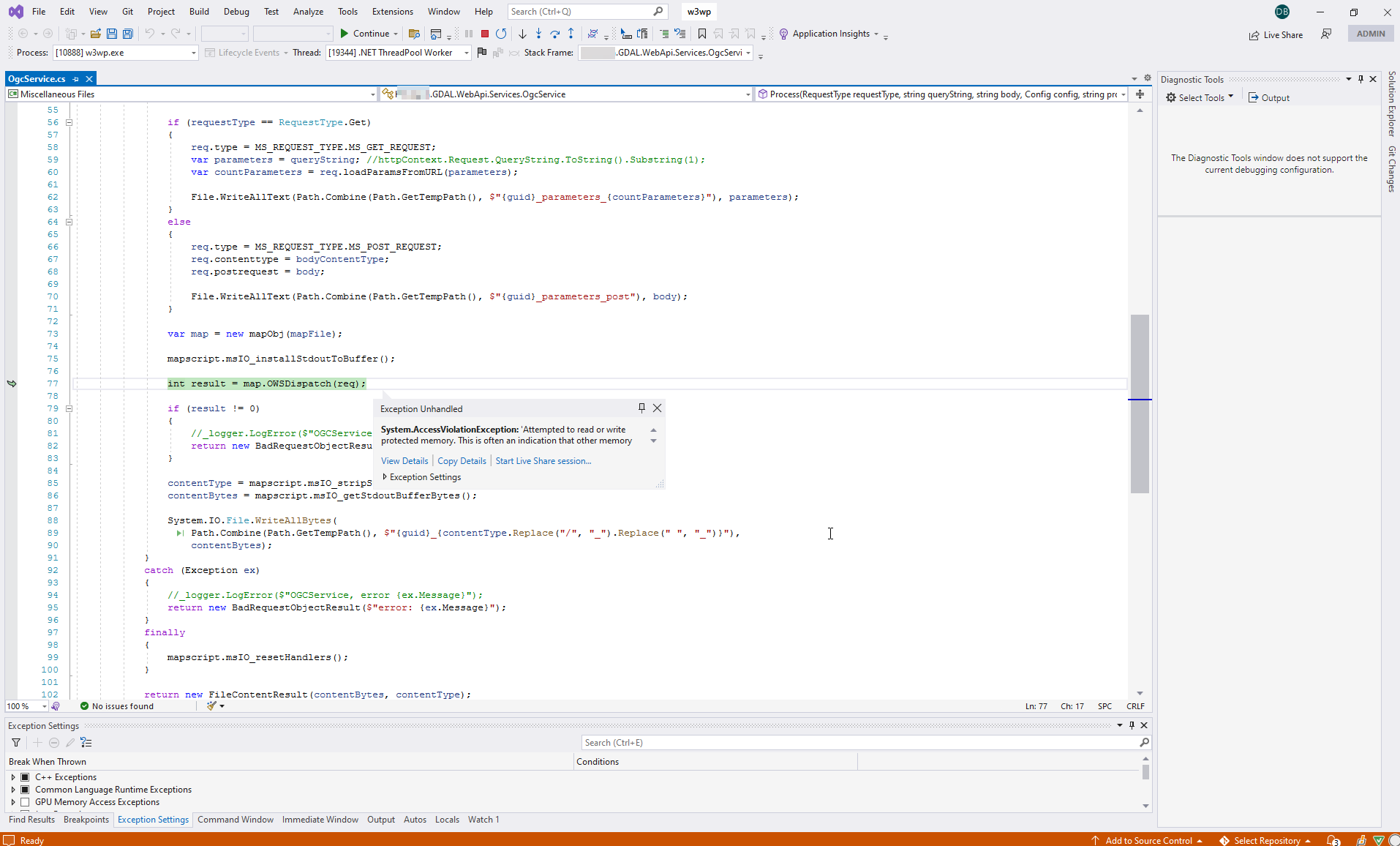

Has nobody this problem or an idea ? Fact is that, if I do a simple call - for example GetCapabilities for a WMS/WFS - for 100 times in two cases my IIS server instance has a crash. In my opinion that happens to often. Make it perhaps sens to switch to another older version ?
So this is a custom C# MapScript application. Not something I have any experience with. I agree it should be more stable. It might be worth taking this question to the mapserver-user mailing list to get more eyes on it. @szekerest, do you have any ideas?
--Steve

I will do that as soon as the bindings from @szekerest are available for Mapserver 8.0
In the meantime I have updated to GDAL 3.5.2 and MapServer 8.0. In my opinion this issue is solved. Do you have changed or improved something ?
We have still the same effect like described in my first comment (same line). But it happens less than before.
@bad-ch Could you share the corresponding code to be able to reproduce this? What was the testing tool to execute the stress testing? We need to compile mapserver with debug symbols to make sure about the crash location.

Sure no problem we are using a .Net 6 controller - but it happens with Dot.Net 4.8 as well - to call the following (we are using your bindings):
using Test.GDAL.WebApi.Models;
using Microsoft.AspNetCore.Mvc;
using OSGeo.MapServer;

namespace Test.GDAL.WebApi.Services
{
    public class OgcService
    {
        public enum RequestType
        {
            Get,
            Post
        }

        public static ActionResult Process(RequestType requestType, string queryString, string body, Config config, string project, string bodyContentType = "")
        {
            if (string.IsNullOrEmpty(project))
            {
                return new BadRequestObjectResult("No valid map file name");
            }

            var projectsPath = config.DataProjects;

            if (projectsPath == null || !Directory.Exists(projectsPath.FullName))
            {
                return new BadRequestObjectResult("No valid root path");
            }

            var projectPath = Path.Combine(projectsPath.FullName, $"{project}");

            if (!Directory.Exists(projectPath))
            {
                return new BadRequestObjectResult("No valid data path");
            }

            var mapFile = new DirectoryInfo(projectPath).GetFiles("*.map").FirstOrDefault()?.FullName;

            if (mapFile == null || !System.IO.File.Exists(mapFile))
            {
                return new NotFoundObjectResult("Map file not found");
            }

            GdalConfiguration.ConfigureGdal();
            GdalConfiguration.ConfigureOgr();

            string? contentType;
            byte[] contentBytes;

            OWSRequest req = new OWSRequest();

            try
            {
                if (requestType == RequestType.Get)
                {
                    req.type = MS_REQUEST_TYPE.MS_GET_REQUEST;
                    req.loadParamsFromURL(queryString);
                }
                else
                {
                    req.type = MS_REQUEST_TYPE.MS_POST_REQUEST;
                    req.contenttype = bodyContentType;
                    req.postrequest = body;
                }

                var map = new mapObj(mapFile);

                mapscript.msIO_installStdoutToBuffer();

                int result = map.OWSDispatch(req);

                if (result != 0)
                {
                    req.Dispose();
                    map.Dispose();
                    mapscript.msIO_resetHandlers();
                    return new BadRequestObjectResult("Wrong result from map");
                }

                contentType = mapscript.msIO_stripStdoutBufferContentType().Split(';')[0];
                contentBytes = mapscript.msIO_getStdoutBufferBytes();
                req.Dispose();
                map.Dispose();
                mapscript.msIO_resetHandlers();
            }
            catch (Exception ex)
            {
                req.Dispose();
                mapscript.msIO_resetHandlers();
                return new BadRequestObjectResult($"error: {ex.Message}");
            }

            return new FileContentResult(contentBytes, contentType);
        }
    }
}
The try catch above don't help because everything is crashing.
To reproduce that behavior there is no special testing tool necessary, you could use a browser and do some calls for different WMS/WFS services for example GetCapabilities requests (refresh browser several times in different tabs, I have configured more than one worker in the IIS application) or you use QGIS, after some some activity the IIS or the application crasches. If you like I could deliver you a complete VS solution with mapfiles and data as well ? Lot's of times it happens during the first request.