

 MahApps
bug: bound icons in an ItemsControl are shown incorrectly. Error appeared on 4.4.0 (it did work correctly on 4.3.0)
Describe the bug
I have a rather complex app, and at some point I have an array of controls, and each control has an array of PackIconMaterial bound icons. The culprit code is this (once again, this works perfectly in 4.3.0):
<ItemsControl ItemsSource="{Binding combo_icons}" VerticalAlignment="Center"
			  binding:vc_dep.Visible="{Binding meta.is_combo_icons}"
			  HorizontalAlignment="Right" Margin="0 0 -4 0" Grid.Column="2" >
	<ItemsControl.Resources>
		<Style TargetType="ListViewItem">
			<Setter Property="Height" Value="{Binding icon_size}" />
			<Setter Property="MinHeight" Value="0" />
			<Setter Property="Padding" Value="0" />
			<Setter Property="MinWidth" Value="0"/>
			<Setter Property="Width" Value="{Binding icon_size}"/>
		</Style>
	</ItemsControl.Resources>

	<ItemsControl.ItemsPanel><ItemsPanelTemplate>
		<StackPanel Orientation="Horizontal" HorizontalAlignment="Right"/>
	</ItemsPanelTemplate></ItemsControl.ItemsPanel>
	<ItemsControl.ItemTemplate><DataTemplate>
		<Grid Background="{Binding bg_color}"
			  Padding="{Binding icon_padding}"
			  PointerPressed="combo_click" extensions:Mouse.Cursor="Hand"
			  PointerEntered="combo_hover_enter" PointerExited="combo_hover_exit"  ToolTipService.ToolTip="{Binding tooltip}">
			<iconPacks:PackIconMaterial Kind="{Binding icon}" Foreground="{Binding color}"
										Width="{Binding icon_size}" Height="{Binding icon_size}"
										HorizontalAlignment="Center" VerticalAlignment="Center"
										/>
		</Grid>
	</DataTemplate></ItemsControl.ItemTemplate>
</ItemsControl>
This is supposed to show this:
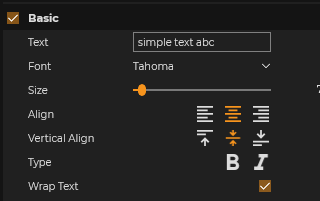
In 4.4.0 it shows this:
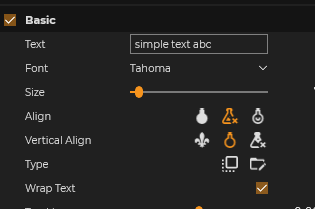
and in 4.5.0 it shows this:
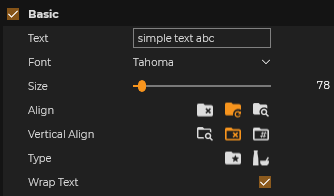
(in later versions it shows yet another set of icons). Note that as far as I can see, the issue only occur if the icons are bound in an ItemsControl -- if I have a simple bound icon, it works correctly.
Desktop Environment (please complete the following information):
- IconPacks Version: 4.4.0
- Visual Studio: 2019 and 2022 preview
- UWP

Hi @jtorjo
do you think you can manage to create a very short sample App which shows the issue? I think maybe there is something in the Binding going on. Maybe the Kind name changed or something like this?
Thank you and happy coding Tim

Hi @timunie Will take a look one next week, and I'll get back to you! Best, John