
com.piyushgarg.rclone
 com.piyushgarg.rclone copied to clipboard
 Magisk-Modules-Repo
Android 11 Compatibility
Apparently /sbin no longer exists in android 11, causing symlinks to fail. rclone-wrapper.sh is still usable by calling the absolute path, but will fail when trying to call fusermount
Android Version: 11 Phone model: Oneplus 6T Magisk version: 21.0 Module version: 1.13

Thanks @viperML for the advanced information. I still do not have any idea about android 11 (still on android 10). Try magisk stable version.

is 2020/12/07 07:44:25 Fatal error: failed to mount FUSE fs: fusermount: exec: "fusermount": executable file not found in $PATH related ? worked fine before upgrading to android 11. in a root shell i can't call fusermount as it's not detected.
edit : fixed it by manually putting the fusermount binary into /system/bin in TWRP. so now it's working on A11.

Thanks @viperML for the advanced information. I still do not have any idea about android 11 (still on android 10). Try magisk stable version.
You should use ${MAGISKTMP} instead of hardcoding /sbin for future releases: https://topjohnwu.github.io/Magisk/guides.html#root-directory-overlay-system

is
2020/12/07 07:44:25 Fatal error: failed to mount FUSE fs: fusermount: exec: "fusermount": executable file not found in $PATHrelated ? worked fine before upgrading to android 11. in a root shell i can't call fusermount as it's not detected.edit : fixed it by manually putting the fusermount binary into /system/bin in TWRP. so now it's working on A11.
I added fusermount binary to PATH, and am manually calling the rclone-wrapper.sh script. Whenver I run rclone-wrapper.sh config, then type q to quit, it shows that my remotes have been mounted at /mnt and /cloud. This used to work on Android 10, but now it has just created empty folders. The only errors it shows are failing to create symlinks to the /sbin directory, is this what's causing the empty folders to be created? Can you walk me through how you got the remotes to properly mount?
I made this module for this issue if you want https://github.com/mirsella/magisk-fusermount-bin
I made this module for this issue if you want https://github.com/mirsella/magisk-fusermount-bin
Thank you for that, however as I said I have already added fusermount to path and the fusermount error is not occurring. Rather, the mount is completing successfully, but the folders created are empty.
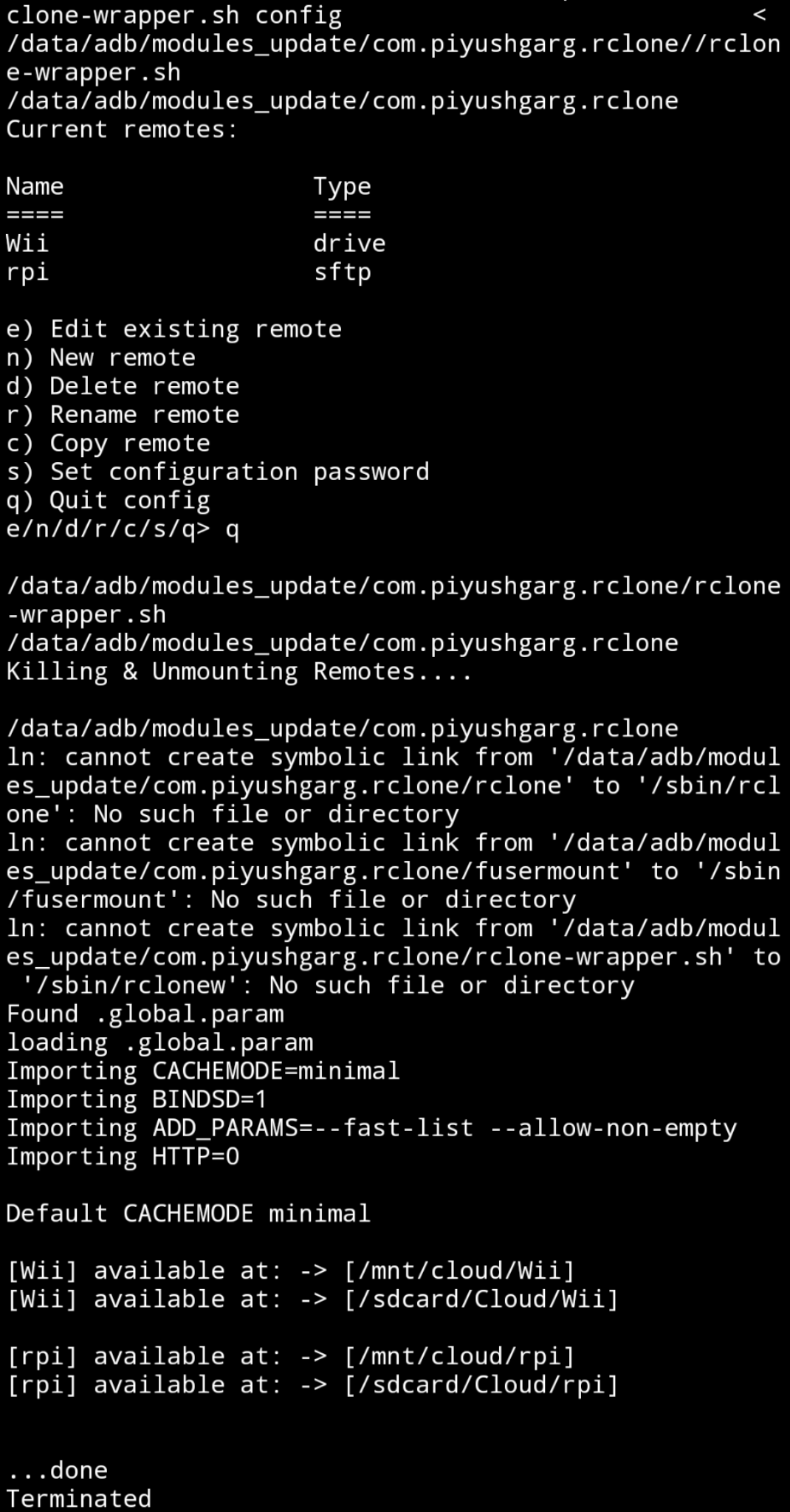
I stand corrected. I was adding the fusermount that came with this module to PATH, turns out it doesn't work like that. I now simply copied the fusermount binary that came with this module to /system/bin and now it works. This is exactly the same thing your module does. Sorry about that. Thanks for the help!
yeah the module is really simple, I don't remember why but it was removed frequently maybe when updating my ROM that's why I use the module it's easier for me
yeah the module is really simple, I don't remember why but it was removed frequently maybe when updating my ROM that's why I use it's easier
you're right, the file is removed every reboot. Looks like I'm going to use your module then
even when placing it from TWRP ? I thought you could really accessing /system from TWRP. the reboot was probably my problem
Alright, what I did was manually delete the file I copied, I rebooted into TWRP (reboots take a lot longer when rclone is installed for some reason, hangs at a black screen for about a minute before rebooting), I copy the fusermount binary from this module into the /system/bin folder via TWRP, reboot to system, my remotes are automounted at startup and are working as expected, fusermount binary is still in /system/bin. I reboot again, takes a minute, rclone still working, binary still present. I am not going to test this next theory as I believe I already know the answer (and you know the answer as well), whether or not the binary remains after a rom flash. I install custom fonts in the /system/fonts directory, they get removed every flash of any rom, so that is probably what was happening to you. Also, I don't think you need to use TWRP to make the fusermount binary stay after reboots, I think I messed everything up because even magisk got uninstalled somehow, something was clearly corrupted then.
holy freak the black screen at reboot, I thought it was my ROM since it doesn't happened since a update ! that's a mystery solved for me.
yep it probably was the ROM update, I use a custom ROM and there is update like each week so the module is still the best for me as it keep installed after updates.
I think you need to use TWRP because from your OS /system is mounted as read only, like at each reboot /system is mounted from a read only image which can't be changed from the system. TWRP can do it since it has a special options to mount it him self, it's not mounted by Android. but I'm not sure.
I don't know about you, but my battery life is draining crazy fast due to "Media Storage". I literally left my phone idle for 5 hours and it drained 60% I tried restricting its battery usage but looks like it didn't actually do anything. I might need to wait for a proper Android 11 update to this module
maybe some rclone configuration ? I personally have BINDSD=1 SDBINDPOINT=gdrive CACHEMODE=writes LOGFILE=/sdcard/.rclone/rclone.log
and I don't even have media storage in my battery list
I have CACHEMODE=minimal BINDSD=1 ADD_PARAMS=--fast-list --allow-non-empty HTTP=0 FTP=0
I didn't make it myself, I got it from a YouTube tutorial that I watched last year. I used this exact configuration when using Android 10 without issue though. I rebooted my phone to see if the issue would persist, looks good so far actually.
yeah unfortunately it's still happening. My phone heats up like crazy and it drains it very fast. My remote HDD is blinking non-stop as well, meaning rclone is constantly doing I/O with the drive. Why is rclone constantly syncing?
So I did some process monitoring and yeah, network was in constant usage and the rclone daemon was using around 1% of my cpu at all times (meaning no doze). I did rclone-wrapper.sh unmount and the network usage instantly dropped to 0, and the rclone daemon obviously disappeared.
I wonder what is causing it to do that.
I just opened Google Photos and it turns out it was indexing all the photos on my remote drive. That was probably the issue.
I am now using the newly added SUBPATH variable from https://github.com/Magisk-Modules-Repo/com.piyushgarg.rclone/pull/44 to only load the directories I need on my phone, that way all the photos don't get indexed by Google Photos. I needed to disable the --fast-list param for this to function. Now everything works as expected
Any updates on getting this to work with Android 11? I can't test the SUBPATH issue since I am on android 11. I can take a stab at updating this module to android 11, but its going to require a huge rewrite as many Magisk conventions were not followed. A good thing is that I see that a lot of the code will become unnecessary when updating. For example, the current module manually symlinks the binaries -- this doesn't happen anymore, the binaries are simply placed in the system/bin dir and they are overlay mounted automatically. Let me know if you want me to take a shot.

@jasonsyoung It does work on Android 11, and SUBPATH works on Android 11. I've been sharing my experiences in the pull request, did you miss that I said it worked with Android 11?
@jasonsyoung It does work on Android 11, and SUBPATH works on Android 11. I've been sharing my experiences in the pull request, did you miss that I said it worked with Android 11?
Apologies, this comment made it seem like there is still an issue. Regardless, I am unable to get the mounts working in 11.
@jasonsyoung what's your problem with the mount ? can you call fusermount from a root shell ?
@jasonsyoung yeah that comment was about the spaces in particular. I was saying that maybe Android 11 requires the backlash to escape the space due to how it deals with variables. It still works after escaping the space though.
In order to mount on Android 11, you'll need to copy the fusermount binary (you can download it from this repo and rename it to fusermount, or simply copy it from the magisk directory /data/adb/modules/com.piyushgarg.rclone/ (or /data/adb/modules_update/com.piyushgarg.rclone/ if you haven't rebooted yet) to the /system/bin folder (preferably through recovery, because if you do it while still booted in Android with root perms, it will get deleted on next reboot). You must also change the perms of the fusermount binary to have read and execute perms (0755).
After that, open Termux and type su, and now since rclone isn't in path, you should add it. A temporary way to do this is to do: PATH=$PATH:/data/adb/modules/com.piyushgarg.rclone/ (if you installed rclone-mount from magisk without rebooting, replace modules with modules_update, otherwise, after your first reboot, always use modules). After that, do not use the rclone command, rather, use rclone-wrapper.sh instead. Some common commands are config, remount, unmount, and disable. Just use rclone-wrapper.sh remount to mount all your remotes. It should detect your rclone.conf and param files in the /sdcard/.rclone folder, if not (directly after an install), you should reboot and try again.
@jasonsyoung yeah that comment was about the spaces in particular. I was saying that maybe Android 11 requires the backlash to escape the space due to how it deals with variables. It still works after escaping the space though.
In order to mount on Android 11, you'll need to copy the fusermount binary (you can download it from this repo and rename it to
fusermount, or simply copy it from the magisk directory/data/adb/modules/com.piyushgarg.rclone/(or/data/adb/modules_update/com.piyushgarg.rclone/if you haven't rebooted yet) to the/system/binfolder (preferably through recovery, because if you do it while still booted in Android with root perms, it will get deleted on next reboot). You must also change the perms of the fusermount binary to have read and execute perms (0755).After that, open Termux and type
su, and now since rclone isn't in path, you should add it. A temporary way to do this is to do:PATH=$PATH:/data/adb/modules/com.piyushgarg.rclone/(if you installed rclone-mount from magisk without rebooting, replacemoduleswithmodules_update, otherwise, after your first reboot, always usemodules. After that, do not use therclonecommand, rather, userclone-wrapper.shinstead. Some common commands areconfig,remount,unmount, anddisable. Just userclone-wrapper.sh remountto mount all your remotes. It should detect your rclone.conf and param files in the/sdcard/.rclonefolder, if not (directly after an install), you should reboot and try again.
Ok, so this module clearly isn't Android 11 compatible lol. I will follow those steps to test the SUBPATH space issue, but it would be nice to not have to do anything to get this module working...
@jasonsyoung yeah there's still lots of things to fix lol, sorry if I implied there were no issues. I was speaking specifically about the claim that it doesn't work on Android 11 in general, sorry for the misunderstanding
for me everything worked apart from the fusermount binary, which is installable with a magisk module so easy to do too.
Can anyone tell a clear method how to mount rclone on Android 11, if it's possible without twrp , I will prefer this

@aman-rohilla you need magisk installed anyway to use this module, and you need a custom recovery like TWRP to install magisk.
with magisk installed, this worked for me :
- install rclone-mount module by searching in the magisk app repo list
- install https://github.com/mirsella/magisk-fusermount-bin by downloading the zip and flashing it in the magisk app using the 'install from storage' box