

 MScholtes
Transpose-Object bug
This does not work
[pscustomobject]@{a=0; b=1; c=2},
[pscustomobject]@{a=3; b=4; c=5},
[pscustomobject]@{a=6; b=7; c=8},
[pscustomobject]@{a=9; b=10; c=11} | Transpose-Object
but if you add $col=1 to begin block and replace $InputObject | Out-String (line 50) with "column$($col)"; $col++ it will

Hello @scriptingstudio,
I took me some time to find where a bug is. Your example works fine with Transpose-Object, you might see it better when you add Format-Table:
[pscustomobject]@{a=0; b=1; c=2},[pscustomobject]@{a=3; b=4; c=5},[pscustomobject]@{a=6; b=7; c=8},[pscustomobject]@{a=9; b=10; c=11} | Transpose-Object | Format-Table
There seems to be a bug in Out-GridView, when a key starts oder ends with white space, Out-GridView does not determine the value, for example see this:
[pscustomobject]@{ "a "=1 } | Out-GridView
This one works:
[pscustomobject]@{ "a"=1 } | Out-GridView
Is this the issue you found? I will implement a workaround for this.
Greetings
Markus

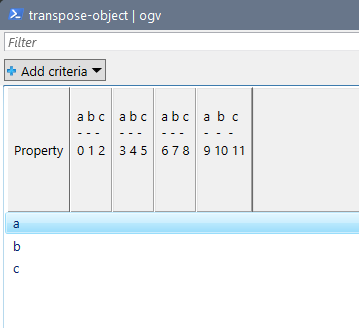
Property
         a b c                                             a b c                       a b c                    a  b  c
         - - -                                             - - -                       - - -                    -  -  -
         0 1 2                                             3 4 5                       6 7 8                    9 10 11


-------- --------------------------- --------------------------- --------------------------- --------------------------
a                                                              3                           6                          9
b        1                                                     4                           7                         10
c        2                                                     5                           8                         11
Hello @scriptingstudio,
I do not know if it's really what you expect but I uploaded a new version of Transpose-Object.ps1 today that has a workaround for the Out-GridView error (remove leading or trailing whitespace from titles) and fixes an error. Additionally you can select the property whose values are used as titles. If the object do not have a title property the script still uses the text representation of the objects as titles.
Greetings
Markus
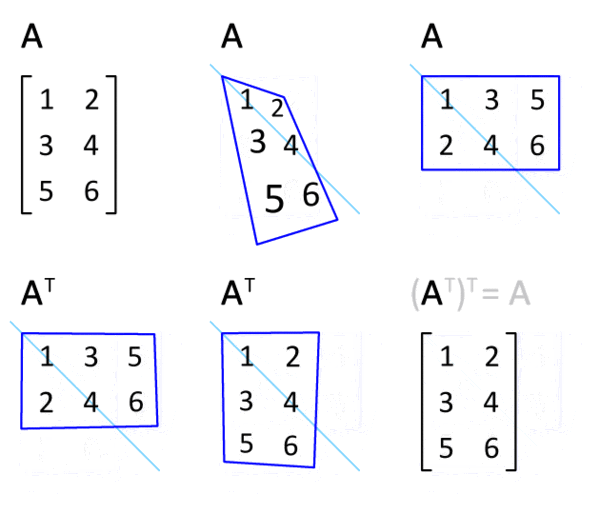
I would expect to see this
or in Powershell
[pscustomobject]@{'a'=0; 'b'=1; 'c'=2}
a b c
- - -
0 1 2

[pscustomobject]@{'a'=0; 'b'=1; 'c'=2} | Transpose-Object
Property value
-------- -----
a        0
b        1
c        2
but I see this
[pscustomobject]@{'a'=0; 'b'=1; 'c'=2} | Transpose-Object
Property a b c
         - - -
         0 1 2
-------- -------------------
a
b        1
c        2
but
[pscustomobject]@{'a'=0; 'b'=1; 'c'=2} | Transpose-Object -ti a
Property 0
-------- -
a
b        1
c        2
I understand that this is your way, but it is not math way.
Hello @scriptingstudio,
an answer to keep these thread alive.
Being mathematically correct the expected result would be something like
a 0
- -
b 1
c 2
But this was not my intension (since maths does not define how to transpose objects), I saw the practival use for Out-GridView and Export-CSV.
Greetings
Markus
P.S.: The 0 is missing because 0 is equated to $NULL