

 MScholtes
String is cut off after converting PS to EXE
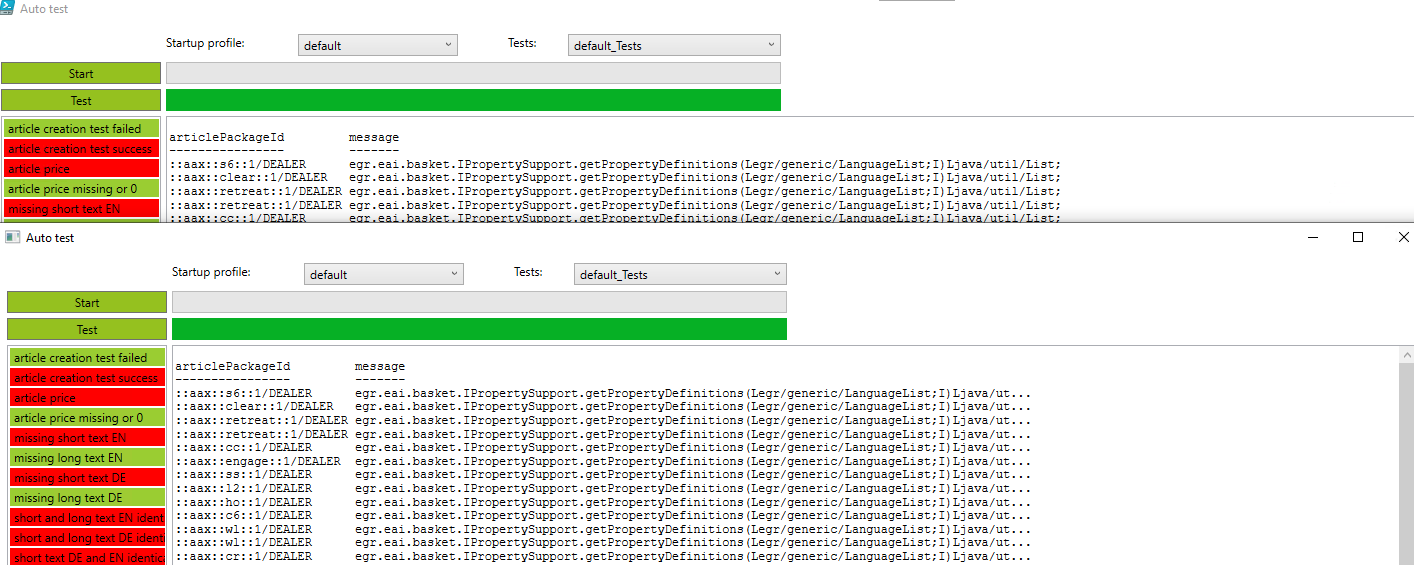
I built a PS GUI app that evaluates an SQL database and displays the results in a table.
After converting to EXE the text from the database is cut off, see screenshot.

Hello @Utanapisti,
I can't say much about it because there is some kind of auto-formatting happening here: In the second example, the window has a scroll bar, so the line is shorter and there is not enough space for the whole printout. The best thing is to make more space available on the line or to make sure that the scroll bar does not appear. Maybe in the second example there is simply a larger result set?
Greetings
Markus

Hallo Markus,
I have created a minimum sample PS project that illustrates the issue. There is no GUI involved, so the missing GUI space can be excluded I think.
It is just a script, that reads a string from a SQL database.
If I run it in PowerShell the string shows in complete.
If I run it after conversion to EXE the string is incomplete in the text file.
The database content is always the same.
I uploaded a script with a database and all needed stuff here: https://we.tl/t-8XvCWCVbPb
This is the PS code you may also use directly together with a database to test it: ` add-type -path "c:\SQLite_Exec_Query\sqlite.net_1.0.113\System.Data.SQLite.dll"
function invoke-sqlitequery($strSQLiteCmd, $strSQLiteConnect){
$objSQLite = New-Object -typename System.Data.SQLite.SQLiteConnection
$objSQLite.ConnectionString = $strSQLiteConnect
$objSQLite.open()
$SQLquery = $objSQLite.CreateCommand()
$SQLquery.CommandText = $strSQLiteCmd
$adap = New-Object -TypeName System.Data.SQLite.SQLiteDataAdapter $SQLquery
$dataset = New-Object -TypeName System.Data.DataSet
[void]$adap.Fill($dataset)
$dataset.tables
$dataset.Dispose()
$adap.Dispose()
$objSQLite.Dispose()
}
clear
$strSQLiteConnect = "data source=c:\SQLite_Exec_Query\database\2022-06-17-09-51-30.db"
$strSQLiteCmd = "SELECT article.baseArticleNumber, article.seriesId, log_entry.message FROM article INNER JOIN log_entry ON article.id = log_entry.parentId GROUP BY article.baseArticleNumber, log_entry.message ORDER BY article.baseArticleNumber ASC LIMIT 5" #$strSQLiteCmd = "SELECT log_entry.message FROM log_entry LIMIT 5"
invoke-sqlitequery -strSQLiteCmd $strSQLiteCmd -strSQLiteConnect $strSQLiteConnect `
Hello @Utanapisti,
sorry, I get only errors trying to run your script: Module System.Data.SQLite.SQLiteConnection not found
But I have a guess, Powershell scripts use the "Powershell pipeline" on output and input. The Powershell pipeline is aware of Powershell types such as string arrays (I think this is the output you are getting). When you compile the script to an executable, this changes. Every executable uses the "cmd.exe pipeline". The "cmd.exe pipeline" knows only one type of output: string. The output of your compiled script is converted to a string and this is what you get.
Can you try to write your output to a file and check if the file's content is okay?
Greetings
Markus
Hello Markus,
thank you for pointing me in the right direction. The dimensions of the shell is the limitation and brought us to the solution. We can control the lenght of the output by using these two lines of code:
$FormatEnumerationLimit=-1
$dataset.tables | out-string -Width 200
Greetings!