

 MISP
MISP
Error while running the Custom object script "jq_all_the.things.sh" and "validate_all.sh"
Hello MISP team,
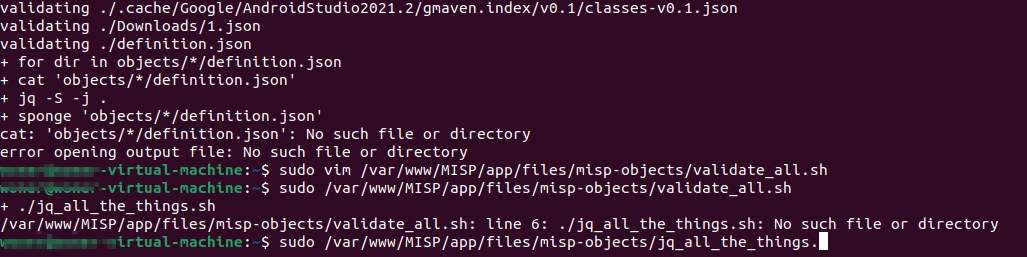
I was trying to create a custom MISP object related to malware sample IoCs, successfully created the definition.json file and updated it to MISP. But while running the validate_all.sh getting an error as below:
Existing custom objects do not have all the attributes related to any malicious sample in a single definition.json file. For example, https://github.com/MISP/misp-objects/tree/main/objects/file - this object has hashes, file name, size, and other attributes but is missing URL, domain, and IP attribute related to a malicious file. Our objective is to create a custom object which can have all the possible attributes related to a single malicious file. Below is the definition file content.
{
  "attributes": {
    "domain": {
      "categories": [
        "Network activity",
        "External analysis"
      ],
      "description": "Domain name",
      "misp-attribute": "domain",
      "multiple": true,
      "ui-priority": 1
    },
    "first-seen": {
      "description": "First seen time of malware sample",
      "disable_correlation": true,
      "misp-attribute": "datetime",
      "ui-priority": 0
    },
    "last-seen": {
      "description": "Last seen time of malware sample",
      "disable_correlation": true,
      "misp-attribute": "datetime",
      "ui-priority": 0
    },
    "hostname": {
      "description": "Hostname related to the IP",
      "misp-attribute": "hostname",
      "ui-priority": 1
    },
    "ip": {
      "categories": [
        "Network activity",
        "External analysis"
      ],
      "description": "IP Address",
      "misp-attribute": "ip-dst",
      "multiple": true,
      "ui-priority": 1
    },
    "port": {
      "categories": [
        "Network activity",
        "External analysis"
      ],
      "description": "Associated TCP port with the domain",
      "misp-attribute": "port",
      "multiple": true,
      "ui-priority": 1
    },
    "filename": {
      "categories": [
        "Payload delivery",
        "Artifacts dropped",
        "Payload installation",
        "External analysis"
      ],
      "description": "Filename of malicious sample",
      "disable_correlation": true,
      "misp-attribute": "filename",
      "multiple": true,
      "ui-priority": 1
    },
    "md5": {
      "description": "[Insecure] MD5 hash (128 bits)",
      "misp-attribute": "md5",
      "recommended": false,
      "ui-priority": 1
    },
    "sha1": {
      "description": "[Insecure] Secure Hash Algorithm 1 (160 bits)",
      "misp-attribute": "sha1",
      "recommended": false,
      "ui-priority": 1
    },
    "sha256": {
      "description": "Secure Hash Algorithm 2 (256 bits)",
      "misp-attribute": "sha256",
      "ui-priority": 1
    },
    "size-in-bytes": {
      "description": "Size of the file, in bytes",
      "disable_correlation": true,
      "misp-attribute": "size-in-bytes",
      "ui-priority": 0
    },
    "text": {
      "description": "Free text value to attach to the file",
      "disable_correlation": true,
      "misp-attribute": "text",
      "multiple": true,
      "recommended": false,
      "ui-priority": 1
    }
  },
  "description": "All possible IoCs related to the malware sample",
  "meta-category": "network",
  "name": "malware-ioc",
  "requiredOneOf": [
    "ip",
    "domain",
    "hostname",
    "filename",
    "size-in-bytes",
    "md5",
    "sha1",
    "sha256"
  ],
  "uuid": "0af7e110-30d3-11ed-a261-0242ac120002",
  "version": 1
}
I need help here to fix the error that the script is generating, not sure where it's because of the platform I am running the script on. While automating the event-adding process, the pyMISP is checking for MISP objects on your repository. Is there any way you can modify the existing object or create the new object to achieve this objective.

You need to be in the directory where the scripts are located. You just have to cd before running the validation.

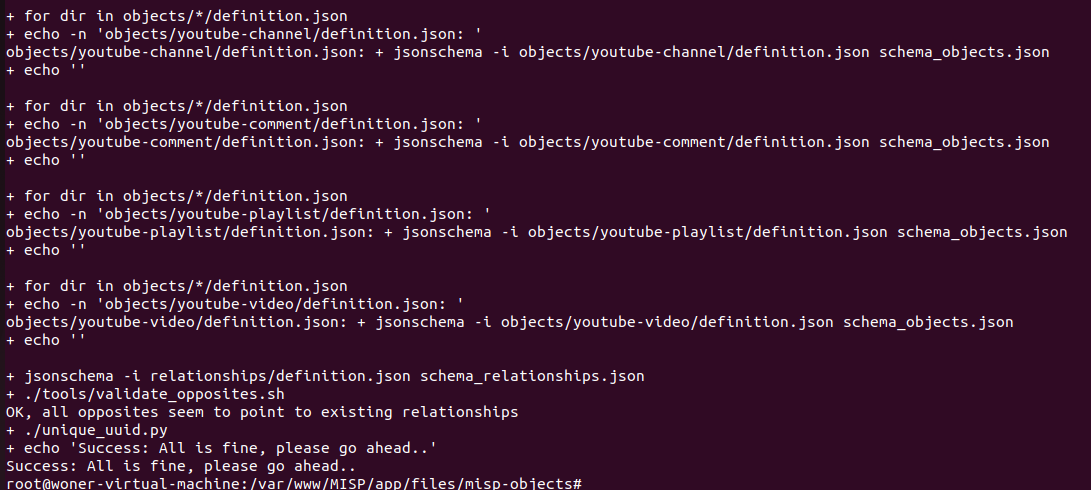 I was able to run the script successfully but the custom object is not reflected. While automating the event adding still got the error.
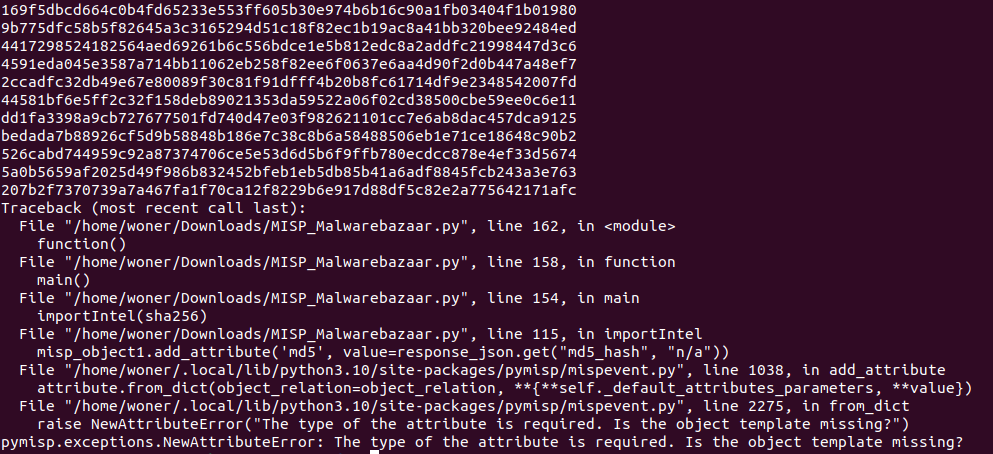
Is there any way to resolve this issue? Unable to find the custom object while automating, tried again. There is no error while running the script but object is not reflecting
You seem to have put the template on the server, and you're using PyMISP in the script in your download directory. Am I correct?
If yes, this won't work: PyMISP has no way to get that template from the webserver and you have a few options to get your code to work:
- setup a full dev environment:
- Clone PyMISP
- Put the template in
pymisp/data/misp-objects/objects/<objectname>/definition.json - Install pymisp locally with poetry and run the script from the virtual environment
- Change the call to
MISPObjectto something like that:user_defined_obj = MISPObject(name='test_object_template', strict=True, misp_objects_path_custom='../../tests/mispevent_testfiles')- https://github.com/MISP/PyMISP/blob/main/docs/tutorial/FullOverview.ipynb

The second option worked very well for me. Thank you so much for helping me out here.