
Minecraft-Console-Client

Minecraft-Console-Client copied to clipboard
 MCCTeam
[BUG] Proxy not working
Prerequisites
- [X] I made sure I am running the latest development build
- [X] I tried to look for similar issues before opening a new one
- [X] I have set
debugmessages=truein config to diagnose my issue - [X] I have redacted session tokens and passwords before attaching screenshots
Minecraft Version
1.19
Console Client Version
Latest
Expected Behavior
i expect to join when i use a free proxy
Actual Behavior
when i try to join with a proxy it does not let me i tried about 200 of them always the same thing
Steps to Reproduce the bug
- go to google and search up free minecraft proxies (last one i used was hidemy.name)
- get a random proxy
- try it and see how it fails
Attach screenshot here (If applicable)
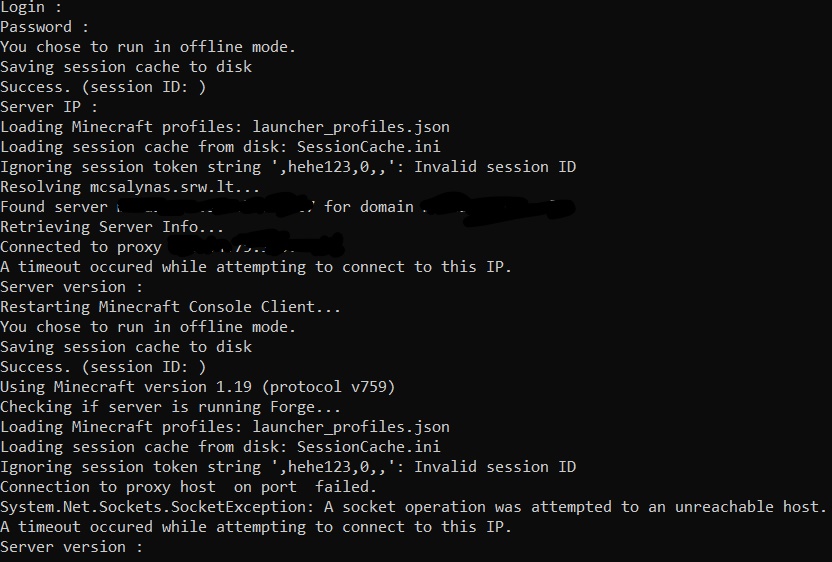
Anythings that could help diagnosing the bug
my proxy config is this
[Proxy]
# Connect to a server via a proxy instead of connecting directly
# If Mojang session services are blocked on your network, set enabled=login to login using proxy but connect directly to the server
# If connecting to port 25565 (Minecraft) is blocked on your network, set enabled=true to login & connect using the proxy
# /!\ Make sure your server rules allow Proxies or VPNs before setting enabled=true, or you may face consequences!
enabled=true                      # Use 'false', 'true', or 'login' for login only
type=SOCKS4                          # Supported types: HTTP, SOCKS4, SOCKS4a, SOCKS5
server=95.154.75.180:45735                # Proxy server must allow HTTPS for login, and non-443 ports for playing
username=                          # Only required for password-protected proxies
password=                          # Only required for password-protected proxies
Device
Laptop
Operating System
Windows
Server Address (If applicable)
No response
