

 M2Team
Proposals of changes taken from Easy 7-Zip
~~Proposals of changes taken from "7-Zip-ZStandard" :~~
described in the comments below
- Implementation of skin support as attempted to do years ago in the type example: 7-ZIP Theme Manager http://www.7ztm.de/index.php?cat=01_English
Currently, you can use available solutions outside the program: https://github.com/Wilenty/7zTC-7-ZIP-NanaZip-Theme-Changer https://github.com/RipplePiam/7zip-Theme

NanaZip have followed all suitable changes from 7-Zip ZStandard repository on Feb 14, 2023. I think you should read the https://github.com/M2Team/NanaZip/commits/main first.
Kenji Mouri

Here are something new from 7-Zip Zstandard main branch for NanaZip main branch needs to follow.
- [x] https://github.com/mcmilk/7-Zip-zstd/pull/297
- [x] https://github.com/mcmilk/7-Zip-zstd/commit/4fae369d2d6aa60e2bb45eea1fb05659a2599caa
NanaZip has not merged features from Easy 7-Zip.
I think maybe you can update the list NanaZip needs to do. Thanks.
Kenji Mouri
NanaZip have followed all suitable changes from 7-Zip ZStandard repository on Feb 19, 2023.
Kenji Mouri
Thank you for the feedback. In that case, most of the expected "facilitations" were added to the future edition. By the way, I found the sources of changes introduced to the "Easy 7-zip (www.e7z.org) version, which you can use, I do not have adequate programming knowledge.
I use the Nanazip 2.1 Preview 0 x64 (2.1.451.0) and Microsoft Windows 10 [Version 10.0.19045.2604] version. I checked that the changes were not implemented and the functions added to Easy 7-Zip. Some of these functions already have 7-Zip Zstandard Edition.
I copied the following information from http://www.e7z.org . The suggestions I am writing about are there nicely presented.
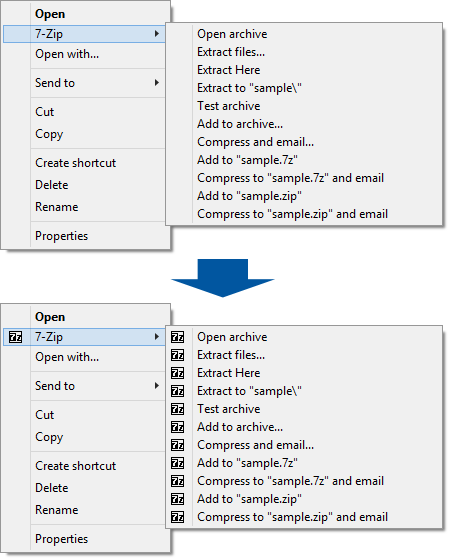
What features were added to Easy 7-Zip? 1. Adds icons to context menu

2. Adds icons to context menu / Adds icons to cascaded context menu
3. Adds options to Extract dialog
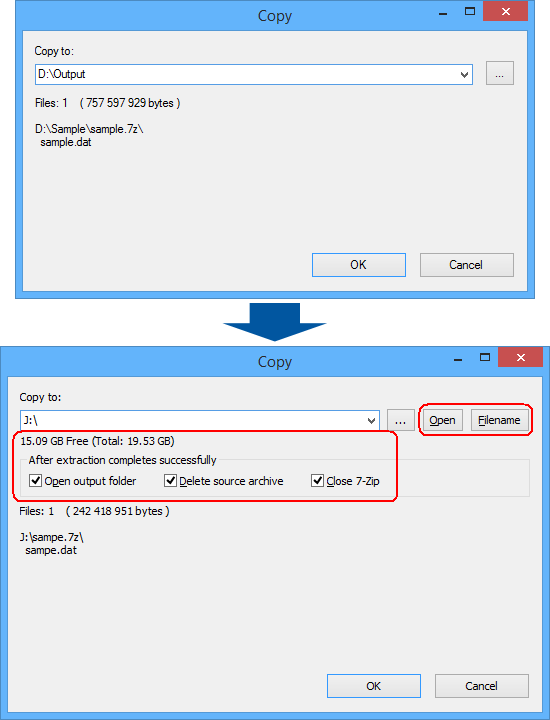
4. adds 4 features to the extract dialog in 7-Zip File Manager.

Button "Open": Easy 7-Zip will open output folder when clicking on the button. So you can easily view files or directories in the folder by a click. Button "Filename": When the button is clicked, Easy 7-Zip adds file name to end of output folder so that the program will create folder of file name and extract files to the folder. For example, file name is sample.7z, output folder is D:\Output, when clicking the button, the output folder will be D:\Output\sample, and all files will be outputted to the folder. Show free and total space of output drive. It's useful for large file. Options "After extraction completes successfully": Open output folder: If the option is checked, Easy 7-Zip opens output folder after extraction. So that you can locate to the output files easily. Delete source archive: Delete source archive after extraction completes successfully. If any errors happen while extracting, for example, wrong password, the Easy 7-Zip won't delete the source archive. Close 7-Zip: Close 7-Zip after extraction. Extract dialog of context menu was changed to something like screen shot below.
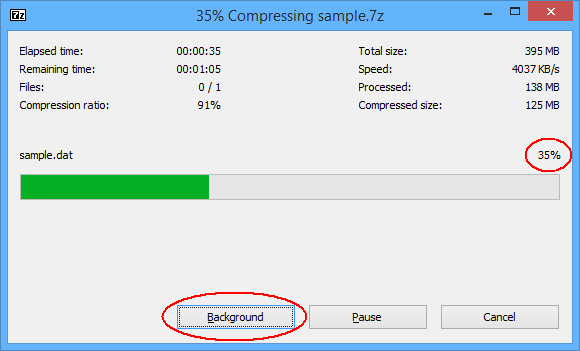
5. Minimizes to system tray when clicking "Background" on progress dialog
5A. Adds percent of progress to the dialog when unpacking
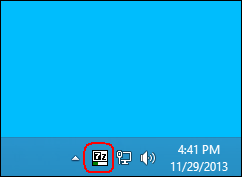
5B. The program shows progress in system tray as well
Sources from which the above functionalities should be quickly imported: https://github.com/mcmilk/7-Zip-zstd/pull/186 https://github.com/treysis/Easy-7-Zip-ZS/tree/a189442071b0cd06d553c72ac2bc609417eff694 https://github.com/treysis/easy7ZipZStd https://github.com/treysis/Easy-7-Zip-ZS/tree/Easy-7-Zip https://github.com/treysis/Easy-7-Zip-ZS https://github.com/glachancecmaisonneuve/Easy7-Zip/tree/Easy7Zip
I'm sorry about the mess that is my forks of 7zip 🙈 I'd be great to have this integrated to NanaZip as that's the only version I can use at work (due to missing admin rights, but NanaZip can be installed via MSStore!).

Hello, is there still a chance to implement the following changes indicated in order to include them in the NanaZip development branch code?
It would be nice if the features (details that were added early to Easy 7-Zip , could also be added in future release NanaZip:
- Adds icons to context menu
- Adds icons to context menu / Adds icons to cascaded context menu
- adds options to Extract dialog
- adds 4 features to the extract dialog in 7-Zip File Manager.
- Minimizes to system tray when clicking "Background" on progress dialog
- Adds percent of progress to the dialog when unpacking
- The program shows progress in system tray as well