
Polygonization-by-Frame-Field-Learning
 Polygonization-by-Frame-Field-Learning copied to clipboard
 Lydorn
ASM and ACM polygonization issue
When we do polygonization using ASM or ACM method, polygon results of some buildings looks strange. It appears like saw tooth edge across all faces of the building.
Details:
- It does like that for some random patches(not all)
- No error found in Simple polygonization method
Kindly tell me the way to fix this problem as soon as you return to your repository :octocat:

Hi, yeah sorry for not being active these past few weeks. Does this problem appear when training your own model on your own images? Could you send an example where this happens? So I can be sure of how it looks like, for now I'll guess 😃. As I assume the frame field is correct, the most probable explanation is that during ASM or ACM optimization, the energy coefficient for the frame field alignment is too high and it aligns some edges to the other direction than the one we want. You can try reducing that "crossfield_coef" coefficient: https://github.com/Lydorn/Polygonization-by-Frame-Field-Learning/blob/master/configs/polygonize_params.json#L49 For the ACM or the equivalent "crossfield" for the ASM. Since I setup the optimization procedure so that this would not happen I'm not sure reducing that coefficient will work if the problem you're having is different from what I imagine.

@Lydorn No problem. Glad you came back :dancers: , I hope you have had completed most of your academic work now. yes it happens while I train and infer my sample dataset with few images added in training phase which is basically initialized from your inria.leaderboard model. please find the image reference below. Meanwhile I will check the code part that you mentioned
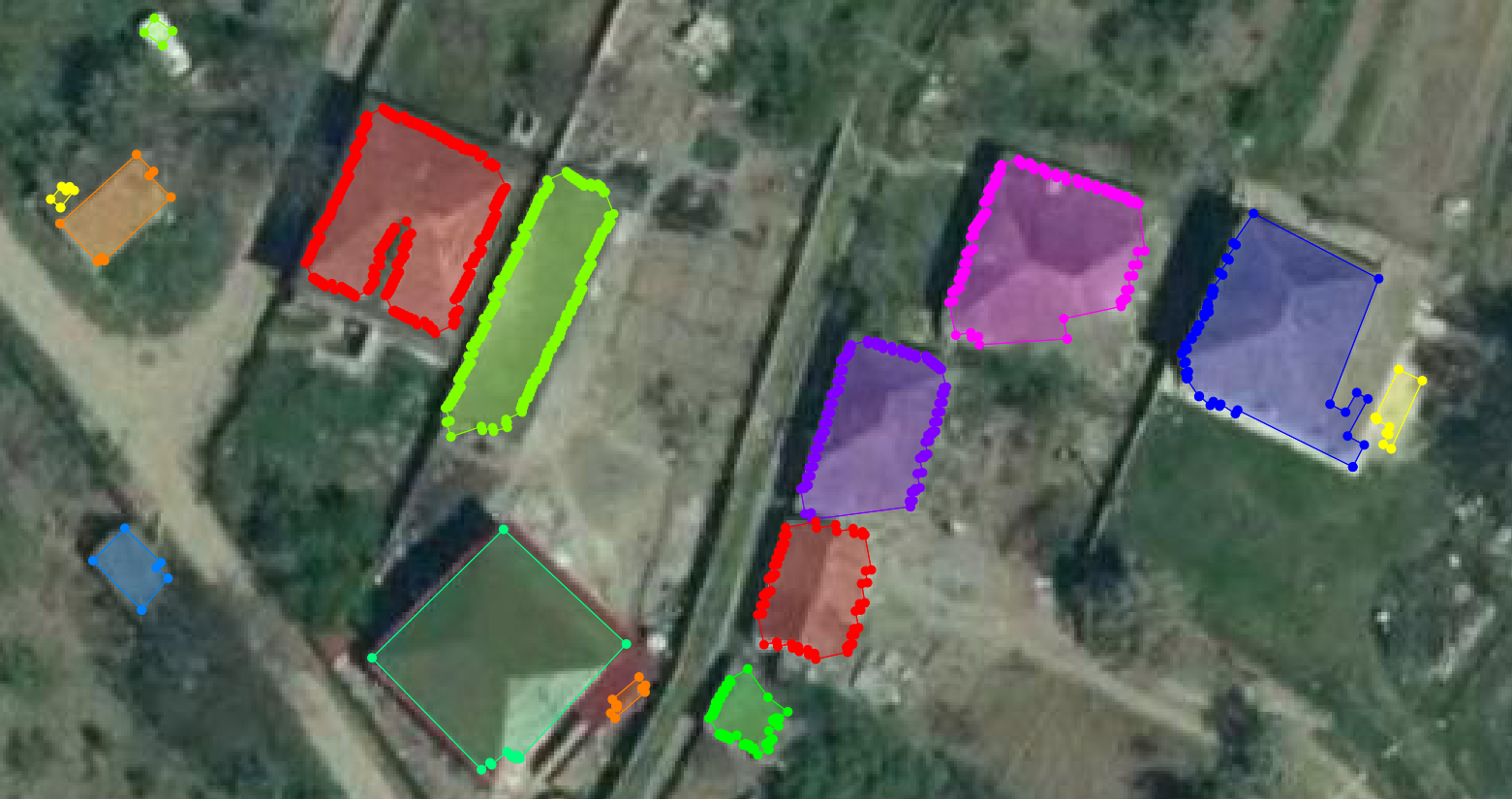
Yes it's mostly completed and almost all done thx! The problem I see in the image is that the individual edges of the contour align successively to a different frame field direction, which then makes the vertices be detected as corner which are then protected from the simplification step. I observed this sometimes when the segmentation was not good: for example a tree is in the way and some parts of the building is missed by the segmentation (but the frame field itself is correct, thus not agreeing with the segmentation). On those occasions the contour is initialized with a wrong segmentation and then tries to align to the frame field resulting in a stair case pattern on that location. However it can happen just on small parts of buildings, not on the whole building. Especially in your case the segmentation seems ok. I doubt the frame field is wrong but it's worth visualizing it to be sure.
As you initialize with inria.leaderboard, there is no "edge" segmentation map so it's best to just use ACM polygonization (or ASM with marching squares initialisation).
Lastly, for easier testing and tinkering, you can run polygon_acm.py by itself on saved frame field and segmentation map. Just use the --im_filepath option and it will look for the segmentation on frame field next to if it follows the right naming convention (or you can adapt/write your own script for that and then call the polygonize() function).
Sorry I don't have a clear answer as I didn't encounter this specific problem. But keep me updated if changing the frame field optimization coefficient helped.
@Lydorn Yes sure I will try to visualize them, the reason why I use ASM is because it produces good output over ACM except these kind of segmentations at some random location. I will check polygon_acm and polygon_asm file too. No problem, I will investigate this problem and try to find a working solution.
Sure, I will keep you posted! Thanks for your detailed response