

 LuxCoreRender
Two clear volumes in face contact
.blend file: Test_Scene.zip
Steps to reproduce: just render the test scene
Screenshots or rendered images:
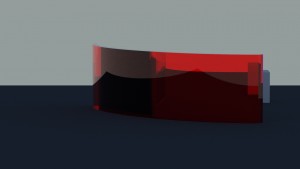
This shows the issue with two bodies
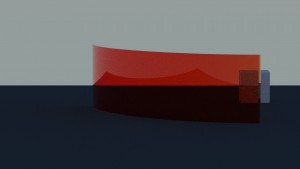
This is the etimated appearance.
It's made with one body but the appearance with two should be very similar to this:
Error message from Blender console: no error messages
Description (copy from forum): I've some troubles with two bodies made from clear plastics that touch each other and share a surface. I was used to manage this situation with an intermediate surface with defined internal and external volumes. This example shows this situation and the rendering looks wrong. The reflections are by far too high... and the optical effects too strong. A simple offsetted volume with the same thicknes everywhere should have almost no optical effect (slight shift of the image). The volumes also share identical IOR so the reflection on the intermediate should be 0.
I've been looking in the face normals several times and I can't find any mistake... (tried a lot) Also already tested, the behaviour is the same with 2.4 and 2.5 luxcore. And its also retested on the 2.83 LTS and current 2.92.0 blender.
What's wrong with this? Thanks a lot - I really apprechiate your help.
OS: Windows 10 Blender version: 2.92.0 LuxCore version: 2.5
