

 Lokathor
iOS Support

I tried without success to make this works on iOS. I think I'm close to having it working but got a little frustrated after many different attempts. So I decided to leave here, in an ugly way what I have right now, and hope for the future me or anybody else to solve it.
build.rs:
use std::env;

fn main() {
 ......

  let dll_to = std::path::Path::new(&out_dir).join("SDL2.dll");
  println!("dll_to:{}", dll_to.display());

  std::fs::copy(dll_from, dll_to).unwrap();

  let sdl_path = std::path::Path::new(&cargo_manifest_dir).join("SDL2-2.0.16");

  if target.contains("ios") {
    let xcodeproj_path = sdl_path.join("Xcode").join("SDL").join("SDL.xcodeproj");
    if let Some(path) = xcodeproj_path.to_str() {
      // if !sdl_path.join("Xcode").join("SDL").join("build").join("Release-iphoneos").join("libSDL2.a").exists() {
        std::process::Command::new("xcodebuild")
            .args(&["-project", path, "-target", "Static Library-iOS", "-arch", "arm64", "-sdk", "iphoneos", "-configuration", "Release"])
            .status()
            .expect("Error building iOS project");

      // }
      //
      // if !sdl_path.join("Xcode").join("SDL").join("build").join("Release-iphonesimulator").join("libSDL2.a").exists() {
      //   std::process::Command::new("xcodebuild")
      //       .args(&["-project", path, "-target", "Static Library-iOS", "-sdk", "iphonesimulator", "-configuration", "Release"])
      //       .status()
      //       .expect("Error building iOS Simulator project");
      // }
    }

    // I think this is not necesarry because this frameworks are added form the xcode project
    println!("cargo:rustc-flags=-l framework=AVFoundation");
    println!("cargo:rustc-flags=-l framework=AudioToolbox");
    println!("cargo:rustc-flags=-l framework=CoreAudio");
    println!("cargo:rustc-flags=-l framework=CoreGraphics");
    println!("cargo:rustc-flags=-l framework=CoreMotion");
    println!("cargo:rustc-flags=-l framework=Foundation");
    println!("cargo:rustc-flags=-l framework=GameController");
    println!("cargo:rustc-flags=-l framework=CoreHaptics");
    println!("cargo:rustc-flags=-l framework=OpenGLES");
    println!("cargo:rustc-flags=-l framework=QuartzCore");
    println!("cargo:rustc-flags=-l framework=UIKit");

    println!(
      "cargo:rustc-link-search={}",
      sdl_path.join("Xcode").join("SDL").join("build").join("Release-iphoneos").display()
    );
    println!("cargo:rustc-link-lib=static=SDL2");

  } else if cfg!(feature = "experimental_fast_build")
    && target == "x86_64-pc-windows-msvc"
  {
    let manifest_dir = std::path::PathBuf::from(
      env::var("CARGO_MANIFEST_DIR")
        .expect("Could not read `CARGO_MANIFEST_DIR`!"),
    );
    // declare search path
    .......
This build script will compile SDL for arm64 arch (devices) and linked it to the rust binary.
Next step is to create an Xcode project with two files: ffi.h: (c header)
namespace ffi {
    extern "C" {
        void start_app();
    }
}
main.m: (Objective-C++ Source)
#include "ffi.h"

int main(int argc, char * argv[]) {
    @autoreleasepool {
        ffi::start_app();
    }
}
The last step is to link the frameworks and our lib: General -> Frameworks:
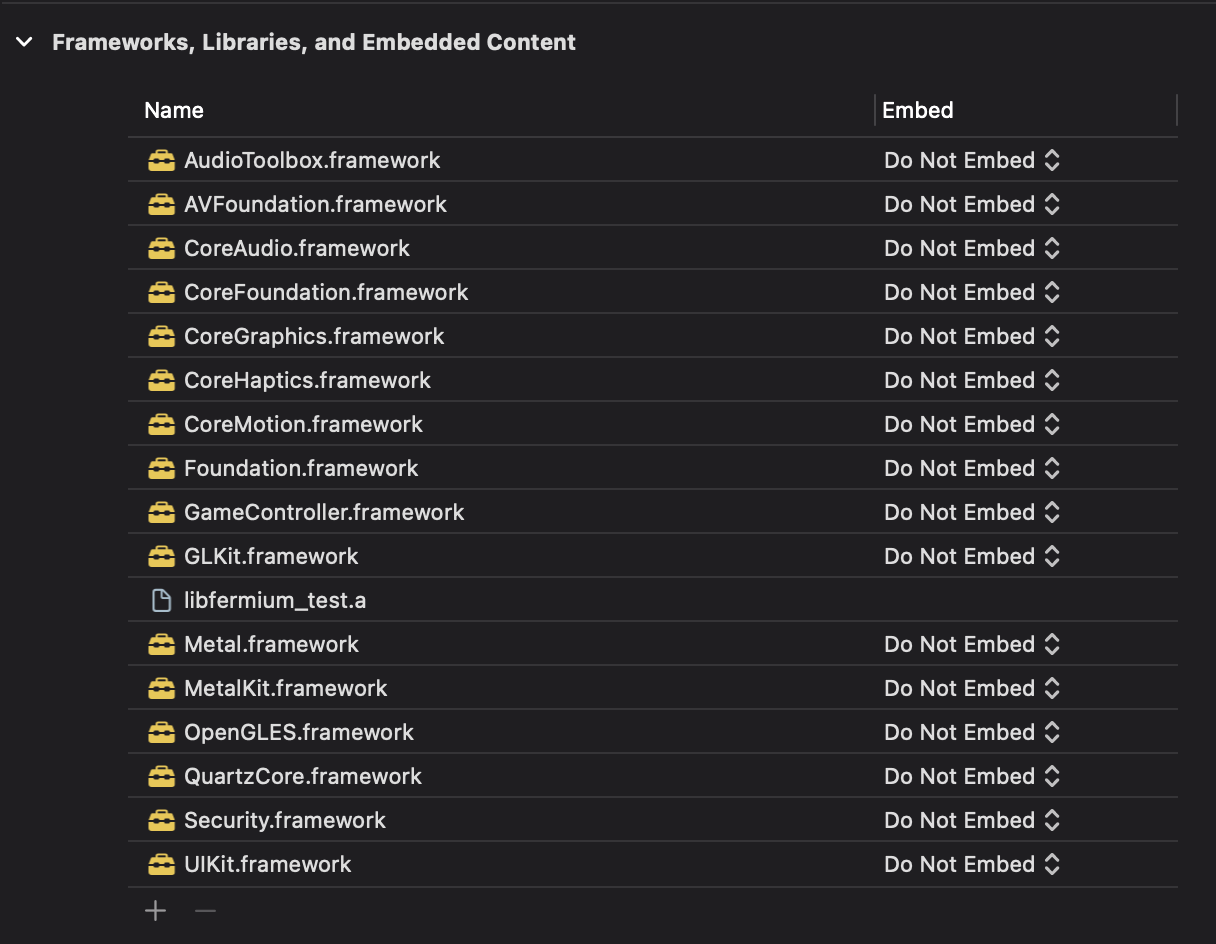
Where libfremium_test.a is the name of my project lib. Some of the frameworks included are not necessary, but I got tired before I check which of them I can remove.
The rust project that I am using, is quite simple, I'm just clearing and painting a triangle on the screen.
The first line of the project or at least the line that needs to come before SDL_Init(...) is SDL_SetMainReady(); Which is not on fermium yet, but it's easy to add it on src/lib.rs.
We need to tell cargo that this is a library:
[lib]
crate-type = ["staticlib", "cdylib", "rlib"]
And expose in our lib.rs the start function:
#[no_mangle]
pub extern "C" fn start_app() {
    start();
}
And this is it. With this, you should be able to compile the rust project, move the project_lib.a to xcode, build it for an iOS device and see all the logs, loops of SDL etc... but, you will see nothing on the screen.
So as a summary: [x] Compile rust project with SDL linked for iOS devices [x] Compile and run XCode project executing the rust code [ ] See the triangle on the screen
Anyway, I hope that this helps for future attempts.

I'm trying to get a small app running on iOS/iPadOS and currently have things compiling and linking. I haven't been able to test running the builds yet, since deploying is an entire different game.
tl;dr: SDL has a pretty good CMakeLists.txt, so I think we just need to ask nicely and everything will work out.
SDL TIL
So first, here are some useful links I found:
- SDL's README-cmake.md talks about how to configure SDL's CMake build for Apple's platforms. Most of my changes are just porting this into
fermium'sbuild.rs - Dynamic API This is a neat feature of SDL I hadn't heard of before. The tl;dr is if you build an app and static link against SDL, you can still load new
.so/.dll/.dylibs without rebuilding. Pretty slick, and a strong case to static link SDL by default imo.
Things that work so far
I have a few changes that I want to put in a PR, but with them all of these commands on a sample project compile and link. 🎉
cargo build --target aarch64-apple-darwin
cargo build --target aarch64-apple-ios
cargo build --target x86_64-apple-darwin
cargo build --target x86_64-apple-ios
SDL is supposed to work on mac and iOS, so all the changes were in build.rs (so far 🤞 )
The magic variables to set are:
CMAKE_OSX_ARCHITECTURES=arm64, when building for any Apple arm platformCMAKE_SYSTEM_NAME=iOSwhen building iOS anythingCMAKE_OSX_SYSROOT=iphoneos, when building for iOS devicesCMAKE_OSX_SYSROOT=iphonesimulator, when building for iOS simulator (unclear what simulator on M1 does)SDL_SHARED=OFF, because I'm getting link errors only on the iOS dylib builds.
Things that don't work yet
I can cd into CMake's build directory inside of target and build individual targets directly:
libSDL2main.abuilds finelibSDL2.abuilds finelibSDL2.dylibdoes not:
❯ make
[  1%] Built target SDL2main
[  1%] Linking C shared library libSDL2-2.0.dylib
ld: warning: -headerpad_max_install_names is ignored when used with -bitcode_bundle (Xcode setting ENABLE_BITCODE=YES)
ld: -undefined and -bitcode_bundle (Xcode setting ENABLE_BITCODE=YES) cannot be used together
clang: error: linker command failed with exit code 1 (use -v to see invocation)
make[2]: *** [CMakeFiles/SDL2.dir/build.make:2689: libSDL2-2.0.dylib] Error 1
make[1]: *** [CMakeFiles/Makefile2:114: CMakeFiles/SDL2.dir/all] Error 2
make: *** [Makefile:136: all] Error 2
I'm not sure how to convince it to skip bitcode. But skipping the shared build (SDL_SHARED=OFF) works for my use case.
Google suggests that this should work, but may only apply when building via Xcode, so I didn't see it fix anything.
set_target_properties(SDL2 PROPERTIES XCODE_ATTRIBUTE_ENABLE_BITCODE "NO")
I believe bitcode is deprecated in all of Apple's 2022 OSes, so this may sort itself out in the fall. 🤷♀️ If someone wanted to try this on a Ventura beta that'd answer that.
Versions and Stuff
❯ rustc --version
rustc 1.62.1 (e092d0b6b 2022-07-16)

❯ cmake --version
cmake version 3.24.0

❯ sw_vers
ProductName:	macOS
ProductVersion:	12.4
BuildVersion:	21F79

❯ xcodebuild -version
Xcode 13.4.1
Build version 13F100
