

 Live-Charts
Gauge is not working with bound properties
How to reproduce?
180 Gauge does not appear to work when From, To, and Value are bound to DataContext Properties:
<lc:Gauge x:Name="performanceGlanceGauge"
                      From="0"
                      To="100"
                      Value="{Binding GoalCompletion}"
                      LabelFormatter="{Binding PercentFormat}"
                      LabelsVisibility="Visible"
                      Margin="20"
                      HorizontalAlignment="Stretch"
                      VerticalAlignment="Stretch">
                <lc:Gauge.GaugeActiveFill>
                    <LinearGradientBrush>
                        <GradientStop Color="Yellow"
                                      Offset="0.0" />
                        <GradientStop Color="Orange"
                                      Offset="0.5" />
                        <GradientStop Color="Red"
                                      Offset="1.0" />
                    </LinearGradientBrush>
                </lc:Gauge.GaugeActiveFill>
            </lc:Gauge>
The above code works as expected without bindings This is probably simple, but the example page does not give an example using bindings only hard coded values.
Extra notes
Additional code:
public HomePageViewModel(double salesGoal, double salesTotal)
        {
            PercentFormat = chartFormat => chartFormat + "%";
            GoalCompletion = Math.Round((SalesTotal / SalesGoal) * 100, 2);
        }

public Func<Double, string> PercentFormat { get; set; }
        private double _SalesTotal = 100000;
        public double SalesTotal
        {
            get { return _SalesTotal; }
            set { SetProperty(ref _SalesTotal, value); }
        }
        private double _SalesGoal = 1000000;
        public double SalesGoal
        {
            get { return _SalesGoal; }
            set { SetProperty(ref _SalesGoal, value); }
        }
I am using
| Live-Charts version | 0.9.7 |
| .Net Version | 4.5 |
| Windows | Windows 7 |

So I came back to this again, and I am still having issues with getting gauge chart to function with bindings. I will edit and put my View Model property code above, I am essentially hard coding the values in the property definition at this point. The values display correctly but the animation doesn't start.
Alright back again. The animation does draw but only after window is resized... So i suppose this happens because Update() is called in Gauge.cs upon SizeChanged event. I still think it is a bug, but for now I am just slightly resizing the window as it is loaded for a hack work around. It'll do for now...
I attempted to debug the Gauge.cs file to see what was going on. For the record I'm a self taught developer so take the following with that in mind...
The Pie.beginAnimation() method is called correctly once i.e. the completed varible has the correct value, but then the code jumps back into the Update() method without reevaluating the completed variable and calls Pie.BeginAnimation() again with completed equaling 0.
I believe this is what is causing the animation not to start, and in turn gets fixed after a subsequent update call.
Anyone have any thoughts?
This issue seems to be related to the UpdateLayout() call on the labels. Possibly similar to
#465
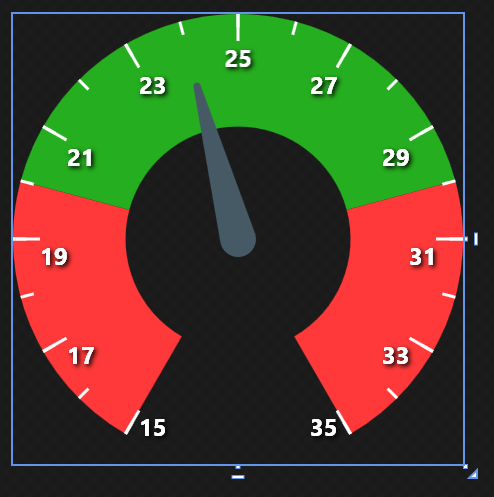
@Phexyaa I think I'm having the same issue :
XAML file
<UserControl x:Class="Custom_WPF_User_Controls.TempGauge"
             xmlns="http://schemas.microsoft.com/winfx/2006/xaml/presentation"
             xmlns:x="http://schemas.microsoft.com/winfx/2006/xaml"
             xmlns:mc="http://schemas.openxmlformats.org/markup-compatibility/2006"
             xmlns:d="http://schemas.microsoft.com/expression/blend/2008"
             xmlns:local="clr-namespace:Custom_WPF_User_Controls"
             xmlns:lvc="clr-namespace:LiveCharts.Wpf;assembly=LiveCharts.Wpf"
             mc:Ignorable="d"
             d:DesignHeight="300" d:DesignWidth="300">
    <Grid>
        <lvc:AngularGauge Name="ggeTemp" Grid.Row="0" Value="{Binding Value}" FromValue="15" ToValue="35" d:DataContext="{d:DesignInstance local:TempGauge}"
                          LabelsStep="2" TicksStep="1" Wedge="300"
                          TicksForeground="White" Foreground="White"
                          FontWeight="Bold" FontSize="16"
                          SectionsInnerRadius=".5">
            <lvc:AngularGauge.Sections>
                <lvc:AngularSection FromValue="15" ToValue="20" Fill="#FF3939"/>
                <lvc:AngularSection FromValue="20" ToValue="30" Fill="#25AE1f"/>
                <lvc:AngularSection FromValue="30" ToValue="35" Fill="#FF3939"/>
            </lvc:AngularGauge.Sections>
        </lvc:AngularGauge>
    </Grid>
</UserControl>
C# file
using System;
using System.ComponentModel;
using System.Windows;
using System.Windows.Controls;

namespace Custom_WPF_User_Controls
{
    public partial class TempGauge : UserControl, INotifyPropertyChanged
    {
        private double _value;

        public TempGauge()
        {
            InitializeComponent();
            this.DataContext = this;

            _value = this.Value;
        }

        public double Value
        {
            get { return _value; }
            set
            {
                _value = value;
                OnPropertyChanged("Value");
            }
        }

        public event PropertyChangedEventHandler PropertyChanged;

        protected virtual void OnPropertyChanged(string propertyName = null)
        {
            if (PropertyChanged != null) PropertyChanged(this, new PropertyChangedEventArgs(propertyName));
        }
    }
}
View result, the needle is set to 24.0 value by default, I don't know why...

I have same issue. I'm using a Gauge chart and when the value updates, all the animations run, only the MeasureTextBlock doesn´t update. It just get the new value when I change the UserControl size.
