
ltfs
 ltfs copied to clipboard
 LinearTapeFileSystem
LTO-5 Cannot mount volume: medium consistency check failed
When attempting to mount an LTO-5 tape that had previously had data written to it I received the message "Cannot mount volume: medium consistency check failed." The message also advised I run ltfsck. Having tried various options with ltfsck I've still had no luck in mounting this tape.
The tape was formatted and had data written to it using "LTFS version 2.4.3.2 (Prelim)", the latest stable-2.4 build downloaded and compiled only last week. The OS is Debian 10 (Buster) on an Intel x64 platform using an HP LTO-5 Ultrium 3000 tape drive in an external SAS enclosure and an HP SAS9205-4i4e HBA (flashed with LSI firmware v20.00.07.00). There was no power loss, or any indication of an error during data writing and once data had been written to the tape it was ejected using the 'sudo umount /mnt/ltfs' command.
I've successfully formatted and written data to other tapes, which were rechecked after the above issue, with no issues found.
I would really like to avoid having to format the tape and re-write all of the data and would like to try and understand what has caused this issue and hopefully how it can be resolved to avoid this happening to anyone else.
The full output and commands tried so far are listed below:
Log1: mount the tape
lee@starfury:~$ sudo ltfs -o work_directory=/home/lee/ltfs -o capture_index -o rules="size=50M/name=*.md5sum:*.sha1sum:*.sha256sum:*sha512sum:\_TapeReadMe\_*.txt" -o sync_type=unmount -o eject -o devname=/dev/sg0 /mnt/ltfs/
76d LTFS14000I LTFS starting, LTFS version 2.4.3.2 (Prelim), log level 2.
76d LTFS14058I LTFS Format Specification version 2.4.0.
76d LTFS14104I Launched by "ltfs -o work_directory=/home/lee/ltfs -o capture_index -o rules=size=50M/name=*.md5sum:*.sha1sum:*.sha256sum:*sha512sum:\_TapeReadMe\_*.txt -o sync_type=unmount -o eject -o devname=/dev/sg0 /mnt/ltfs/".
76d LTFS14105I This binary is built for Linux (x86_64).
76d LTFS14106I GCC version is 8.3.0.
76d LTFS17087I Kernel version: Linux version 4.19.0-16-amd64 ([email protected]) (gcc version 8.3.0 (Debian 8.3.0-6)) #1 SMP Debian 4.19.181-1 (2021-03-19) i386.
76d LTFS17089I Distribution: PRETTY_NAME="Debian GNU/Linux 10 (buster)".
76d LTFS14064I Sync type is "unmount".
76d LTFS17085I Plugin: Loading "sg" tape backend.
76d LTFS17085I Plugin: Loading "unified" iosched backend.
76d LTFS30209I Opening a device through sg-ibmtape driver (/dev/sg0).
76d LTFS30250I Opened the SCSI tape device 0.0.0.0 (/dev/sg0).
76d LTFS30207I Vendor ID is HP      .
76d LTFS30208I Product ID is Ultrium 5-SCSI  .
76d LTFS30214I Firmware revision is Z6ED.
76d LTFS30215I Drive serial is HUJ4482F6U.
76d LTFS30285I The reserved buffer size of /dev/sg0 is 1048576.
76d LTFS30294I Setting up timeout values from RSOC.
76d LTFS30205I TEST_UNIT_READY (0x00) returns -20202.
76d LTFS30205I TEST_UNIT_READY (0x00) returns -20202.
76d LTFS30205I TEST_UNIT_READY (0x00) returns -20202.
76d LTFS30205I PREVENT/ALLOW_MEDIUM_REMOVAL (0x1e) returns -20601.
76d LTFS30263I PREVENT/ALLOW_MEDIUM_REMOVAL returns Not Ready to Ready Transition, Medium May Have Changed (-20601) /dev/sg0.
76d LTFS17160I Maximum device block size is 1048576.
76d LTFS11330I Loading cartridge.
76d LTFS39805W The timeout table is not configured: SCSI OP code 0x4d. Use the default timeout.
76d LTFS11332I Load successful.
76d LTFS39805W The timeout table is not configured: SCSI OP code 0x4d. Use the default timeout.
76d LTFS17157I Changing the drive setting to append-only mode.
76d LTFS30205I MODESELECT (0x55) returns -20500.
76d LTFS30263I MODESELECT returns Invalid Field in Parameter List (-20500) /dev/sg0.
76d LTFS17266I Skip setting the append only mode because the drive doesn't seem to support it.
76d LTFS11005I Mounting the volume.
76d LTFS39805W The timeout table is not configured: SCSI OP code 0x4d. Use the default timeout.
76d LTFS39805W The timeout table is not configured: SCSI OP code 0x4d. Use the default timeout.
76d LTFS30205I MODESENSE (0x5a) returns -20501.
76d LTFS30263I MODESENSE returns Invalid Field in CDB (-20501) /dev/sg0.
76d LTFS39805W The timeout table is not configured: SCSI OP code 0x4d. Use the default timeout.
76d LTFS39805W The timeout table is not configured: SCSI OP code 0x4d. Use the default timeout.
76d LTFS11026I Performing a full medium consistency check.
76d LTFS11196W Cannot read index: self-pointer mismatch.
76d LTFS17037E XML parser: failed to read from XML stream.
76d LTFS17016E Cannot parse index direct from medium (-5000).
76d LTFS11194W Cannot read index: failed to read and parse XML data (-5000).
76d LTFS11220E Medium check failed: extra blocks detected. Run ltfsck.
76d LTFS11027E Cannot mount volume: medium consistency check failed.
76d LTFS14013E Cannot mount the volume.
76d LTFS30205I MODESELECT (0x55) returns -20500.
76d LTFS30263I MODESELECT returns Invalid Field in Parameter List (-20500) /dev/sg0.
Log2: List indexes on the tape
lee@starfury:~$ sudo ltfsck /dev/sg0 -l
LTFS16000I Starting ltfsck, LTFS version 2.4.3.2 (Prelim), log level 2.
LTFS16088I Launched by "ltfsck -l /dev/sg0".
LTFS16089I This binary is built for Linux (x86_64).
LTFS16090I GCC version is 8.3.0.
LTFS17087I Kernel version: Linux version 4.19.0-16-amd64 ([email protected]) (gcc version 8.3.0 (Debian 8.3.0-6)) #1 SMP Debian 4.19.181-1 (2021-03-19) i386.
LTFS17089I Distribution: PRETTY_NAME="Debian GNU/Linux 10 (buster)".
LTFS16084I List indexes in backward direction strategy.
LTFS17085I Plugin: Loading "sg" tape backend.
LTFS30209I Opening a device through sg-ibmtape driver (/dev/sg0).
LTFS30250I Opened the SCSI tape device 0.0.0.0 (/dev/sg0).
LTFS30207I Vendor ID is HP      .
LTFS30208I Product ID is Ultrium 5-SCSI  .
LTFS30214I Firmware revision is Z6ED.
LTFS30215I Drive serial is HUJ4482F6U.
LTFS30285I The reserved buffer size of /dev/sg0 is 1048576.
LTFS30294I Setting up timeout values from RSOC.
LTFS17160I Maximum device block size is 1048576.
LTFS11330I Loading cartridge.
LTFS39805W The timeout table is not configured: SCSI OP code 0x4d. Use the default timeout.
LTFS11332I Load successful.
LTFS39805W The timeout table is not configured: SCSI OP code 0x4d. Use the default timeout.
LTFS17157I Changing the drive setting to write-anywhere mode.
LTFS16018I Listing LTFS file system rollback points on '/dev/sg0'.
LTFS39805W The timeout table is not configured: SCSI OP code 0x4d. Use the default timeout.
LTFS39805W The timeout table is not configured: SCSI OP code 0x4d. Use the default timeout.
LTFS16023I LTFS volume information:.
LTFS16024I Volser (bar code) : LJN003.
LTFS16025I Volume UUID     : 135b622e-1b90-4386-9ada-0c1de10d5e00.
LTFS16026I Format time     : 2021-06-08 17:29:53.917898709 BST.
LTFS16027I Block size      : 524288.
LTFS16028I Compression     : Enabled.
LTFS16029I Index partition : ID = a, SCSI Partition = 0.
LTFS16030I Data partition  : ID = b, SCSI Partition = 1.
LTFS11005I Mounting the volume.
LTFS39805W The timeout table is not configured: SCSI OP code 0x4d. Use the default timeout.
LTFS39805W The timeout table is not configured: SCSI OP code 0x4d. Use the default timeout.
LTFS30205I MODESENSE (0x5a) returns -20501.
LTFS30263I MODESENSE returns Invalid Field in CDB (-20501) /dev/sg0.
LTFS39805W The timeout table is not configured: SCSI OP code 0x4d. Use the default timeout.
LTFS39805W The timeout table is not configured: SCSI OP code 0x4d. Use the default timeout.
LTFS11026I Performing a full medium consistency check.
LTFS11196W Cannot read index: self-pointer mismatch.
LTFS17037E XML parser: failed to read from XML stream.
LTFS17016E Cannot parse index direct from medium (-5000).
LTFS11194W Cannot read index: failed to read and parse XML data (-5000).
LTFS11220E Medium check failed: extra blocks detected. Run ltfsck.
LTFS11027E Cannot mount volume: medium consistency check failed.
LTFS16087E Volume is inconsistent. Try to recover consistency with ltfsck first.
LTFS30205I MODESELECT (0x55) returns -20500.
LTFS30263I MODESELECT returns Invalid Field in Parameter List (-20500) /dev/sg0.
Log3: Recover tape with deep recovery
lee@starfury:~$ sudo ltfsck /dev/sg0 -z
LTFS16000I Starting ltfsck, LTFS version 2.4.3.2 (Prelim), log level 2.
LTFS16088I Launched by "ltfsck -z /dev/sg0".
LTFS16089I This binary is built for Linux (x86_64).
LTFS16090I GCC version is 8.3.0.
LTFS17087I Kernel version: Linux version 4.19.0-16-amd64 ([email protected]) (gcc version 8.3.0 (Debian 8.3.0-6)) #1 SMP Debian 4.19.181-1 (2021-03-19) i386.
LTFS17089I Distribution: PRETTY_NAME="Debian GNU/Linux 10 (buster)".
LTFS17085I Plugin: Loading "sg" tape backend.
LTFS30209I Opening a device through sg-ibmtape driver (/dev/sg0).
LTFS30250I Opened the SCSI tape device 0.0.0.0 (/dev/sg0).
LTFS30207I Vendor ID is HP      .
LTFS30208I Product ID is Ultrium 5-SCSI  .
LTFS30214I Firmware revision is Z6ED.
LTFS30215I Drive serial is HUJ4482F6U.
LTFS30285I The reserved buffer size of /dev/sg0 is 1048576.
LTFS30294I Setting up timeout values from RSOC.
LTFS17160I Maximum device block size is 1048576.
LTFS11330I Loading cartridge.
LTFS39805W The timeout table is not configured: SCSI OP code 0x4d. Use the default timeout.
LTFS11332I Load successful.
LTFS39805W The timeout table is not configured: SCSI OP code 0x4d. Use the default timeout.
LTFS17157I Changing the drive setting to write-anywhere mode.
LTFS16014I Checking LTFS file system on '/dev/sg0'.
LTFS39805W The timeout table is not configured: SCSI OP code 0x4d. Use the default timeout.
LTFS39805W The timeout table is not configured: SCSI OP code 0x4d. Use the default timeout.
LTFS16023I LTFS volume information:.
LTFS16024I Volser (bar code) : LJN003.
LTFS16025I Volume UUID     : 135b622e-1b90-4386-9ada-0c1de10d5e00.
LTFS16026I Format time     : 2021-06-08 17:29:53.917898709 BST.
LTFS16027I Block size      : 524288.
LTFS16028I Compression     : Enabled.
LTFS16029I Index partition : ID = a, SCSI Partition = 0.
LTFS16030I Data partition  : ID = b, SCSI Partition = 1.
LTFS39805W The timeout table is not configured: SCSI OP code 0x4d. Use the default timeout.
LTFS39805W The timeout table is not configured: SCSI OP code 0x4d. Use the default timeout.
LTFS17139I Starting a deep recovery operation: missing EOD.
LTFS39805W The timeout table is not configured: SCSI OP code 0x4d. Use the default timeout.
LTFS39805W The timeout table is not configured: SCSI OP code 0x4d. Use the default timeout.
LTFS17141I Both EODs are detected. A deep recovery operation is unnecessary.
LTFS11005I Mounting the volume.
LTFS39805W The timeout table is not configured: SCSI OP code 0x4d. Use the default timeout.
LTFS39805W The timeout table is not configured: SCSI OP code 0x4d. Use the default timeout.
LTFS30205I MODESENSE (0x5a) returns -20501.
LTFS30263I MODESENSE returns Invalid Field in CDB (-20501) /dev/sg0.
LTFS39805W The timeout table is not configured: SCSI OP code 0x4d. Use the default timeout.
LTFS39805W The timeout table is not configured: SCSI OP code 0x4d. Use the default timeout.
LTFS11026I Performing a full medium consistency check.
LTFS11196W Cannot read index: self-pointer mismatch.
LTFS17037E XML parser: failed to read from XML stream.
LTFS17016E Cannot parse index direct from medium (-5000).
LTFS11194W Cannot read index: failed to read and parse XML data (-5000).
LTFS11206E Index partition back pointer is invalid.
LTFS11219E Cannot check medium: pointer verification failed (-1014).
LTFS11027E Cannot mount volume: medium consistency check failed.
LTFS16021E Volume is inconsistent and was not corrected.
LTFS30205I MODESELECT (0x55) returns -20500.
LTFS30263I MODESELECT returns Invalid Field in Parameter List (-20500) /dev/sg0.
Log4: List indexes on the tape
lee@starfury:~$ sudo ltfsck /dev/sg0 -l -m
LTFS16000I Starting ltfsck, LTFS version 2.4.3.2 (Prelim), log level 2.
LTFS16088I Launched by "ltfsck -l -m /dev/sg0".
LTFS16089I This binary is built for Linux (x86_64).
LTFS16090I GCC version is 8.3.0.
LTFS17087I Kernel version: Linux version 4.19.0-16-amd64 ([email protected]) (gcc version 8.3.0 (Debian 8.3.0-6)) #1 SMP Debian 4.19.181-1 (2021-03-19) i386.
LTFS17089I Distribution: PRETTY_NAME="Debian GNU/Linux 10 (buster)".
LTFS16084I List indexes in backward direction strategy.
LTFS17085I Plugin: Loading "sg" tape backend.
LTFS30209I Opening a device through sg-ibmtape driver (/dev/sg0).
LTFS30250I Opened the SCSI tape device 0.0.0.0 (/dev/sg0).
LTFS30207I Vendor ID is HP      .
LTFS30208I Product ID is Ultrium 5-SCSI  .
LTFS30214I Firmware revision is Z6ED.
LTFS30215I Drive serial is HUJ4482F6U.
LTFS30285I The reserved buffer size of /dev/sg0 is 1048576.
LTFS30294I Setting up timeout values from RSOC.
LTFS17160I Maximum device block size is 1048576.
LTFS11330I Loading cartridge.
LTFS39805W The timeout table is not configured: SCSI OP code 0x4d. Use the default timeout.
LTFS11332I Load successful.
LTFS39805W The timeout table is not configured: SCSI OP code 0x4d. Use the default timeout.
LTFS17157I Changing the drive setting to write-anywhere mode.
LTFS16018I Listing LTFS file system rollback points on '/dev/sg0'.
LTFS39805W The timeout table is not configured: SCSI OP code 0x4d. Use the default timeout.
LTFS39805W The timeout table is not configured: SCSI OP code 0x4d. Use the default timeout.
LTFS16023I LTFS volume information:.
LTFS16024I Volser (bar code) : LJN003.
LTFS16025I Volume UUID     : 135b622e-1b90-4386-9ada-0c1de10d5e00.
LTFS16026I Format time     : 2021-06-08 17:29:53.917898709 BST.
LTFS16027I Block size      : 524288.
LTFS16028I Compression     : Enabled.
LTFS16029I Index partition : ID = a, SCSI Partition = 0.
LTFS16030I Data partition  : ID = b, SCSI Partition = 1.
LTFS11005I Mounting the volume.
LTFS39805W The timeout table is not configured: SCSI OP code 0x4d. Use the default timeout.
LTFS39805W The timeout table is not configured: SCSI OP code 0x4d. Use the default timeout.
LTFS30205I MODESENSE (0x5a) returns -20501.
LTFS30263I MODESENSE returns Invalid Field in CDB (-20501) /dev/sg0.
LTFS39805W The timeout table is not configured: SCSI OP code 0x4d. Use the default timeout.
LTFS39805W The timeout table is not configured: SCSI OP code 0x4d. Use the default timeout.
LTFS11026I Performing a full medium consistency check.
LTFS11196W Cannot read index: self-pointer mismatch.
LTFS17037E XML parser: failed to read from XML stream.
LTFS17016E Cannot parse index direct from medium (-5000).
LTFS11194W Cannot read index: failed to read and parse XML data (-5000).
LTFS11220E Medium check failed: extra blocks detected. Run ltfsck.
LTFS11027E Cannot mount volume: medium consistency check failed.
LTFS16087E Volume is inconsistent. Try to recover consistency with ltfsck first.
LTFS30205I MODESELECT (0x55) returns -20500.
LTFS30263I MODESELECT returns Invalid Field in Parameter List (-20500) /dev/sg0.

From the log3, it looks actual index position and position stored in the index is mismatched, LTFS11196W. On the other hand, LTFS tells current position to the device before writing an index and store the position received into the index. So it is very curious to me.
I've never seen such kind of errors before (on the IBM devices). I need to have a raw record to investigate deeper but at this time we don't have good tools to capture it. Need a new program would be introduced into #196.
LTFS11026I Performing a full medium consistency check.
LTFS11196W Cannot read index: self-pointer mismatch.
LTFS17037E XML parser: failed to read from XML stream.
LTFS17016E Cannot parse index direct from medium (-5000).
LTFS11194W Cannot read index: failed to read and parse XML data (-5000).
LTFS11206E Index partition back pointer is invalid.
LTFS11219E Cannot check medium: pointer verification failed (-1014).
LTFS11027E Cannot mount volume: medium consistency check failed.
LTFS16021E Volume is inconsistent and was not corrected.

Thank you for your reply.
From your response it doesn’t sound like there’s much chance of working out what went wrong at the moment, so I’ll create a new tape for now and keep the old tape with the above issue to one side.
If the tools required become available I could then generate more useful logs for this issue to be investigated further.
so I’ll create a new tape for now and keep the old tape with the above issue to one side.
If the tools required become available I could then generate more useful logs for this issue to be investigated further.
Thank you very much for your decision. That's very helpful to us. Now I don't have enough time to develop it. But I will make it in the near future. I will touch you once I finish it.
Thank you for your patience.
@ljnash
I'm very sorry not to notify you. But we added the low level index capturing tool at #309. Could you capture the index by new tool ?
Sorry for taking so long to reply. I'm stuck in the middle of some home renovations at the moment but when I get a chance I'll compile the latest build and give it a go. Thank you.
hi @piste-jp-ibm
I run LTFS for archiving in the video industry.
My customer brought in an LTO that couldn't be mounted. (It's not mine, customers LTO) I ran the ltfsck command -z but it failed. When I checked the LTO in question with Maxell LTO CM Analyzer, It seemed that there were multiple fatal read errors. (Please see the image)
What could be the cause of the trouble?
-Is the structure unreadable due to poor tape quality? -Failed to write when unmounting?
Please let me know if you have any hints. I am always grateful for the progress of LTFS.
Thank you.
---------LTFS Command log---------
LTFS16000I Starting ltfsck, LTFS version 2.4.4.0 (10470), log level 2.
LTFS16088I Launched by "ltfsck -z 0".
LTFS16089I This binary is built for Mac OS X .
LTFS16090I GCC version is 4.2.1 Compatible Apple Clang 4.1 ((tags/Apple/clang-421.11.66)).
LTFS17087I Kernel version: Unknown kernel.
LTFS17085I Plugin: Loading "iokit" tape backend.
LTFS30810I Opening a device through iokit driver (0).
LTFS30814I Vendor ID is IBM     .
LTFS30815I Product ID is 'ULT3580-HH7     '.
LTFS30816I Firmware revision is P381.
LTFS30817I Drive serial is 1097001015.
LTFS30872I Setting up timeout values from RSOC.
LTFS17160I Maximum device block size is 1048576.
LTFS11330I Loading cartridge.
LTFS30854I Logical block protection is disabled.
LTFS11332I Load successful.
LTFS17157I Changing the drive setting to write-anywhere mode.
LTFS16014I Checking LTFS file system on '0'.
LTFS30854I Logical block protection is disabled.
LTFS16023I LTFS volume information:.
LTFS16024I Volser (bar code) :       .
LTFS16025I Volume UUID     : d9cfc3d5-a57d-4ba8-8e4c-1db99d43f20e.
LTFS16026I Format time     : 2016-11-17 12:41:40.460826000 JST.
LTFS16027I Block size      : 524288.
LTFS16028I Compression     : Disabled.
LTFS16029I Index partition : ID = a, SCSI Partition = 0.
LTFS16030I Data partition  : ID = b, SCSI Partition = 1.

LTFS30808I READ_ATTR (0x8c) returns -20501.
LTFS30865I READ_ATTR returns Invalid Field in CDB (-20501) 0.
LTFS30836I Cannot read attribute (-20501).
LTFS11336I The attribute does not exist. Ignore the expected error.
LTFS17139I Starting a deep recovery operation: missing EOD.
LTFS17141I Both EODs are detected. A deep recovery operation is unnecessary.
LTFS11005I Mounting the volume.
LTFS30854I Logical block protection is disabled.
LTFS30808I READ_ATTR (0x8c) returns -20501.
LTFS30865I READ_ATTR returns Invalid Field in CDB (-20501) 0.
LTFS30836I Cannot read attribute (-20501).
LTFS11336I The attribute does not exist. Ignore the expected error.
LTFS11026I Performing a full medium consistency check.
LTFS17095W The index read from the tape uses an old version of the LTFS format. If this tape is modified, the index upgrades format version to 2.4.0 from 2.2.0.
LTFS30806I Unexpected CDB status: 0x00000001.
LTFS30808I LOCATE (0x92) returns -21701.
LTFS30865I LOCATE returns CDB command returned with unexpected status (-21701) 0.
LTFS12039E Cannot seek EOD: backend locate call failed (-21701).
LTFS11199E Cannot locate index: failed to locate to EOD (-21701).
LTFS11213E Cannot check medium: seek index failed on the data partition (-21701).
LTFS11027E Cannot mount volume: medium consistency check failed.
LTFS16021E Volume is inconsistent and was not corrected.
LTFS30854I Logical block protection is disabled.
[](url
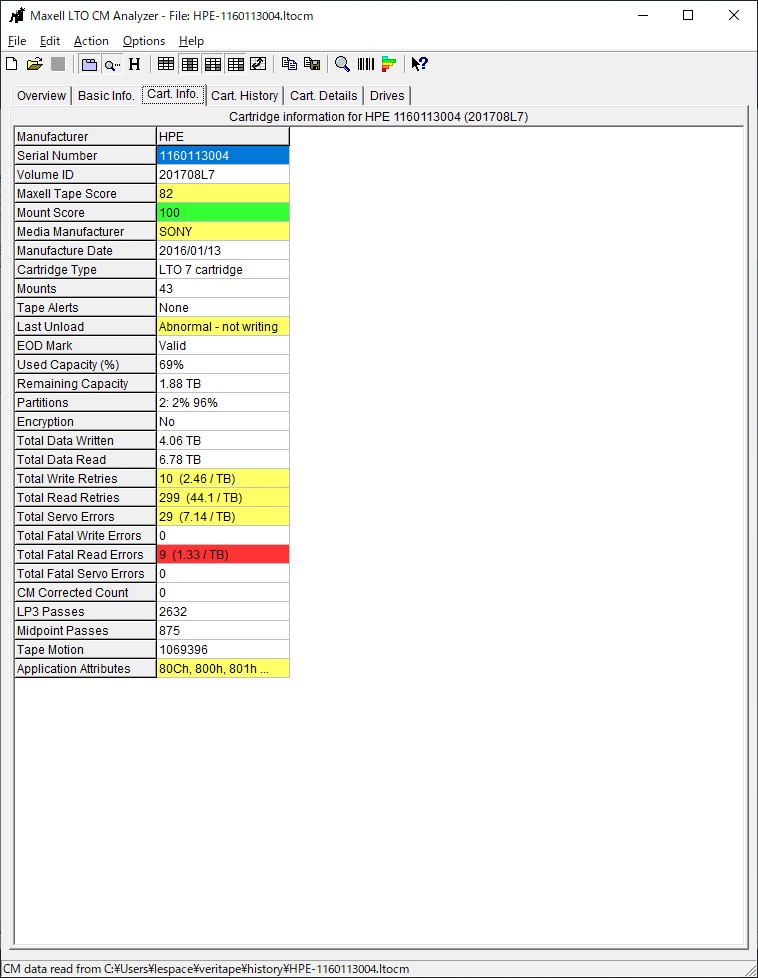 )
)

What could be the cause of the trouble?
-Is the structure unreadable due to poor tape quality? -Failed to write when unmounting?
I don't think so. ltfsck failed because of unexpected response of SCSI. SCSI status shall not be 0x00000001 from the spec point of view. It looks the HBA or machine is little bit funny.
LTFS30806I Unexpected CDB status: 0x00000001.
LTFS30808I LOCATE (0x92) returns -21701.
LTFS30865I LOCATE returns CDB command returned with unexpected status (-21701) 0.
Do you have any log captured on the mount process?
Thank you quick reply.
I don't have any log at Failed LTO (It's returned). However, I tested normal LTO with "ltfsck -z" command log. I think normal LTO with "ltfsck -z" was sucessful(no operation).
My HBA is ATTO H680(with latest firmware) Do you have any comments?
---------LTFS Command log---------
macmini15:sh lespace$ ltfsck -z 0 LTFS16000I Starting ltfsck, LTFS version 2.4.4.0 (10470), log level 2. LTFS16088I Launched by "ltfsck -z 0". LTFS16089I This binary is built for Mac OS X . LTFS16090I GCC version is 4.2.1 Compatible Apple Clang 4.1 ((tags/Apple/clang-421.11.66)). LTFS17087I Kernel version: Unknown kernel. LTFS17085I Plugin: Loading "iokit" tape backend. LTFS30810I Opening a device through iokit driver (0). LTFS30814I Vendor ID is IBM . LTFS30815I Product ID is 'ULT3580-HH7 '. LTFS30816I Firmware revision is P381. LTFS30817I Drive serial is 1097001015. LTFS30872I Setting up timeout values from RSOC. LTFS17160I Maximum device block size is 1048576. LTFS11330I Loading cartridge. LTFS30854I Logical block protection is disabled. LTFS11332I Load successful. LTFS17157I Changing the drive setting to write-anywhere mode. LTFS16014I Checking LTFS file system on '0'. LTFS30854I Logical block protection is disabled. LTFS16023I LTFS volume information:. LTFS16024I Volser (bar code) : . LTFS16025I Volume UUID : 537c87a4-83a4-4c58-9847-1e946d3ffcbe. LTFS16026I Format time : 2022-01-13 15:03:46.258253538 JST. LTFS16027I Block size : 524288. LTFS16028I Compression : Enabled. LTFS16029I Index partition : ID = a, SCSI Partition = 0. LTFS16030I Data partition : ID = b, SCSI Partition = 1.
LTFS17139I Starting a deep recovery operation: missing EOD. LTFS17141I Both EODs are detected. A deep recovery operation is unnecessary. LTFS11005I Mounting the volume. LTFS30854I Logical block protection is disabled. LTFS11026I Performing a full medium consistency check. LTFS11233I Updating MAM coherency data. LTFS17227I Tape attribute: Vendor = IBM . LTFS17227I Tape attribute: Application Name = LTFS . LTFS17227I Tape attribute: Application Version = 2.4.4.0 . LTFS17227I Tape attribute: Medium Label = SAWA. LTFS17228I Tape attribute: Text Localization ID = 0x81. LTFS17227I Tape attribute: Barcode = . LTFS17227I Tape attribute: Application Format Version = 2.4.0 . LTFS17228I Tape attribute: Volume Lock Status = 0x00. LTFS17227I Tape attribute: Media Pool name = . LTFS11031I Volume mounted successfully. NO_BARCODE : Gen = 3 / (a, 5) -> (b, 30504) / 1097001015. LTFS17265I Skip writing the index because of the volume is not dirty and current self pointer points IP. LTFS11034I Volume unmounted successfully. LTFS16022I Volume is consistent. LTFS30854I Logical block protection is disabled.
My understanding is
- You have 2 tapes and only one drive
- One tape generates a
-21701error on LOCATE ofltfsck -z - The other tape generates nothing in the same operation on the same drive
If my understanding is correct, medium corruption (or out-of-spec) might cause the problem. I recommend to contact to the drive support of IBM.
For contacting them the dump file captured just after the LOCATE error make the situation easier. It is great if you can capture it by modifying _process_errors() function to capture dumps (.dmp and _f.dmp) even if it is -21701 error.
Yes, your understanding of the situation is correct.
This issue also occurred on our own TS2900 LTO7 (drive farm is a bit older N4Q1)
I will stop asking any more questions.
Because we are not responsible for the data. There is a high possibility of a problem with the LTO cartridge itself.
In my business, I have paid attention to the quality difference between cartridge manufacturers. I feel that this issue is related to it.
I will tell the customer the facts so far. (Although it is kindness that has no merit for us)
Thank you for your kind response and explanation.