

 LibreELEC
[BUG] Invalid-key while connecting to wifi - LE11
Describe the bug
Hello :) Since upgrading to LireElec 10 (10.0.3) the wifi is really unstable. Every now and then, LibreElec will forget the wifi password and won't accept to reconnect because of some "invalid-key" error even tho the password
Other times it needs to try a few times before the connection actually is established.
To Reproduce
Steps to reproduce the behavior:
- Boot the LibreElec as alway
- (optional) if some wifi were previously configured and working it happens that libreelec won't connect to the wifi and will ask for it's key
- Connect to some wifi (2,4 or 5GHz)
- Connecting fails because of invalid key.
Informations
- LE Version: 10.0.3
- Hardware Platform: RPi4
Log file
Additional context
What I tried :
- rebooting it many times
- tried wih different wifi band and AP
- event AP from my phone right next to the raspberry don't work (sometimes yes, some times no)
- raspberry is in its official case near the tv but far enough from interferences
- removing the case doesn't help
I have two raspberries 4 with LibreElec, but having issues, so I don't think it's an hardware issue. I also got an Odroid c2 which work flawlessly with the same wifi as the 2 other.
Even with LibreElec 9 there was wifi issues (failing to connect, without reason or because of input/output error) (for the two raspberries).

Same issue here, seems to have gotten worse with versions >nightly20221128

Same issue here, seems to have gotten worse with versions >nightly20221128
Are you having the issue with LE10 or LE1 nightlies?

Are you having the issue with LE10 or LE1 nightlies?
LE11
Hard to compare LE10 and LE11 (we shouldn’t)
- le10 runs wpasupplicant
- le11 runs iwd
For le11 please check with > 20221213 - as this is the new kernel (check in dmesg for kernel 6.1) and includes the Kodi rc1. We will need the logs etc …
Inactive issue. Please reopen if still an issue and with updated information (using latest LE11 nightly.)
I encountered this issue today with the latest LE11 nightly (f4f7d8e). I ran it on a Pine H64 Model B, so it seems that this issue is affecting more hardware platforms than just the Raspberry Pi 4.
If you reopen this issue, I'm willing to provide any debug logs you need to troubleshoot this; just guide me through what I should do.

On last Nightly build, stop and restart wireless connection in parameter allow connecting to Wi-Fi. If that can help someone

The solution from the LibreElec forum appears to works:
To create the modprobe configuration file:
echo 'option iwlwifi amsdu_size=3' > /storage/.config/modprobe.d/iwlwifi.confThen reboot.

Why does this amsdu_size=3 option seem to fix this issue? Is it because the device needs monitor mode as described in the iwlwifi wiki? Apparently this option will put pressure on the memory subsystem, but I suppose that can't be avoided if it's necessary for correct device operation.
I'm not sure - but I'm pretty sure it works. When I ran into the issue after upgrading to LE11, I rebooted, wiped the wifi settings, etc without result. Eventually I found that thread, applied the setting, and now it works and it keeps working even after reboots.
edit: No, now it broke again. It just seems that the wifi failure is completely random.
I tried the amsdu_size=3 modprobe configuration on LibreELEC nightly-20230327-9da7818, but it did not resolve the issue for my Pine H64 Model B device. So it seems like that's unfortunately not the solution for this issue. :slightly_frowning_face:
If you reopen this issue, I'm willing to provide any debug logs you need to troubleshoot this; just guide me through what I should do.
Same here. I need to persist the logs to SD card though, as I don't have a wired connection where it reproduces and I can't reproduce it where I have a wired connection (because I'm near a different access point that doesn't exhibit the issue).
I tried to figure out troubleshooting steps and perhaps I'm adding more noise to to this issue than actual value, so take the below with a huge grain of salt.
In the ArchLinux wiki I read that iwd can sometimes come online too early, so I tried to add a systemd unit that simply calls /usr/bin/sleep. This didn't have any effect.
You can also run iwd in debugging mode, so that's what I tried next.
For this I ran these commands:
systemctl stop iwd.service
STATE_DIRECTORY=/tmp/iwtest
export STATE_DIRECTORY
mkdir -p $STATE_DIRECTORY
/usr/lib/iwd -d
Then in another SSH session, to attempt to connect to a wireless network:
iwctl station wlan0 scan
iwctl station wlan0 get-networks # This should list your networks
iwctl station wlan0 connect Skynet

Then I can see in the other SSH session:
build/build.LibreELEC-RPi4.arm-11.0.1/build/iwd-2.3/src/station.c:station_autoconnect_next() autoconnect: Trying SSID: Skynet Xtra
/build/build.LibreELEC-RPi4.arm-11.0.1/build/iwd-2.3/src/station.c:station_autoconnect_next() autoconnect: 'fc:ee:e6:00:83:d2' freq: 2457, rank: 591, strength: -4800
/build/build.LibreELEC-RPi4.arm-11.0.1/build/iwd-2.3/src/station.c:station_autoconnect_next() autoconnect: network_autoconnect: No such file or directory (-2)
/build/build.LibreELEC-RPi4.arm-11.0.1/build/iwd-2.3/src/wiphy.c:wiphy_select_akm() Network is WPA3-Personal...
/build/build.LibreELEC-RPi4.arm-11.0.1/build/iwd-2.3/src/station.c:station_autoconnect_next() autoconnect: Trying SSID: Skynet
/build/build.LibreELEC-RPi4.arm-11.0.1/build/iwd-2.3/src/station.c:station_autoconnect_next() autoconnect: No suitable BSSes found
/build/build.LibreELEC-RPi4.arm-11.0.1/build/iwd-2.3/src/wiphy.c:wiphy_select_akm() Network is WPA3-Personal...
/build/build.LibreELEC-RPi4.arm-11.0.1/build/iwd-2.3/src/station.c:station_autoconnect_next() autoconnect: Trying SSID: D23
/build/build.LibreELEC-RPi4.arm-11.0.1/build/iwd-2.3/src/station.c:station_autoconnect_next() autoconnect: '76:ac:b9:22:01:ee' freq: 2472, rank: 591, strength: -6100
/build/build.LibreELEC-RPi4.arm-11.0.1/build/iwd-2.3/src/station.c:station_autoconnect_next() autoconnect: network_autoconnect: No such file or directory (-2)
/build/build.LibreELEC-RPi4.arm-11.0.1/build/iwd-2.3/src/wiphy.c:wiphy_select_akm() Network is WPA3-Personal...
/build/build.LibreELEC-RPi4.arm-11.0.1/build/iwd-2.3/src/station.c:station_autoconnect_next() autoconnect: Trying SSID: Blackhole
/build/build.LibreELEC-RPi4.arm-11.0.1/build/iwd-2.3/src/station.c:station_autoconnect_next() autoconnect: 'fe:ee:e6:00:83:d2' freq: 2457, rank: 591, strength: -4700
/build/build.LibreELEC-RPi4.arm-11.0.1/build/iwd-2.3/src/station.c:station_autoconnect_next() autoconnect: network_autoconnect: No such file or directory (-2)
/build/build.LibreELEC-RPi4.arm-11.0.1/build/iwd-2.3/src/station.c:station_autoconnect_next() autoconnect: Trying SSID: RaspHTPC-WIFI
/build/build.LibreELEC-RPi4.arm-11.0.1/build/iwd-2.3/src/station.c:station_autoconnect_next() autoconnect: '76:ac:b9:32:01:ee' freq: 2472, rank: 591, strength: -6100
/build/build.LibreELEC-RPi4.arm-11.0.1/build/iwd-2.3/src/station.c:station_autoconnect_next() autoconnect: network_autoconnect: No such file or directory (-2)
/build/build.LibreELEC-RPi4.arm-11.0.1/build/iwd-2.3/src/station.c:station_autoconnect_next() autoconnect: Trying SSID: Solar-WiFi223W0101
/build/build.LibreELEC-RPi4.arm-11.0.1/build/iwd-2.3/src/station.c:station_autoconnect_next() autoconnect: '2c:9c:6e:9e:b6:26' freq: 2457, rank: 492, strength: -5900
/build/build.LibreELEC-RPi4.arm-11.0.1/build/iwd-2.3/src/station.c:station_autoconnect_next() autoconnect: network_autoconnect: No such file or directory (-2)
/build/build.LibreELEC-RPi4.arm-11.0.1/build/iwd-2.3/src/station.c:station_autoconnect_next() autoconnect: Trying SSID: ZiggoFE76B37
/build/build.LibreELEC-RPi4.arm-11.0.1/build/iwd-2.3/src/station.c:station_autoconnect_next() autoconnect: 'ac:22:05:4c:83:2a' freq: 5220, rank: 13, strength: -8600
/build/build.LibreELEC-RPi4.arm-11.0.1/build/iwd-2.3/src/station.c:station_autoconnect_next() autoconnect: network_autoconnect: No such file or directory (-2)
The "network_autoconnect" happens for any network, but the network I just tried to connect to shows "No suitable BSSes found". I can't determine whether this is of any significance. I also cannot find any other debug tracing or apparent messages of importance.
Are you able to test your case with IWD v2.4 ? I could guess that your issue is fixed - at least my "operation failed" issue disappeared when using not v2.3 anymore.

Please retest with iwd2.4 - LibreELEC-yyyyy-11.0-nightly-20230329-a0f002b.img.gz (or newer) from https://test.libreelec.tv/11.0
Unfortunately still the same issues, same symptoms (invalid key, input/output error).
Tested with:

And Raspberry Pi 4.
For those who want to try, add "https://test.libreelec.tv/" as alternative update channel:

And pick a release:

@Sebazzz good to know. I see a couple "debug" method - the first one looks to get the right information.
- https://bbs.archlinux.org/viewtopic.php?id=268631
- https://lore.kernel.org/all/[email protected]/T/
For your SSID - "Skynet" can you please share what type is it ? It looks like it is 2.4Ghz Channel 10. It is not Hidden.
- Is it WPA3-PSK? Have you tried WPA2-PSK?
Some questions / feedback - complicated / simple / special character PSK?
- is the PSK something like "12BobIsAGreatGuy"
From my use
- I haven't seen the error - for a while ... if at all the same ...
- I have seen iwd not reconnect on a dropped connection
- #6643
- I have seen the invalid "error" but not consistently like you are experiencing.
Skynet is WPA2/WPA3 (whatever that means on Unifi). The password is in range [A-z][0-9] only.
I'll try setting up a separate network with WPA2 only and check what that does.
Met vriendelijke groet, Sebastiaan Dammann
Van: Rudi Heitbaum @.> Verzonden: Thursday, March 30, 2023 4:51:04 AM Aan: LibreELEC/LibreELEC.tv @.> CC: Sebastiaan Dammann @.>; Mention @.> Onderwerp: Re: [LibreELEC/LibreELEC.tv] [BUG] Invalid-key while connecting to wifi - LE11 (Issue #7166)
@Sebazzzhttps://emea01.safelinks.protection.outlook.com/?url=https%3A%2F%2Fgithub.com%2FSebazzz&data=05%7C01%7C%7Cea1b93b2bfb44f34fbc808db30c99ad0%7C84df9e7fe9f640afb435aaaaaaaaaaaa%7C1%7C0%7C638157414666721690%7CUnknown%7CTWFpbGZsb3d8eyJWIjoiMC4wLjAwMDAiLCJQIjoiV2luMzIiLCJBTiI6Ik1haWwiLCJXVCI6Mn0%3D%7C3000%7C%7C%7C&sdata=EWxzXzvpsoyp1zPtoRdIRvJjlh4DRnO9RsJFbVlG7VM%3D&reserved=0 good to know. I see a couple "debug" method - the first one looks to get the right information.
- https://bbs.archlinux.org/viewtopic.php?id=268631https://emea01.safelinks.protection.outlook.com/?url=https%3A%2F%2Fbbs.archlinux.org%2Fviewtopic.php%3Fid%3D268631&data=05%7C01%7C%7Cea1b93b2bfb44f34fbc808db30c99ad0%7C84df9e7fe9f640afb435aaaaaaaaaaaa%7C1%7C0%7C638157414666721690%7CUnknown%7CTWFpbGZsb3d8eyJWIjoiMC4wLjAwMDAiLCJQIjoiV2luMzIiLCJBTiI6Ik1haWwiLCJXVCI6Mn0%3D%7C3000%7C%7C%7C&sdata=k3bUd7F1rHIWh%2FvXpHHEcT8zi%2Fam10nDKr9u48dHXo8%3D&reserved=0
- @.***/T/https://emea01.safelinks.protection.outlook.com/?url=https%3A%2F%2Flore.kernel.org%2Fall%2F0e7ab80d46b3e138910af83e5ba138fcb3178a92.camel%40gmail.com%2FT%2F&data=05%7C01%7C%7Cea1b93b2bfb44f34fbc808db30c99ad0%7C84df9e7fe9f640afb435aaaaaaaaaaaa%7C1%7C0%7C638157414666721690%7CUnknown%7CTWFpbGZsb3d8eyJWIjoiMC4wLjAwMDAiLCJQIjoiV2luMzIiLCJBTiI6Ik1haWwiLCJXVCI6Mn0%3D%7C3000%7C%7C%7C&sdata=pO%2BNYqXprEJBkIkll4X1JPokpX7EQ5MGh6fscFctONA%3D&reserved=0
For your SSID - "Skynet" can you please share what type is it ? It looks like it is 2.4Ghz Channel 10. It is not Hidden.
- Is it WPA3-PSK? Have you tried WPA2-PSK?
Some questions / feedback - complicated / simple / special character PSK?
- is the PSK something like "12BobIsAGreatGuy"
From my use
- I haven't seen the error - for a while ... if at all the same ...
- I have seen iwd not reconnect on a dropped connection * #6643https://emea01.safelinks.protection.outlook.com/?url=https%3A%2F%2Fgithub.com%2FLibreELEC%2FLibreELEC.tv%2Fissues%2F6643&data=05%7C01%7C%7Cea1b93b2bfb44f34fbc808db30c99ad0%7C84df9e7fe9f640afb435aaaaaaaaaaaa%7C1%7C0%7C638157414666721690%7CUnknown%7CTWFpbGZsb3d8eyJWIjoiMC4wLjAwMDAiLCJQIjoiV2luMzIiLCJBTiI6Ik1haWwiLCJXVCI6Mn0%3D%7C3000%7C%7C%7C&sdata=n7iwZn8BIh14Lotgg%2BMtNQDEZVzNL8ewvj%2FvzjTePhg%3D&reserved=0
- I have seen the invalid "error" but not consistently like you are experiencing.
— Reply to this email directly, view it on GitHubhttps://emea01.safelinks.protection.outlook.com/?url=https%3A%2F%2Fgithub.com%2FLibreELEC%2FLibreELEC.tv%2Fissues%2F7166%23issuecomment-1489607857&data=05%7C01%7C%7Cea1b93b2bfb44f34fbc808db30c99ad0%7C84df9e7fe9f640afb435aaaaaaaaaaaa%7C1%7C0%7C638157414666877911%7CUnknown%7CTWFpbGZsb3d8eyJWIjoiMC4wLjAwMDAiLCJQIjoiV2luMzIiLCJBTiI6Ik1haWwiLCJXVCI6Mn0%3D%7C3000%7C%7C%7C&sdata=tDZdg5O%2FJ5pjCAgKxalew%2FzMIOLLZsyeA1pth7kJQUw%3D&reserved=0, or unsubscribehttps://emea01.safelinks.protection.outlook.com/?url=https%3A%2F%2Fgithub.com%2Fnotifications%2Funsubscribe-auth%2FAAK4FMPRM4EFUEJ2C5LVPHTW6TYJRANCNFSM6AAAAAASJ7HGTQ&data=05%7C01%7C%7Cea1b93b2bfb44f34fbc808db30c99ad0%7C84df9e7fe9f640afb435aaaaaaaaaaaa%7C1%7C0%7C638157414666877911%7CUnknown%7CTWFpbGZsb3d8eyJWIjoiMC4wLjAwMDAiLCJQIjoiV2luMzIiLCJBTiI6Ik1haWwiLCJXVCI6Mn0%3D%7C3000%7C%7C%7C&sdata=YdADumXuaeIYKysCXrk7ifbTKBBwkP0%2FZRxL42W0YGI%3D&reserved=0. You are receiving this because you were mentioned.Message ID: @.***>
Skynet is WPA2/WPA3 (whatever that means on Unifi). The password is in range [A-z][0-9] only. I'll try setting up a separate network with WPA2 only and check what that does. Met vriendelijke groet, Sebastiaan Dammann …
So apart from the WPA3 - that is the same as here. Going to 🤞for a positive outcome, otherwise it’s back to debug… and having to work with iwd/conman teams.
Here's a brief update from my side: I tried LibreELEC-H6.arm-11.0-nightly-20230328-a0f002b-pine-h64-model-b.img.gz but I'm still experiencing the invalid-key error message consistently; my network is set for WPA2, frequency available at 2.4Ghz/5Ghz, and the password is a mix of special characters and alphanumerical characters.
did you delete all old wifi directories within /storage/.cache/connman ? or older config files?
I cloned the image directly to the SD card so the files and directories are the exact same as distributed in the nightly image.
Sorry, I don't have an ethernet cable so I'm only able to troubleshoot directly on the device. :slightly_frowning_face:
You can enable hidden files/folders in Kodi settings and then use the Kodi file manager GUI to navigate-to and delete the folder (to see if that helps).

I procured an Ethernet cable so I can SSH into the system now. There are no wifi directories/files under /storage/.cache/connman (as expected because this is a freshly formatted SD card) so I don't think that's the problem. However, I can now run any sort of commands you need for debug information.
I tried the iwctl commands as described earlier in this thread. I can see my network when I issue iwctl station wlan0 get-networks, but trying to connect results in an Operation failed message. However I did get the following debug log print out:
build/build.LibreELEC-H6.arm-11.0-devel/build/iwd-2.4/src/agent.c:agent_register() agent register called
/build/build.LibreELEC-H6.arm-11.0-devel/build/iwd-2.4/src/agent.c:agent_register() agent :1.23 path /agent/802
/build/build.LibreELEC-H6.arm-11.0-devel/build/iwd-2.4/src/network.c:network_connect()
/build/build.LibreELEC-H6.arm-11.0-devel/build/iwd-2.4/src/network.c:network_connect_psk() ask_passphrase: true
/build/build.LibreELEC-H6.arm-11.0-devel/build/iwd-2.4/src/agent.c:agent_request_passphrase() agent 0x14168c8 owner :1.23 path /agent/802
/build/build.LibreELEC-H6.arm-11.0-devel/build/iwd-2.4/src/agent.c:agent_send_next_request() send request to :1.23 /agent/802
/build/build.LibreELEC-H6.arm-11.0-devel/build/iwd-2.4/src/agent.c:agent_receive_reply() agent 0x14168c8 request id 88
/build/build.LibreELEC-H6.arm-11.0-devel/build/iwd-2.4/src/network.c:passphrase_callback() result 0
/build/build.LibreELEC-H6.arm-11.0-devel/build/iwd-2.4/src/network.c:network_generate_sae_pt() Generating PT for Group 19
/build/build.LibreELEC-H6.arm-11.0-devel/build/iwd-2.4/src/network.c:network_generate_sae_pt() Generating PT for Group 20
/build/build.LibreELEC-H6.arm-11.0-devel/build/iwd-2.4/src/netdev.c:netdev_cqm_rssi_update()
/build/build.LibreELEC-H6.arm-11.0-devel/build/iwd-2.4/src/wiphy.c:wiphy_radio_work_insert() Inserting work item 13
/build/build.LibreELEC-H6.arm-11.0-devel/build/iwd-2.4/src/wiphy.c:wiphy_radio_work_next() Starting work item 13
/build/build.LibreELEC-H6.arm-11.0-devel/build/iwd-2.4/src/station.c:__station_connect_network() connecting to BSS 88:96:4e:37:ed:00
/build/build.LibreELEC-H6.arm-11.0-devel/build/iwd-2.4/src/station.c:station_enter_state() Old State: autoconnect_full, new state: connecting
/build/build.LibreELEC-H6.arm-11.0-devel/build/iwd-2.4/src/scan.c:scan_periodic_stop() Stopping periodic scan for wdev 1
CMD_SET_CQM failed: Operation not supported
/build/build.LibreELEC-H6.arm-11.0-devel/build/iwd-2.4/src/station.c:station_netdev_event() Associating
/build/build.LibreELEC-H6.arm-11.0-devel/build/iwd-2.4/src/netdev.c:netdev_mlme_notify() MLME notification Connect(46)
/build/build.LibreELEC-H6.arm-11.0-devel/build/iwd-2.4/src/netdev.c:netdev_connect_event()
/build/build.LibreELEC-H6.arm-11.0-devel/build/iwd-2.4/src/netdev.c:netdev_connect_event() aborting and ignore_connect_event not set, proceed
/build/build.LibreELEC-H6.arm-11.0-devel/build/iwd-2.4/src/netdev.c:netdev_connect_event() expect_connect_failure not set, proceed
/build/build.LibreELEC-H6.arm-11.0-devel/build/iwd-2.4/src/wiphy.c:wiphy_radio_work_done() Work item 13 done
/build/build.LibreELEC-H6.arm-11.0-devel/build/iwd-2.4/src/station.c:station_connect_cb() 4, result: 2
/build/build.LibreELEC-H6.arm-11.0-devel/build/iwd-2.4/src/station.c:station_reset_connection_state() 4
/build/build.LibreELEC-H6.arm-11.0-devel/build/iwd-2.4/src/station.c:station_roam_state_clear() 4
/build/build.LibreELEC-H6.arm-11.0-devel/build/iwd-2.4/src/station.c:station_enter_state() Old State: connecting, new state: disconnected
/build/build.LibreELEC-H6.arm-11.0-devel/build/iwd-2.4/src/station.c:station_enter_state() Old State: disconnected, new state: autoconnect_quick
/build/build.LibreELEC-H6.arm-11.0-devel/build/iwd-2.4/src/scan.c:scan_periodic_start() Starting periodic scan for wdev 1
/build/build.LibreELEC-H6.arm-11.0-devel/build/iwd-2.4/src/wiphy.c:wiphy_radio_work_insert() Inserting work item 14
/build/build.LibreELEC-H6.arm-11.0-devel/build/iwd-2.4/src/wiphy.c:wiphy_radio_work_next() Starting work item 14
/build/build.LibreELEC-H6.arm-11.0-devel/build/iwd-2.4/src/netdev.c:netdev_mlme_notify() MLME notification Connect(46)
/build/build.LibreELEC-H6.arm-11.0-devel/build/iwd-2.4/src/netdev.c:netdev_connect_event()
/build/build.LibreELEC-H6.arm-11.0-devel/build/iwd-2.4/src/netdev.c:netdev_connect_event() aborting and ignore_connect_event not set, proceed
Unexpected connection related event -- is another supplicant running?
Perhaps that CMD_SET_CQM failed: Operation not supported line is relevant to this issue. I'm not familiar with iwd, so I'm not sure what this means.
A quick google for “CMD_SET_CQM” brings up heaps. But looking at them - 2 things that stand out (and worth testing)
- make sure WPA3 is not an option on the SSID
- Use only 2.4 GHz
- (And just use a simple ascii only pass phrase for the test)
hopefully that should illuminate those “issues” / “others with similar issues”
Skynet is WPA2/WPA3 (whatever that means on Unifi). The password is in range [A-z][0-9] only. I'll try setting up a separate network with WPA2 only and check what that does.
Sorry it took a while to get back. I set up a wireless network with WPA2 only and [A-z] range password:
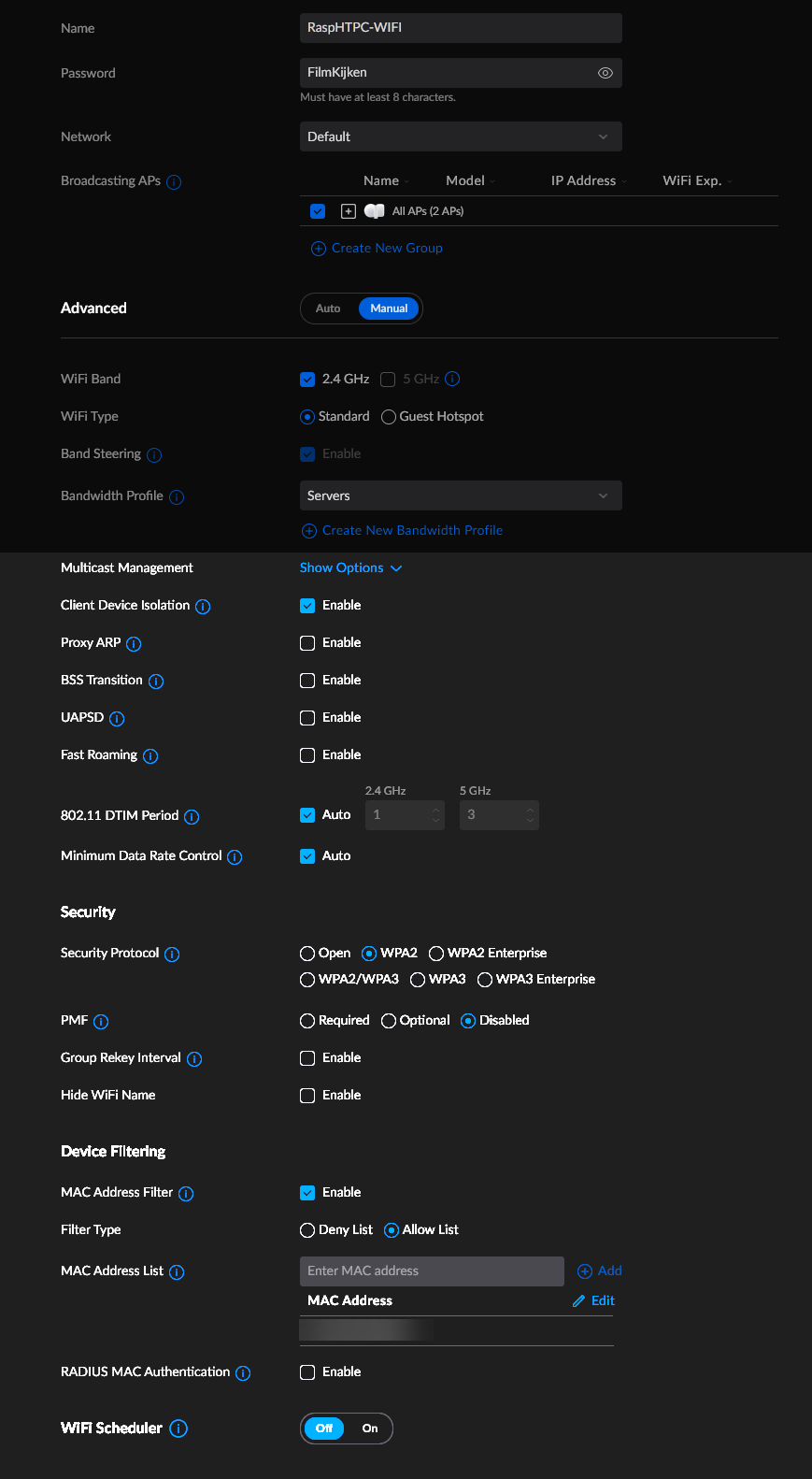
I still experienced the same issues (invalid-key, I/O error).
I'm not sure what changed with LibreElec 4.0, but that is obviously giving the trouble.