
keframe
 keframe copied to clipboard
 LianjiaTech
Nested `FrameSeparateWidget`s causes widget to be stuck in placeholder state
NewsStack is a page containing NewsStackBody and NewsStackMore.
NewsStackBody contains a list of FrameSeparatedWidget where its child is NewsStackCard
NewsStackCard is a widget that renders a FrameSeparateWidget based on switch case
NewsStackMore acts like a suggestion list, when clicked, it pushes the navigator to a new instance of NewsStack
The problem here is that, during the initial open of NewsStack (from home page) everything loads perfectly, however, when opening another NewsStack page by clicking on NewsStackMore, the FrameSeparateWidget seems to always be stuck in the placeholder widget.
The code here is not entirely accurate, more of a pseudocode, but the main idea here is that, on initial open, nested FrameSeparateWidgets work fine, when there are more layers, it gets stuck in placeholder.
Things i tried:
- Letting the page load and wait for the child to appear. Yes it does, but it takes a long time (minutes)
- Instead of doing two layers of
FrameSeparateWidget, I tried using only one layer. Same thing happens, just takes slightly lesser time to load
NewsStack() =>
  return Scaffold(
     body: CustomScrollView(
       slivers: [
           NewsStackBody(),
           NewsStackMore(),
         ],
      ),
  );
  NewsStackBody() =>
   for (var content in list)
    return FrameSeparateWidget(
         placeHolder: customPlaceholder(),
        child: NewsStackCard(),
     );
NewsStackCard()=>
   case (a) => return FrameSeparateWidget(placeholder: customPlaceholder(), child: widgetA(),
   case (b) => return FrameSeparateWidget(placeholder: customPlaceholder(), child: widgetB(),

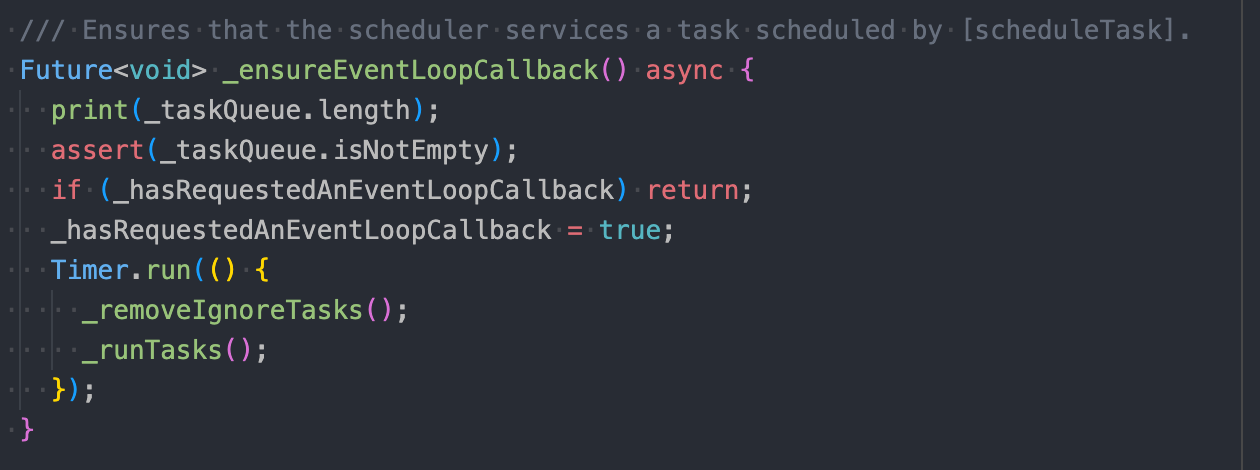
A new finding that I have while doing a print statement here is that, when opening the first page, the taskQueue's length will increase, approximately to 12,000. After waiting for the taskQueue to be cleared (length == 1), navigating to the next page will immediately load the new page's content.
My conclusion here is that, the delay/persistent state of the placeholder widget is due to the taskQueue not being paused/cleared when navigating to the next page.
A temporary workaround that I have, is to clear the taskQueue of the previous instance upon creating a new instance. I am aware that this is obviously not a good solution especially when there are multiple FrameSeparateWidgets but this is what i found useful for my use case, and it is effective when having minimal amount of FrameSeparateWidgets.
Do update me if you have any new findings @Nayuta403

@Nayuta403
I added the print statement to _runTasks() instead, to print the _taskQueue.length. The link below shows a demo of the frame count increasing to more than 10000. I noticed that initially it's still a very small amount, but as i scroll, the number increases drastically. Is this normal?
Could this be happening because of nested FrameSeparateWidgets?
If indeed this is not normal, may I know what can I do to prevent this?
https://drive.google.com/file/d/1miVtoa8CwvzHlfE-K-AZASveyYi4EgFM/view?usp=sharing
OMG, this queue length doesn't look normal. The fastest way is to set this property to control the maximum length of the queue
https://github.com/LianjiaTech/keframe/blob/8b10b65a64f546abb927c858337cc44652dd4d5a/lib/src/frame_separate_task.dart#L24
For example, set it to 100 (this is the maximum number of FrameSepWidget components that can be on the screen at any one time).
Let's see if it works, and then we can see why is it happening
ps: Your app looks so beautiful
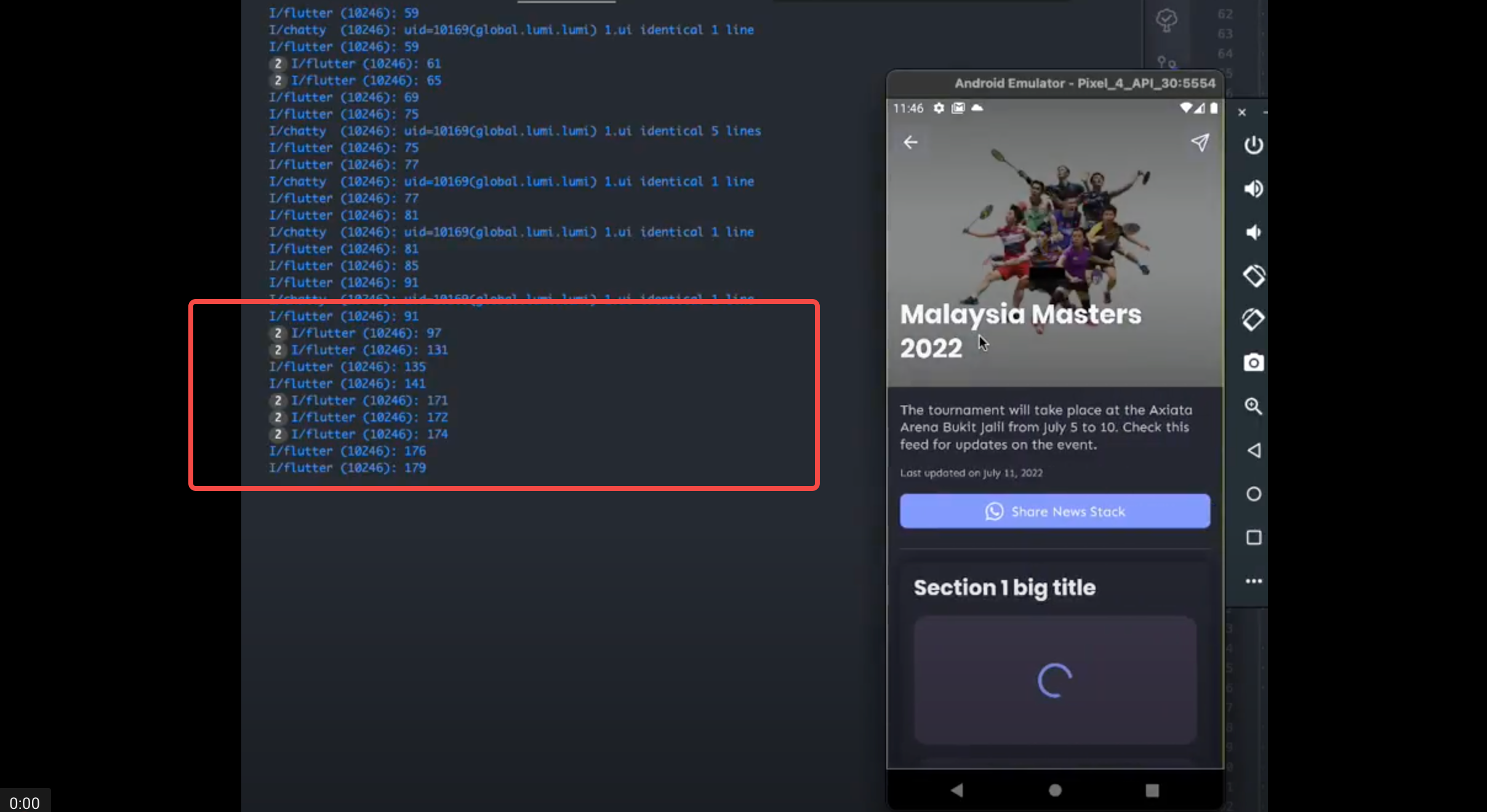
At the beginning of the video there is a sudden increase in the number of FramesepWidgets. It seems a little strange. Can you post where FrameSepWidget is used
At the same time,I do not recommend using FrameSepWidget as a child nested with FrameSepWidget. It should only need to be used on the child.
NewsStackBody() =>
   for (var content in list)
    return FrameSeparateWidget(
         placeHolder: customPlaceholder(),
        child: NewsStackCard(),
     );
NewsStackCard()=>
   case (a) => return FrameSeparateWidget(placeholder: customPlaceholder(), child: widgetA(),
   case (b) => return FrameSeparateWidget(placeholder: customPlaceholder(), child: widgetB(),
you're already using FrameSepWidget in your NewStackCard
@Nayuta403 First off, thank you so much for your time and effort to reply to this thread and looking into this!
As you suggested from this conversation, I tried wrapping only the child with the FrameSeparateWidget, which looks something like this:
  NewsStackBody() =>
   for (var content in list)
      return NewsStackCard();

  NewsStackCard()=>
  	 case (a) => return FrameSeparateWidget(placeholder: customPlaceholder(), child: widgetA(),
     case (b) => return FrameSeparateWidget(placeholder: customPlaceholder(), child: widgetB(),
And also, i adjusted the maxTaskSize to 100 in both line 24, and also modified the resetMaxTaskSize() function to reset to 100. Here is a demo of the page.
It seems to eliminate the high queue issue, and we can see that even stacking NewsStack pages on the navigator does not contain a significant lag as per the previous demo. So, thank you for the suggestion!
May I suggest that a parameter can be introduced so that we can adjust the maxTaskSize based on the app's needs?
There is this parameter, which can be accessed here
https://github.com/LianjiaTech/keframe/blob/8b10b65a64f546abb927c858337cc44652dd4d5a/lib/src/size_cache_widget.dart#L17
@Nayuta403 thanks for the suggestion! will mark this issue as resolved and close this PR