

 LemmyNet
Websocket closed loop issue
Issue Summary
Hi,
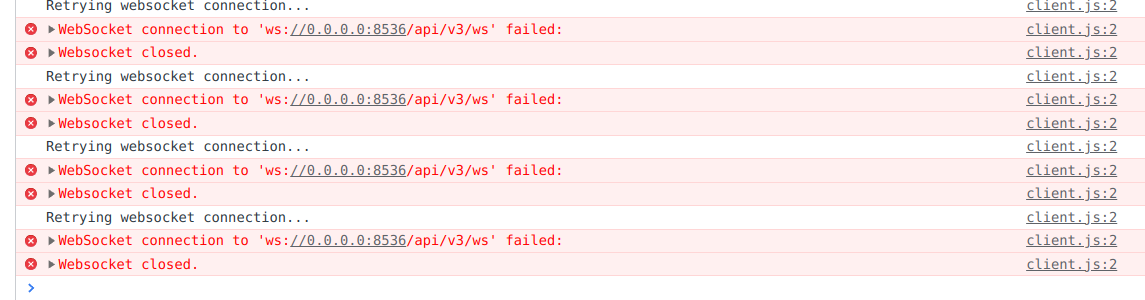
I just bootstrapped a self-hosted instance through Docker following the official doc. All containers are running fine, no errors in logs. But when I open the webUI I can see in the console or in the network inspector websocket errors in loop.
Also, when I try to sign in with the admin account declared in the lemmy.hjson file. When I click the "connect" button, there is no network call fired, nothing happens except the UI showing a loading spinner (I can observe the issue in Firefox and Chromium).
Basically I can't do anything in the webUI. It's quite confusing since I just followed the official “getting started” instructions.
compose.yml file
services:
  lemmy:
    image: dessalines/lemmy:latest
    container_name: lemmy
    restart: unless-stopped
    environment:
      - RUST_LOG="..."
    volumes:
      - ./lemmy.hjson:/config/config.hjson
    ports:
      - "0.0.0.0:8536:8536"
    depends_on:
      - lemmy-db
      - pictrs
    networks:
      - lemmy

  lemmy-ui:
    image: dessalines/lemmy-ui:latest
    container_name: lemmy-ui
    restart: unless-stopped
    environment:
      LEMMY_UI_HOST: "0.0.0.0:3000"
      LEMMY_UI_LEMMY_WS_HOST: "0.0.0.0:8536"
      LEMMY_UI_LEMMY_INTERNAL_HOST: "lemmy:8536"
      LEMMY_UI_LEMMY_EXTERNAL_HOST: "localhost:3000"
      # LEMMY_UI_DISABLE_CSP: true      tried to disable it but didnt fix the issue
    ports:
      - "3003:3000"
    depends_on:
      - lemmy
    networks:
      - lemmy

  pictrs:
    image: asonix/pictrs:0.4.0-rc.1
    container_name: pictrs
    user: 1000:1000
    restart: unless-stopped
    environment:
      PICTRS__SERVER__ADDRESS: '0.0.0.0:8080'
      PICTRS__SERVER__API_KEY: xxx
    volumes:
      - ./pictrs:/mnt
    networks:
      - lemmy

  lemmy-db:
    image: postgres:15-alpine
    container_name: lemmy-db
    restart: always
    environment:
       POSTGRES_USER: lemmy
       POSTGRES_PASSWORD: xxx
       POSTGRES_DB: lemmy
    networks:
      - lemmy

networks:
  lemmy:
lemmy.hjson config
{
  # https://join-lemmy.org/docs/en/administration/configuration.html

  setup: {
    admin_username: "user"
    admin_password: "xxxx"
    site_name: "lemmy"
  }

  hostname: "localhost:8536" # not sure of what value is expected here
  bind: "0.0.0.0"
  port: 8536
  tls_enabled: false

  pictrs: {
    url: "http://pictrs:8080/"
    api_key: "xxx"
  }

  database: {
    database: "lemmy"
    user: "lemmy"
    password: "xxx"
    host: "lemmy-db"
    port: 5432
    pool_size: 5
  }
}
Steps to Reproduce
follow the official docker install https://join-lemmy.org/docs/en/admins/install_docker.html
Launch the containers, open the web UI in the browser and observe console errors.
Technical details

Don't use the latest tags, I really hope none of our instructions say to do that. Use 0.17.2.
hostname should just be "localhost".
Also check the config.hjson and docker-compose.yml from lemmy-ansible: https://github.com/LemmyNet/lemmy-ansible/blob/main/templates/docker-compose.yml
My best guess is its a routing issue having to do with hostnames.

+1. Same issue here. Is this a macOS issue or something? I'm confused why, assumably, we're the only ones running into this.

Yeah same, I have been using the local setup for now. The WS is causing all sorts of trouble for me with docker. Not sure the issue.

Another weird thing I would like to note is that in the /scripts/install.sh and the scripts/db-init.sh are setting the local postgres passwords to different strings. install.sh is setting it as password while db-init.sh is setting it to lemmy.
When running cargo run from a fresh 17.2 tag pull lemmy is looking for the password to be password not lemmy.
The docs instruct you to run db-init.sh which if you follow the instructions will put you in a state where lemmy wont be able to connect to the db without changing the password.
Looks like there's a fix in the works in #1081! I was able to work around this issue by using that branch (use_http_client_2) to test my changes.
