

 LazZiya
"404 - File or directory not found" error when host on IIS
Describe the bug
- I download PagingSampleProject source.
- Open with VS 2022 and update NuGet package.
- Add a new folder named 'Samples' under 'Pages' folder of Project.
- Add a new razor page named 'Index' under 'Samples' folder.
- Copy code of Index to the new one.
- Run & test, browse to Samples. It's working well.

- Publish the project and host on IIS server under Default Web Site.
- Run & test, browse to Samples. The first page is OK,
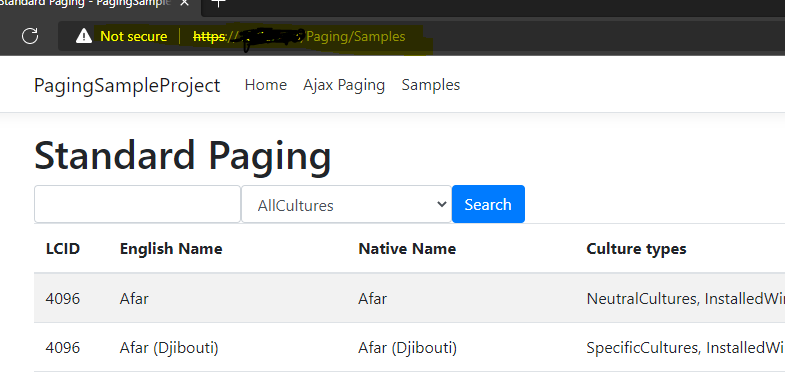
- Face 404 Server Error when browse the other pages.

- I write the extension method and inject
HttpContext.Request.Pathbefore return page.

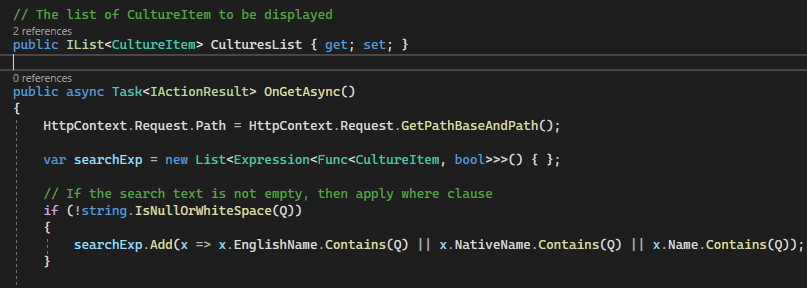
- Publish again, run and test. It's working well.


Try changing this param to false:
fix-url-path=false
if it didn't help, you can use url-template to provide your full url.
See #26 and #27 for more details.

This can be solved differently perhaps. Putting this here since I did not have time to fully test this with Areas related code
First off this can be removed methinks:
          // show-hide first-last buttons on user options
            if (ShowFirstLast == true)
            {
                ShowFirstLast = true;
            }
In the paging tag helper in my local I removed all that "fix-url-path" related code and did
    private readonly LinkGenerator _linkGenerator;

    private string UriBase { get; set; }

    /// <summary>
    /// <para>ViewContext property is not required to be passed as parameter, it will be assigned automatically by the tag helper.</para>
    /// <para>View context is required to access TempData dictionary that contains the alerts coming from backend</para>
    /// </summary>
    [ViewContext]
    public ViewContext ViewContext { get; set; } = null;

    /// <summary>
    /// Creates a pagination control
    /// </summary>
    public PagingTagHelper(IConfiguration configuration,
        ILogger<PagingTagHelper> logger,
        LinkGenerator generator)
    {
        _linkGenerator = generator;
        Configuration = configuration;
        _logger = logger;
    }


    ...

        // deal with the parameter tuples and make a query string of them
        string qString = string.Join("&", qDic.Select(q => q.Item1 + "=" + q.Item2));

        // sets the uri base to the root of the site from current server/environment CORE-3782
        UriBase = _linkGenerator.GetUriByPage(ViewContext.HttpContext);

        var pagelink = $"{UriBase}?{qString}";

        return pagelink;
    }

Try changing this param to false:
fix-url-path=falseif it didn't help, you can use
url-templateto provide your full url.See #26 and #27 for more details.
Thanks so much for solution.
Setting fix-url-path=false in the page control is working.
Setting "fix-url-path": "false" in the appsettings.json is not working.
public bool? FixUrlPath { get; set; } = true; is always true and never null, so reading from config file
FixUrlPath = FixUrlPath == null ? bool.TryParse(Configuration[$"lazziya:pagingTagHelper:{_settingsJson}:fix-url-path"], out bool _fPath) ? _fPath : true : FixUrlPath;
is not effective.
This can be solved differently perhaps. Putting this here since I did not have time to fully test this with Areas related code
First off this can be removed methinks:
          // show-hide first-last buttons on user options
            if (ShowFirstLast == true)
            {
                ShowFirstLast = true;
            }
In the paging tag helper in my local I removed all that "fix-url-path" related code and did
    private readonly LinkGenerator _linkGenerator;

    private string UriBase { get; set; }

    /// <summary>
    /// <para>ViewContext property is not required to be passed as parameter, it will be assigned automatically by the tag helper.</para>
    /// <para>View context is required to access TempData dictionary that contains the alerts coming from backend</para>
    /// </summary>
    [ViewContext]
    public ViewContext ViewContext { get; set; } = null;

    /// <summary>
    /// Creates a pagination control
    /// </summary>
    public PagingTagHelper(IConfiguration configuration,
        ILogger<PagingTagHelper> logger,
        LinkGenerator generator)
    {
        _linkGenerator = generator;
        Configuration = configuration;
        _logger = logger;
    }


    ...

        // deal with the parameter tuples and make a query string of them
        string qString = string.Join("&", qDic.Select(q => q.Item1 + "=" + q.Item2));

        // sets the uri base to the root of the site from current server/environment CORE-3782
        UriBase = _linkGenerator.GetUriByPage(ViewContext.HttpContext);

        var pagelink = $"{UriBase}?{qString}";

        return pagelink;
    }
Thanks so much.
Using LinkGenerator is also great.
Thank you @MarkSchultheiss and @mymintin for your comments, I am a little busy nowadays, will come up with a solution once I have some free time.
// show-hide first-last buttons on user options if (ShowFirstLast == true) { ShowFirstLast = true; }
this is really weird! I don't know how I did not notice it 🤔