

 LMMS
LMMS
Modernize the toolbar
This pull request updates the main toolbar to be much more modern, and moves the looks of LMMS more towards @budislav's design (see #1911).

There are some key changes from that design:
- The master volume out visualizer and CPU load visualizer are swapped. This is so that the master volume out visualizer is next to the master volume spinbox, which I think is a more intuitive position rather than next to the pitch spinbox.
- The buttons on either side are the same buttons LMMS had previously, except redesigned and moved to different positions.
This is what it looks like in a full window. Note that the widget is dynamically positioned to the center of the screen:


:robot: Hey, I'm @LmmsBot from github.com/lmms/bot and I made downloads for this pull request, click me to make them magically appear! :tophat:
Windows
- Windows 64-bit:
lmms-1.2.1.701-mingw-win64.exe(build link) - Windows 32-bit:
lmms-1.2.1.701-mingw-win32.exe(build link) - Windows 32-bit:
lmms-1.2.1-msvc2017-win32.exe(build link) - Windows 64-bit:
lmms-1.2.1-msvc2017-win64.exe(build link)
Linux
- Linux (AppImage):
lmms-1.2.1.701-linux-x86_64.AppImage(build link)
macOS
- macOS :
lmms-1.2.1.701-mac10.13.dmg(build link)
:robot:
{"platform_name_to_artifacts": {"Windows": [{"artifact": {"title": {"title": "64-bit", "platform_name": "Windows"}, "link": {"link": "https://6757-15778896-gh.circle-artifacts.com/0/lmms-1.2.1.701-mingw-win64.exe"}}, "build_link": "https://circleci.com/gh/LMMS/lmms/6757?utm_campaign=vcs-integration-link&utm_medium=referral&utm_source=github-build-link"}, {"artifact": {"title": {"title": "32-bit", "platform_name": "Windows"}, "link": {"link": "https://6754-15778896-gh.circle-artifacts.com/0/lmms-1.2.1.701-mingw-win32.exe"}}, "build_link": "https://circleci.com/gh/LMMS/lmms/6754?utm_campaign=vcs-integration-link&utm_medium=referral&utm_source=github-build-link"}, {"artifact": {"title": {"title": "32-bit", "platform_name": "Windows"}, "link": {"link": "https://ci.appveyor.com/api/buildjobs/qc6sl59pmn5boyou/artifacts/build/lmms-1.2.1-msvc2017-win32.exe"}}, "build_link": "https://ci.appveyor.com/project/Lukas-W/lmms/builds/33239093"}, {"artifact": {"title": {"title": "64-bit", "platform_name": "Windows"}, "link": {"link": "https://ci.appveyor.com/api/buildjobs/dbumvqq8lt3i6uj9/artifacts/build/lmms-1.2.1-msvc2017-win64.exe"}}, "build_link": "https://ci.appveyor.com/project/Lukas-W/lmms/builds/33239093"}], "Linux": [{"artifact": {"title": {"title": "(AppImage)", "platform_name": "Linux"}, "link": {"link": "https://6756-15778896-gh.circle-artifacts.com/0/lmms-1.2.1.701-linux-x86_64.AppImage"}}, "build_link": "https://circleci.com/gh/LMMS/lmms/6756?utm_campaign=vcs-integration-link&utm_medium=referral&utm_source=github-build-link"}], "macOS": [{"artifact": {"title": {"title": "", "platform_name": "macOS"}, "link": {"link": "https://6755-15778896-gh.circle-artifacts.com/0/lmms-1.2.1.701-mac10.13.dmg"}}, "build_link": "https://circleci.com/gh/LMMS/lmms/6755?utm_campaign=vcs-integration-link&utm_medium=referral&utm_source=github-build-link"}]}, "commit_sha": "193ff61820ddc6a78832831d410ce20bf7f0298e"}


Hi, I just saw this project and it's great! but where would you put the oscilloscope? I made a montage in gimp to give you a suggestion.

I suggest that you place the marker next to the buttons to take advantage of space and to make it more pleasing to the eye, also to place the oscilloscope, while the empty space on the right can be reserved for other future projects. regards

If both min:sec & Bar:Beat clocks can be Shown side-by-side simultaneously , then it would look to be more professional.

@Sawuare Ah, you're right! I'll update the file descriptions and copyright information. What are the conventions for adding in developer names and such?
@Gabrielxd195 I'm not sure we should change it back to that layout, as it would ultimately look cluttered again which is exactly what I wanted to avoid. Note that my implementation has been based on budislav's design (see #1911) — I think we should adhere to that unless we have a good reason not to. Any additional widgets shouldn't be added to the right of the widget, but be properly incorporated in an intuitive position in the toolbar. Doing otherwise would be bad user experience. For that reason, I'll probably eventually move those old buttons as well, but that's not for this pull request.
For the same reason, I think we also shouldn't add back the oscilloscope, since it serves no real function in the toolbar other than to take up space. The only reasons to use that oscilloscope is to view the volume output levels (which the 'OUT' widget in the upper right corner does much more efficiently), since the output was way too stuttery (and the widget too small) to provide any real information about the waveform. The toolbar just isn't the right place for this oscilloscope.
@CaBachhav Interesting idea. I'll have to see how well it'd fit in the window, since I would want to avoid wasting too much real-estate when laying it out horizontally. I think this would have to be discussed with the design folks. Perhaps it can be designed as an additional mode for the clock widget in which the beat/bar and min/sec are stacked vertically, but then the numbers would have to be smaller.
Oh, general question: I'm not too familiar with the travis-ci setup over here. Does anyone know why it's giving an error?
You can ignore it. We are in the process of getting rid of it.
On Mon, 21 Oct 2019, 13:46 Lathigos, [email protected] wrote:
Oh, general question: I'm not too familiar with the travis-ci setup over here. Does anyone know why it's giving an error?
— You are receiving this because you were assigned. Reply to this email directly, view it on GitHub https://github.com/LMMS/lmms/pull/5261?email_source=notifications&email_token=AFOMGKAKMMP4VARJ3IT3GVDQPWB7VA5CNFSM4JCVUJ3KYY3PNVWWK3TUL52HS4DFVREXG43VMVBW63LNMVXHJKTDN5WW2ZLOORPWSZGOEBZ4R5Q#issuecomment-544458998, or unsubscribe https://github.com/notifications/unsubscribe-auth/AFOMGKF63HJFCKIVIOAOLP3QPWB7VANCNFSM4JCVUJ3A .
Works nicely for me, everything was fine as it should be in terms of usability.
But, but. Those buttons on left side looks quite "old" with new toolbar mechanics and design, they are cramped in small space.

@qnebra Yeah, I totally agree. I haven't touched the buttons yet because there are too many of them — and in the single-window design at least half of them would disappear anyway — but perhaps I could change some things to make it look better. I'm currently working on a mockup .png to show a possible solution, but it's a bit problematic with the amount of buttons there are.
Perhaps some buttons could be removed to make the toolbar less cluttered? Most of the top buttons have their behaviour mirrored in the menubar anyway, and some of the bottom buttons as well (namely 'show piano roll', 'show BB editor', and 'show automation editor' can all be activated by double-clicking the respective track in the Song Editor, which I think is more intuitive anyway).
So perhaps we should reconsider what buttons we really want to keep as quickbuttons in the toolbar. That is, what actions really warrant being able to do it in one click as opposed to two? Things such as creating a new template-based file is not something I do every five minutes in LMMS, mostly just once per session. Those stuff could be removed as quickbuttons and just remain in the menubar instead.
@Lathigos The copyright notice here is generally of the form: Copyright (c) YEAR NAME EMAIL

If all the file operations were removed (since they're accessible in the File menu, and some via shortcuts), the remaining top row buttons would probably fit fine on the bottom row. This could let us reduce the height of the toolbar, if desired.
On Mon, Oct 21, 2019, 18:10 Lathigos [email protected] wrote:
@qnebra https://github.com/qnebra Yeah, I totally agree. I haven't touched the buttons yet because there are too many of them — and in the single-window design at least half of them would disappear anyway — but perhaps I could change some things to make it look better. I'm currently working on a mockup .png to show a possible solution, but it's a bit problematic with the amount of buttons there are.
Perhaps some buttons could be removed to make the toolbar less cluttered? Most of the top buttons have their behaviour mirrored in the menubar anyway, and some of the bottom buttons as well (namely 'show piano roll', 'show BB editor', and 'show automation editor' can all be activated by double-clicking the respective track in the Song Editor, which I think is more intuitive anyway).
So perhaps we should reconsider what buttons we really want to keep as quickbuttons in the toolbar. That is, what actions really warrant being able to do it in one click as opposed to two? Things such as creating a new template-based file is not something I do every five minutes in LMMS, mostly just once per session. Those stuff could be removed as quickbuttons and just remain in the menubar instead.
— You are receiving this because you are subscribed to this thread. Reply to this email directly, view it on GitHub https://github.com/LMMS/lmms/pull/5261?email_source=notifications&email_token=ACEBLGWKAM5Q442PJO3INTLQPXIA7A5CNFSM4JCVUJ3KYY3PNVWWK3TUL52HS4DFVREXG43VMVBW63LNMVXHJKTDN5WW2ZLOORPWSZGOEB24BFY#issuecomment-544587927, or unsubscribe https://github.com/notifications/unsubscribe-auth/ACEBLGXMM7VS2CZAUX5TBX3QPXIA7ANCNFSM4JCVUJ3A .

Hi @Lathigos, nice work! Here are some of my observations:
-
I still feel like the sliders use too much space and don't quite fit. I would suggest actually implementing the original design, which is the text based widgets. I consulted with people on the discord server and they do like the idea.
-
Note that the widget is dynamically positioned to the center of the screen:
I don't like this because it creates a really large gap between the buttons and the as your screen gets wider:

I would suggest having a fixed gap between the widget and the buttons (everything left aligned on the screen)
-
I agree with @mxmilkb 's observations from the other issue, the zeroes have no place in the time signature, it just looks confusing. e.g.
 vs
vs 
The 4 looks a bit misplaced with the gap, so the ideal behaviour would be to have it like this:

and turn into this once you get into double digits

But if that's too much work just removing zeroes would work fine in my opinion.
-
I think these widgets should be edited like we do TrackLabelButtons, that is they behave like a text box on double click rather than launching a dialog, but this might be out of scope for this PR.
-
The out meter doesn't behave like the FX meters, if you play a low sine you can see the out meter fluctuating while the FX master stays the same (which imo is the correct behaviour)


@qnebra Yeah, I totally agree. I haven't touched the buttons yet because there are too many of them — and in the single-window design at least half of them would disappear anyway — but perhaps I could change some things to make it look better. I'm currently working on a mockup .png to show a possible solution, but it's a bit problematic with the amount of buttons there are.
Perhaps some buttons could be removed to make the toolbar less cluttered? Most of the top buttons have their behaviour mirrored in the menubar anyway, and some of the bottom buttons as well (namely 'show piano roll', 'show BB editor', and 'show automation editor' can all be activated by double-clicking the respective track in the Song Editor, which I think is more intuitive anyway).
So perhaps we should reconsider what buttons we really want to keep as quickbuttons in the toolbar. That is, what actions really warrant being able to do it in one click as opposed to two? Things such as creating a new template-based file is not something I do every five minutes in LMMS, mostly just once per session. Those stuff could be removed as quickbuttons and just remain in the menubar instead.
Create from template was rarely used I think.
Also I made some small amateur mockup, with how I will see this in lmms. Also, also, I was kinda forgot about making toolbar thinner by 7 px (that was a lot of space ;) )

@qnebra I was thinking of something like this, perhaps (just a quick mockup):

The file operations and stuff would be on the left hand side of the widget, and the window visibility buttons would be flushed to the right side of the window. This would also help distinguish their different functionalities.
Of course, we could then indeed remove the margin at the top and bottom of the widget to make the entire toolbar more thin! :smiley:
Perhaps in the final design I can move the metronome button into the central widget as opposed to next to it, more like the original design. And perhaps I should make all buttons the same size, I don't know.
@Umcaruje
I agree with @mxmilkb 's observations from the other issue, the zeroes have no place in the time signature, it just looks confusing.
The out meter doesn't behave like the FX meters, if you play a low sine you can see the out meter fluctuating while the FX master stays the same (which imo is the correct behaviour)
I still feel like the sliders use too much space and don't quite fit.
Alright, many thanks for the feedback, I'll work on them!
I think these widgets should be edited like we do TrackLabelButtons, that is they behave like a text box on double click rather than launching a dialog, but this might be out of scope for this PR.
That'd be a great addition! If I find the time, I'll work on that as well.
I don't like this because it creates a really large gap between the buttons and the as your screen gets wider:
This is the only point which I fundamentally disagree about. I understand that everybody is used to having a left-flushed layout in a toolbar (it took me some time to get used to it as well), but it's an outdated design choice. Once we move towards a single-window design, the centered widget looks much more modern, clean, and above all intuitive — as opposed to cluttered and confusing. Besides, the unused space on the toolbar is wasted space either way.
So I'll experiment around with it, but I'm not sure I like the idea unless there's some really compelling reason to do it.
Great work here! I have a few ideas regarding the colors and contrast. Will comment with some hexes as soon as I get the chance.

@qnebra I was thinking of something like this, perhaps (just a quick mockup):
The file operations and stuff would be on the left hand side of the widget, and the window visibility buttons would be flushed to the right side of the window. This would also help distinguish their different functionalities.
Great idea for me, currently this left side area was really crowded, and right side feels really empty.
Of course, we could then indeed remove the margin at the top and bottom of the widget to make the entire toolbar more thin! 😃
And maybe flat color? But this gradient in your mockup looks really good.
I also wanted to chime in on the matter of scaling that I agree on the center alignment will work on large monitors now that the idea is to put the icons on either side.
If you are proposing to remove the oscilloscope, do we have an idea of where it may be placed or accessed instead? Can we say that this is universally unused and pointless or could this be something which users would find missing?
We need to consider this design with the smallest screen scenario as well as the largest, especially if the point is to go in the direction of scalable UI.
@qnebra
And maybe flat color? But this gradient in your mockup looks really good.
I suppose we could do flat color once we have a single-window UI, but for now I think the gradient is more in tune with the rest of the UI of LMMS so that the toolbar won't clash too much.
@RebeccaDeField
Great work here! I have a few ideas regarding the colors and contrast. Will comment with some hexes as soon as I get the chance.
That'd be great, thanks!
If you are proposing to remove the oscilloscope, do we have an idea of where it may be placed or accessed instead? Can we say that this is universally unused and pointless or could this be something which users would find missing?
I would personally vote for "universally unused", since the widget was too small to comfortably use and the waveform wasn't centered, so you'd only see a flickering line giving no information about the waveform whatsoever other than volume (which is now included in the widget). I think it's safe to remove, but in the end some sort of spectrum visualizer could be useful.
We need to consider this design with the smallest screen scenario as well as the largest, especially if the point is to go in the direction of scalable UI.
Yeah, I agree. I wanted to make it possible for the window to become at least as small as half the width of a 1920x1080 screen, so that the window can be "docked" on one half of the screen in modern operating systems on standard monitors. This probably also covers the smallest-screen scenario, which I guess would be 1024x768?
@Umcaruje Alright, I finally got around to coding a little bit again. I started experimenting with removing the zeroes from the time sig widget. It looks good when there's a single digit on both sides, as well as when there's two digits at both sides. But then I noticed this annoying case, a single digit on one side and two digits on the other:


Now the time sig widget doesn't look centered at all. Of course, one could center the entire widget, but then the "/" would start shaking around as you scroll through the spinboxes and that looks really awful.
So I propose to keep the zeroes in the time sig widget.
The oscilloscope is useful as it can detect clipping & DC bias and examine timbre & stereo separation, so do not remove it.
I think that if it's really needed to remove the oscilloscope, it should become a lmms native plugin

Is there a reason that the oscilloscope could be added to the centerpiece along with the volume controls now that we have found a better layout?
Otherwise, if it can remain as a separate plugin, that may work. I think it is best to not remove it entirely in any case.
Here's a rough mockup of what direction I think we should take for the colors which gives some nice contrast improvements and matches the single-window design a bit closer:
Rough mockup:

Single window:

@umcaruje thoughts?
Note: For whatever reason, my inkscape HSL values are not reflecting the right numbers when converted so I will give hex codes after that is resolved on my end for good measure.
The time/tempo toolbar from my mockup should have a 220 hue and 10 saturation (inkscape goes up to 255 for all values). Not sure why inkscape will not display this with consistency but in case I'm holding things up, I tried some online apps to get hopefully better hex numbers for the mockup I proposed. I would also like to make the toolbar/menu which this part is inset into have a more subtle gradient but I imagine this is something I can do in another PR to keep things organized.
Top stop: #202327
Bottom stop: #191b1f
Border: #151719
I updated the images in the description to reflect the new work I have done.
@Umcaruje
I still feel like the sliders use too much space and don't quite fit.
I have implemented the design you suggested. I haven't yet pushed the code, because I still feel like the text-based widgets are unintuitive. In fact, I have shown several people both designs (see below) and asked which one they thought was more intuitive (while not showing my own opinion to prevent bias). All of them immediately responded that the sliders are more intuitive, even when I tried to convince them of the other design.

This affirms the ideas of good ergonomics design: consistency is essential. Volume is already controlled using sliders in the FX Channels (as well as in every major operating system), so that's what the user has come to expect. The only reason not to use sliders is if it wouldn't fit, but not much real-estate is saved by changing the sliders anyway.
I could probably still change the icons to be text instead ('VOL' and 'PITCH'), since they are probably the features that stick out most, but I think it's best to let the actual controls be sliders.
Other than that, I think I am mostly done with all requested features (except for the oscilloscope). In both designs, there's no room for the oscilloscope in the toolbar in the smallest-screen scenario, so should I re-add it as a native plugin instead?
The design without the faders looks a lot more consistent in my opinion.
I still feel like the text-based widgets are unintuitive. In fact, I have shown several people both designs (see below) and asked which one they thought was more intuitive
Were those people LMMS users? The thing about these controls is that they are rarely used. The master volume is absolutely redundant, because we already have the master FX slider. And the global pitch is much better represented by a number, because if you're transposing your whole project you'd want to know at all times how many semitones you have transposed.
Before I suggested removing the sliders, I talked with a couple of people on the discord server and they said they wouldn't mind removing the sliders as long as the text widgets are editable.
Other than that, I think I am mostly done with all requested features (except for the oscilloscope). In both designs, there's no room for the oscilloscope in the toolbar in the smallest-screen scenario, so should I re-add it as a native plugin instead?
Yes, that would be a good idea.
Also I really like the moving of the buttons to the right and left side, it makes the centered widget really work and look consistent. Great job!
@Umcaruje
Were those people LMMS users?
Some of them were, actually, but others used different DAWs.
The master volume is absolutely redundant, because we already have the master FX slider. And the global pitch is much better represented by a number, because if you're transposing your whole project you'd want to know at all times how many semitones you have transposed.
This is a fair point. I agree the semitones are indeed better represented by a number. I didn't consider the fact that the master FX slider is redundant anyway, so it being intuitive is less of a point. The reason I brought it up again was because of the responses I got from the people I consulted, but I suppose it could go either way. Anyway, thanks for the feedback! I'll push the changes. :smiley:
I also had a quick poll with the users over on discord:
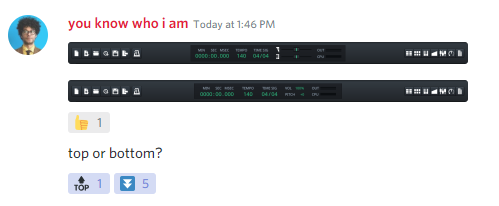 There were some concerns on how effective the dragging will be but if the UX was right, all votes were on removing the sliders.
Anyway, thanks for the feedback! I'll push the changes.
Thank you for working on this! I'll try to test this all out asap.
Alright, I finally got around to coding a little bit again. I started experimenting with removing the zeroes from the time sig widget. It looks good when there's a single digit on both sides, as well as when there's two digits at both sides.
But then I noticed this annoying case, a single digit on one side and two digits on the other. Now the time sig widget doesn't look centered at all. Of course, one could center the entire widget, but then the "/" would start shaking around as you scroll through the spinboxes and that looks really awful.
So I propose to keep the zeroes in the time sig widget.
@Lathigos I just noticed this. I think that it would be better to have an uncentered widget than one with zeroes before the numbers. I would ask to also remove the zeroes before numbers in the tempo widget. These look really weird in my opinion and wouldn't fit in such a modern design.
Just wanted to check in on this. I think even with the 0 to start the time sig, it would be a major enough improvement because of the clarity added to this part of the UI. I wonder if removing the 0 could be another PR improvement for later? If there are any icon improvement needs to finish this, I am also on board to help.
The oscilloscope could be added to the centerpiece along with the volume controls now that we have found a better layout?
There were some concerns about removing the oscilloscope. I believe now that the design was condensed, it should be okay to keep it on the toolbar until someone has time to separate it out as a native plugin.
Even with the oscilloscope, cleaning up the toolbar to this degree would be a big step in the right direction.