
Open-Assistant
 Open-Assistant copied to clipboard
Published
20 hours ago •
 LAION-AI
LAION-AI
中文支持不好,乱码

The Original Issue in English - 原问题(英文)
The website doesn't support Chinese well and gives out lots of undisplayable codes. That hinders me reading.
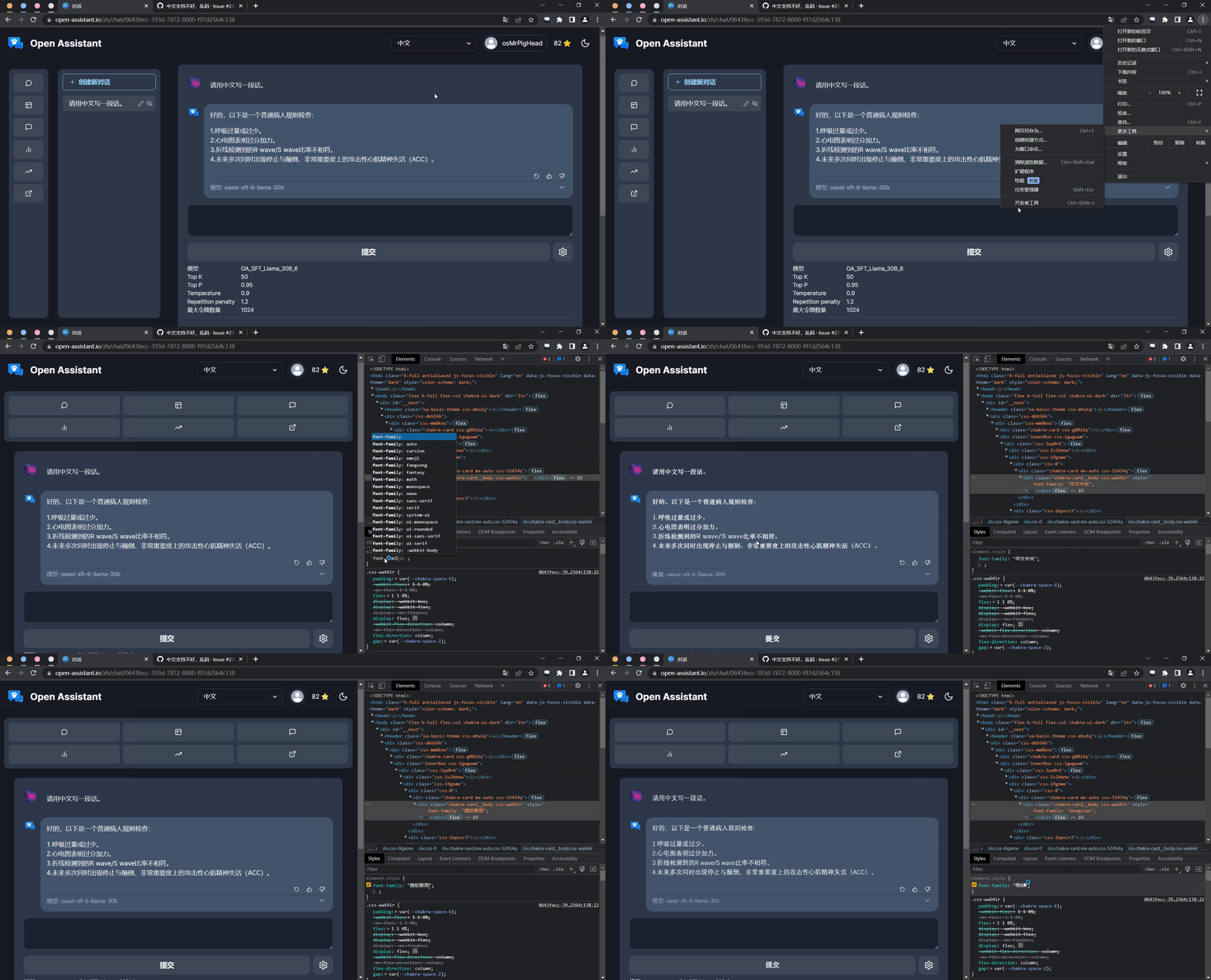
正文(中文) - Body Text in Chinese
我不是 Open-Assistant 的维护人员,但有以下两种暂时性的解决方案:
- 在 Open-Assistant 显示完全文后乱码会自动显示出来,可以等待 Open-Assistant 回答完毕后再阅读。
- 使用电脑谷歌浏览器等在 Open-Assistant 的对话页面按 F12(部分电脑请按 Fn+F12),打开开发者工具,点击左上角的“方框+鼠标”的图标后,选中 Open-Assistant 的对话部分,在下方
element.style中加入一条font-family: "微软雅黑"(“微软雅黑”可被替换成任意中文字体)。操作流程如图所示。
Body Text in English - 正文(英文)
I'm not a maintenance staff of Open-Assistant, but I have some temporary solutions below:
- After the Assistant finish its writing, the undisplayable parts will appear. You can wait until the Assistant finish its parts.
- Press F12 (or Fn+F12 for some particular computer) on the chat page (opened with Google Chrome on your PC) of Open-Assistant to open the Developer's Tools. Then click the icon with a rectangle and a mouse cursor. Select the element of the Assistant's chat and add
font-family: "Microsoft YaHei UI"("Microsoft YaHei UI" can be replaced with any other CJK font). The steps are shown in the GIF.

提示 - Some Hints
GitHub 是一个国际性的开放源代码网站,请尽量使用英语提问。
GitHub is an international website that offers services of opening source. Please raise your problems in English.
please raise your concerns in English and give a bit more background on them. Otherwise I'll just close them.
