

 LAION-AI
Add Markdown rendering

This initial version doesn't render well because whatever style sheet we are using does not have very good support for different HTML elements. For example, <h1> and <h2> look like plain text, and <ul> and <ol> don't have bullets or numbers. I could use some help with getting the styling to work better because I'm not familiar with the styling.
Here is an initial preview of what it looks like and where we need to improve:
Image of an example message with many Markdown features included
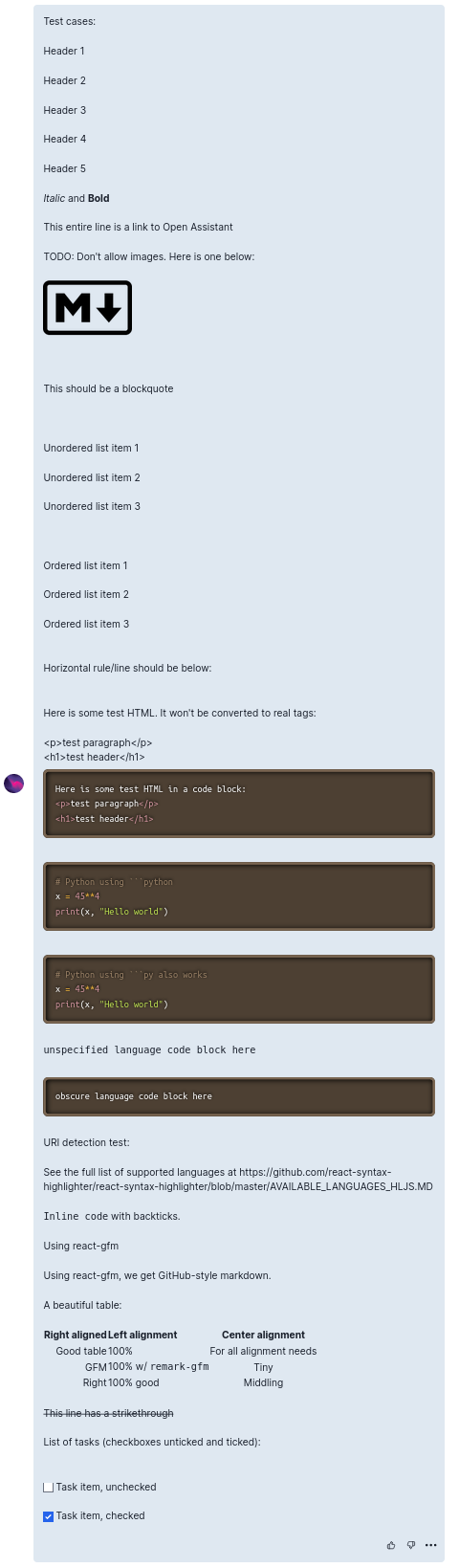
Markdown source of the example above
# Test cases:
# Header 1
## Header 2
### Header 3
#### Header 4
##### Header 5
*Italic* and **Bold**
[This entire line is a link to Open Assistant](https://open-assistant.io/)
TODO: Don't allow images. Here is one below:

> This should be a blockquote
* Unordered list item 1
* Unordered list item 2
* Unordered list item 3
1. Ordered list item 1
2. Ordered list item 2
3. Ordered list item 3
Horizontal rule/line should be below:
---
Here is some test HTML. It won't be converted to real tags:
<p>test paragraph</p>
<h1>test header</h1>
```html
Here is some test HTML in a code block:
<p>test paragraph</p>
<h1>test header</h1>
```
```python
# Python using ```python
x = 45**4
print(x, "Hello world")
```
```py
# Python using ```py also works
x = 45**4
print(x, "Hello world")
```
```
unspecified language code block here
```
```randomlanguagedoesnotexist
obscure language code block here
```
URI detection test:
See the full list of supported languages at https://github.com/react-syntax-highlighter/react-syntax-highlighter/blob/master/AVAILABLE_LANGUAGES_HLJS.MD
`Inline code` with backticks.
## Using react-gfm
Using react-gfm, we get GitHub-style markdown.
A beautiful table:
| Right aligned | Left alignment | Center alignment |
| ------------: | :------------------- | :---------------------: |
| Good table | 100% | For all alignment needs
| GFM | 100% w/ `remark-gfm` | Tiny
| Right | 100% good | Middling
~~This line has a strikethrough~~
List of tasks (checkboxes unticked and ticked):
* [ ] Task item, unchecked
* [x] Task item, checked
#TODO: Don't allow images. Here is one below: Why tho? ChatGPT has such feature, let it be

#TODO: Don't allow images. Here is one below: Why tho? ChatGPT has such feature, let it be
There is always a privacy and safety risk from loading external images you don't have any control over. The image server can track the IPs of OA contributors or selectively/randomly serve them unwanted content. Read https://security.stackexchange.com/questions/31946/is-it-safe-to-allow-external-images-to-be-attached-to-blog-or-any-web-content for more.
External images will be nice to have in the future, but until we have some way of protecting the users (e.g., downloading, hosting, and filtering the images on the OA server) there is significant risk.
I am blocked on this until someone helps me with the styling issues. @fozziethebeat @olliestanley it would help if you could connect someone who is knowledgeable with the styling.
#TODO: Don't allow images. Here is one below: Why tho? ChatGPT has such feature, let it be
There is always a privacy and safety risk from loading external images you don't have any control over. The image server can track the IPs of OA contributors or selectively/randomly serve them unwanted content. Read https://security.stackexchange.com/questions/31946/is-it-safe-to-allow-external-images-to-be-attached-to-blog-or-any-web-content for more.
External images will be nice to have in the future, but until we have some way of protecting the users (e.g., downloading, hosting, and filtering the images on the OA server) there is significant risk.
I am blocked on this until someone helps me with the styling issues. @fozziethebeat @olliestanley it would help if you could connect someone who is knowledgeable with the styling.
For styling you can use this for now https://tailwindcss.com/docs/typography-plugin

For styling you can use this for now https://tailwindcss.com/docs/typography-plugin
Thank you, I'll look into it!
@notmd Thank you for your suggestion. Now, those things render much better! But there are now really big margins, and dark mode does not work. For dark mode, I tried adding the dark:prose-invert class, but that did not do anything. Do you have any suggestions/could you help?
The horizontal rule, table borders, and blockquote line don't show in light mode, but they are there in dark mode. So maybe there is some light/dark mode with prose that needs to be enabled.
Here is what it looks like now in light mode.
Image of an example message with current Markdown rendering

I'm looking into this now. Sorry have to work on other issue, will try again tomorrow