

 LAB02-Research
Bug: Unable to add CPULoad sensor
Please make sure your bug isn't already listed on HASS.Agent's issue tracker:
https://lab02research.youtrack.cloud/
There's a list of open bugs & features on the right. On the left you can see what's being worked on, what's planned and what's ready for the next release.
If you're not sure, don't worry, just go ahead and we'll discuss :)
Describe the bug I have been able to add sensors for GPUTemperature, GPULoad, MemoryUsage successfully.
I try to add a CPULoad sensor, when I click "Store and activate sensors" I get an error message: An error occured while saving the sensors, check the logs for more info.
The logs show the following:
2022-07-18 20:58:50.082 -05:00 [FTL] [SENSORSMANAGER] Error while storing: PerformanceCounter not found
System.Exception: PerformanceCounter not found
at HASS.Agent.Shared.HomeAssistant.Sensors.PerformanceCounterSensor..ctor(String categoryName, String counterName, String instanceName, Nullable1 updateInterval, String name, String id) at HASS.Agent.Shared.HomeAssistant.Sensors.PerfCounterSensors.SingleValue.CpuLoadSensor..ctor(Nullable1 updateInterval, String name, String id)
at HASS.Agent.Settings.StoredSensors.ConvertConfiguredToAbstractSingleValue(ConfiguredSensor sensor)
at HASS.Agent.Sensors.SensorsManager.StoreAsync(List1 sensors, List1 toBeDeletedSensors)
To Reproduce Steps to reproduce the behavior:
-
Go to 'local sensors'
-
Click on 'add new'
-
Scroll down to 'CPULoad'
-
Click 'Store sensor'
-
Click 'Store and activate sensors'
-
See error
-
Click 'OK' [2022-07-18] HASS.Agent_20220718.log
-
Going back to local sensors - no CPULoad sensor was added.
Expected behavior I exptected a CPULoad sensor to be added
Screenshots If applicable, add screenshots to help explain your problem.
Misc info (please complete the following information):
-
Windows build (ideally screenshot/info of
winver.exeoutput):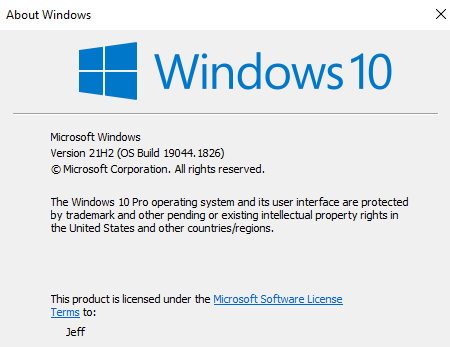
-
Windows' UI language: English
-
HASS.Agent version: 2022.12.0 ? (2212.0.7.0 installer exe version)
Please check what's applicable (multiple answers possible):
- [x] Installed via installer
- [ ] Installed manually
- [x] Problem occurs in HASS.Agent
- [ ] Problem occurs in Satellite Service
Additional context Add any other context about the problem here.
Logs
If possible, please provide the logs of HASS.Agent and - if applicable - the Satellite Service. You can find HASS.Agent's logs by going to the main window, then Configuration -> Logging -> open logs folder. The Satellite Service's logs are in the same window, but the Satellite Service tab -> open service logs folder. If you want, you can mail them to [email protected]
Extended Logging was turned on for the last attempt in this file. [2022-07-18] HASS.Agent_20220718.log


Can you try the latest beta: https://github.com/LAB02-Research/HASS.Agent/releases/download/2022.13.0-beta1/HASS.Agent.Installer.exe
Closing this. If it still doesn't work, you can install OpenHardwareMonitor and add the sensors through wmi:
https://hassagent.readthedocs.io/en/latest/wmi-examples/#fetch-cpu-temp-from-openhardwaremonitor