

 Kozea
Kozea
Wrong top and bottom offsets for absolute-positioned boxes inside of inline elements
Hi,
To help readers easily spot important text inside of a document, one method is to put bars in the left margin. For example, in the following picture:
 We see two lines highlighted with left bars. because of the text inside of the boxes (the boxes will eventually get suppressed because they are not good for legibility).
Then with a little bit of CSS, this is perfectly achievable, see the style inside of the attached HTML file.
It works by putting a relative-positioned span with a specific class around the text to highlight, and adding an ::after pseudo-element, which contains an absolute-positioned empty box with a border. We set the vertical positions with top and bottom, as usual. For the horizontal position, we need a negative margin-left.
In the end, the result looks like the screenshot above, which was taken from a Chromium.
But although Weasyprint manages the horizontal-positioning trick well, the vertical offsets are not as expected:

I attach a full HTML with a generated PDF too. highlighing_bars.zip
It contains another variant of the issue: if the relative position is not set for the span, but the surrounding p, then the bar extends to the whole paragraph, and Weasyprint generates the offsets correctly. But if the paragraph extends over two columns, WP displays the bars on only one side. Note that my Firefox struggles on this variant too.
Best regards

Thanks a lot for this bug report and for the examples.
But although Weasyprint manages the horizontal-positioning trick well, the vertical offsets are not as expected:
That’s sad 😢. Maybe it’s related to #1058 (because markers are just absolute boxes).
But if the paragraph extends over two columns, WP displays the bars on only one side. Note that my Firefox struggles on this variant too.
We’ll check that too.
Actually, even with your first example, I get different results with different browsers.
With Firefox:

With Chrome:

With Epiphany (WebKit-based):

When we get different renderings for "simple" cases like this one, it generally means that the behavior is not defined by the specification, and so that nobody’s wrong. So… It’s time to dive again into the specification and to check what’s allowed!

Hi,
I think getting the vertical offsets right would be the easiest to fix. Moreover, there is little room for interpretation, and there seems to be a consensus among browsers.
I saw the discrepancy for the horizontal positioning between FF and Chromium, but as WP behaves the same as Chromium, I assumed you did the good job :wink: and FF was buggy.
I am perfectly aware that using margin-left to position relative to the left-most text border is a trick and no good CSS. Other properties do not give the expected result: margin-right does not work for the other side, left is interpreted like in your FF and Epiphany examples. The worst of all is right, with my Chromium, if the last letter is vertically left to the first letter, it positions relative to the first letter (A in the example below).
Horizontally positioning relative to an inline element is indeed a difficult problem, because there may be different interpretations on what are the reference points. See for example this picture, which represents a span running from A to B:
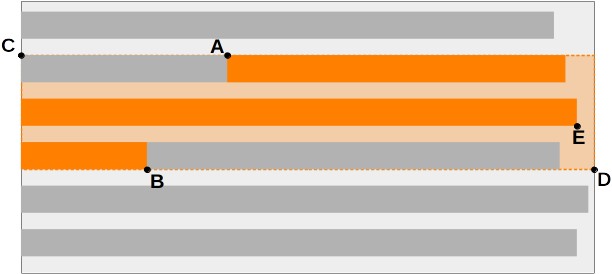
Point A seems a no-brainer, but point B is already a problem, see my issues with right.
I think points C and D are logical choices for a surrounding "virtual" box, intended to reliably position absolute elements. But it's probably not in the specs ?
And eventually the current right-most vertical position, from point E, might be interesting ?
In my opinion, all this would require additional CSS properties, so it will probably not be fixed anytime soon.
But the vertical offsets should be OK. And if it solves the markers problems from #1058 then OK too :smiley:
I actually understand what Chrome does in your example. The default position of an absolute box is "static position" (ie. the position it should have if it wasn’t absolute). In this case, as the element is a block it should break the line container and display the element below the current line, on the left, exactly where WeasyPrint puts it. So, WeasyPrint’s horizontal position is right, and its vertical position would be right too if there were no top and bottom properties.
I don’t understand what WebKit and Firefox do. I would if the bars were ::before, but they’re ::after. That’s a mystery for me.
I think getting the vertical offsets right would be the easiest to fix. Moreover, there is little room for interpretation, and there seems to be a consensus among browsers.
Yes, there’s a bug here for sure.
I am perfectly aware that using
margin-leftto position relative to the left-most text border is a trick and no good CSS.
😁
Other properties do not give the expected result:
margin-rightdoes not work for the other side,
margin-right shouldn’t do anything in a left-to-right document, so it’s OK for me.
leftis interpreted like in your FF and Epiphany examples.
It’s OK for me too, because the left position of the absolutely positioned parent is the left purple border.
The worst of all is
right, with my Chromium, if the last letter is vertically left to the first letter, it positions relative to the first letter (A in the example below).
I don’t understand this one. For me, it should be put on the right. However, surprisingly, I understand what Firefox does in this case.
So… Different browsers give very different renderings. With left, WebKit gives the same rendering as Firefox, but with right it gives the same rendering as Chrome, so that’s not even a Chrome-against-the-other-browsers situation.
We can safely assume that we can’t rely on the specification for this case and that nobody’s right or wrong for the horizontal position.
However, for the vertical position, there’s a bug in WeasyPrint waiting to be solved.
I agree with you, there is no agreement on what the horizontal position should be, but the vertical position is well-defined in any case.
I am no Python developer (I can Java, JS, and some other), and the syntax is not familiar to me. I had a look at the code anyway.
If I interpret it correctly, in inline.py, after line 529: if child.is_absolutely_positioned():, it sets child.position_x, but not child.position_y.
Could this be the bug ?