

 Kozea
Kozea
Floats overflowing the bottom of the page are not put on the next page
There are 4 files in the zip. The html file is the source file, and others are generated by WeasyPrint with version named.
As the screenshot shows. There is a layout issue in the bottom of page 10 and the top of page 11, with v54 and v55. But v53 and v52 worked right as expected.
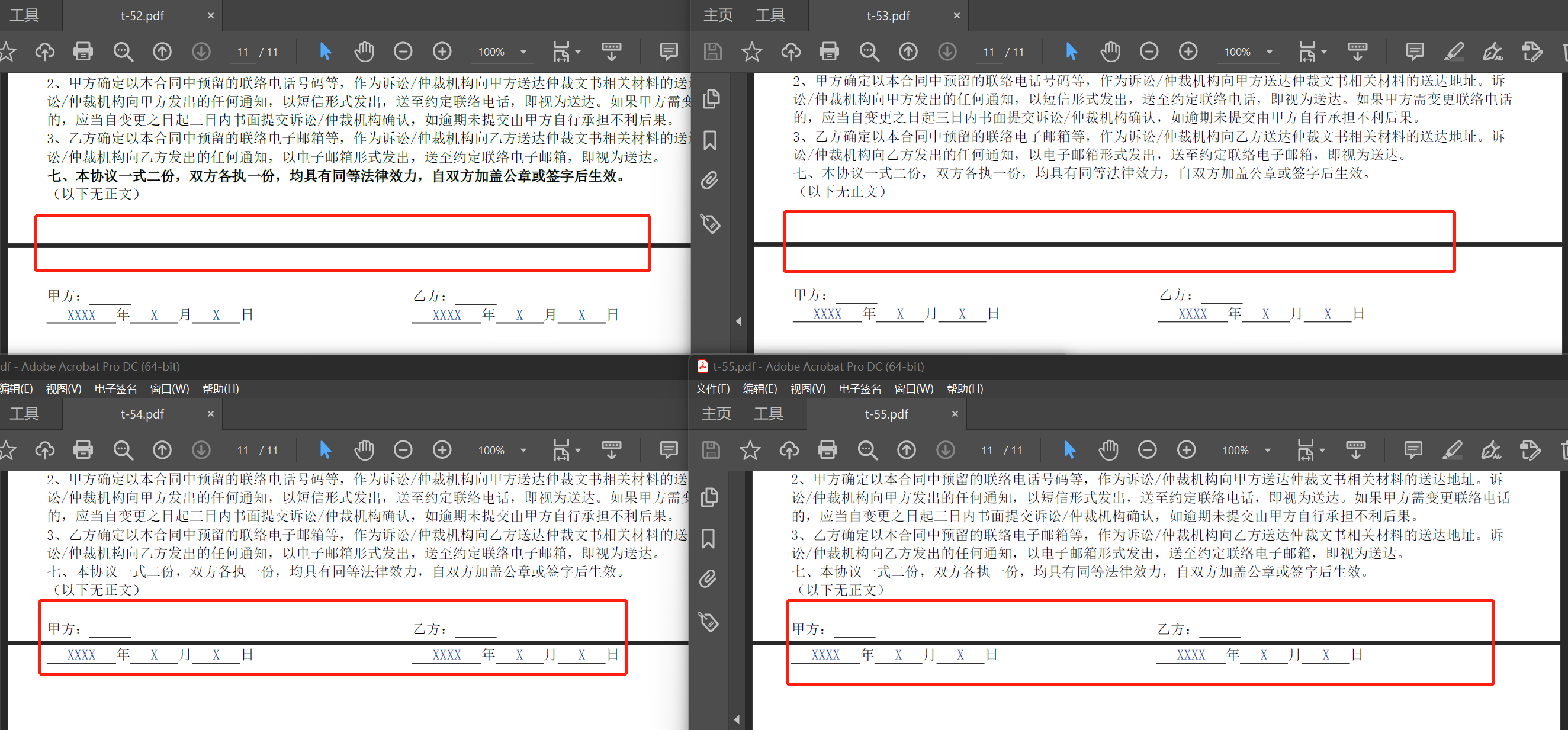
PS: The font weight is a problem too. And v52 seems working correctly of these two issue.

Hi!
Thanks for this bug report.
The problem is caused by the support of page breaks in floats. The problem is that we force to draw the beginning of a float when we reach the bottom of the page.
A simple solution would be to use something different from floats in your last block (I suppose that flex would be better).
Another cleaner solution would be to use break-inside: avoid in your .page_sign block. Unfortunately, there’s a bug duplicating content when a float is at the bottom of the page with break-inside: avoid, but it’s been fixed in f5df55ea and will be part of 55.0.
I’ll rename the issue to explain what’s wrong. There’s a failing test added in aa348dab to keep a failing example.
The font weight is a problem too. And v52 seems working correctly of these two issue.
That’s #1470. You can "fix" that by installing a bold font face on your system.
