

 Kozea
Kozea
Memory leak problem
Hello, we encountered a memory leak when using weasyprint. The phenomenon is that once the memory goes up, it can't go down again.
Prometheus monitoring screenshot:
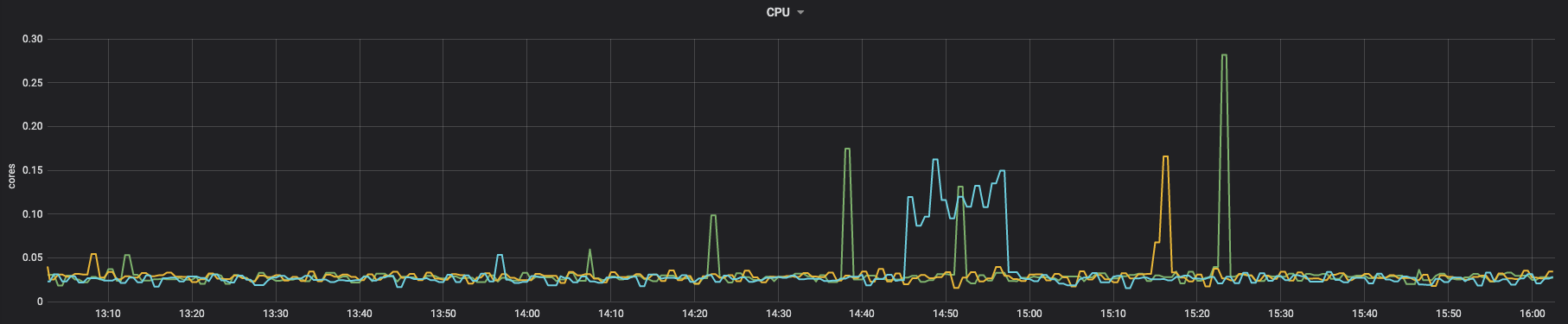
cpu:
 memory:
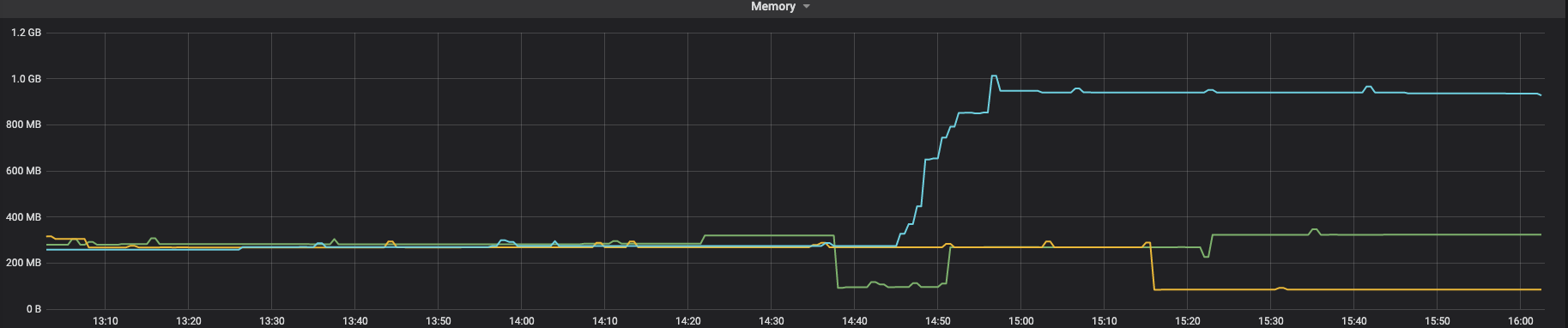 You can see that CPU will drop, but memory will never drop.
We use custom fonts, a lot of pictures and SVG. I don't know if it will be related to them.
Problem recurrence steps
We are running in docker: dockerfile:
FROM python:3.8-bullseye

RUN apt-get update

RUN apt-get install -y python3-cffi python3-brotli libpango-1.0-0 libpangoft2-1.0-0 --no-install-recommends

RUN mkdir ~/.fonts

RUN cp SourceHanSerifCN-Light.ttf ~/.fonts/
SourceHanSerifCN-Light.ttf We used the latest weasyprint:
pip freeze

aliyun-python-sdk-core==2.13.35
aliyun-python-sdk-kms==2.15.0
amqp==2.6.1
bayua==0.0.3
billiard==3.6.4.0
blinker==1.4
Brotli==1.0.9
cachetools==4.2.4
cachext==1.1.1
celery==4.4.7
certifi==2021.10.8
cffi==1.15.0
charset-normalizer==2.0.7
coast==1.4.0
crcmod==1.7
cryptography==35.0.0
cssselect2==0.4.1
elastic-apm==5.10.1
fonttools==4.28.1
grpcio==1.37.1
grpcio-tools==1.37.1
html5lib==1.1
idna==3.3
Jinja2==3.0.3
jmespath==0.10.0
kombu==4.6.11
MarkupSafe==2.0.1
oss2==2.15.0
pendulum==2.1.2
Pillow==8.4.0
protobuf==3.19.1
protos-py==0+untagged.247.gbb6fa5f
pycparser==2.21
pycryptodome==3.11.0
pydyf==0.1.2
PyMuPDF==1.19.1
pyphen==0.11.0
python-dateutil==2.8.2
pytz==2021.3
pytzdata==2020.1
redis==3.5.3
requests==2.26.0
sea==2.3.1
SensorsAnalyticsSDK==1.10.3
sensorsdata-ext==1.0.2
sentry-sdk==1.4.3
six==1.16.0
tinycss2==1.1.0
urllib3==1.26.7
vine==1.3.0
weasyprint==53.4
webencodings==0.5.1
zopfli==0.1.9
Running code
import tempfile

from weasyprint import CSS, HTML
from weasyprint.text.fonts import FontConfiguration

font_config = FontConfiguration()
css = CSS(
    string="""
    @font-face {
        font-family: SourceHanSerifCN-Light;
        src: url("SourceHanSerifCN-Light.ttf");
    }""",
    font_config=font_config,
)

html_url = ""

temp_pdf_file = tempfile.NamedTemporaryFile(mode="w", suffix=".pdf")
HTML(html_url).write_pdf(
    temp_pdf_file.name, stylesheets=[css], font_config=font_config
)
temp_pdf_file.close()
HTML page to be converted (this is just a demo, which is actually much larger than it): https://media-zip1.baydn.com/storage_media_zip/zonyme/182d435ec35fabee217b868a5d2b1e94.49ea39443dfa775bc73b0292a088c88b.html
At first, I thought HTML was too big, so I split HTML into several sub HTML, then converted it into PDF, and finally spliced the PDF, but it would leak memory
like this:
import tempfile

from weasyprint import CSS, HTML
from weasyprint.text.fonts import FontConfiguration

font_config = FontConfiguration()
css = CSS(
    string="""
    @font-face {
        font-family: SourceHanSerifCN-Light;
        src: url("SourceHanSerifCN-Light.ttf");
    }""",
    font_config=font_config,
)

html_url = []

for item in html_url:
  temp_pdf_file = tempfile.NamedTemporaryFile(mode="w", suffix=".pdf")
  HTML(item).write_pdf(
      temp_pdf_file.name, stylesheets=[css], font_config=font_config
  )
 temp_pdf_file.close()
....
merge pdf
I really hope you can see this problem and help fix it

Hello!
Version 55 will be dedicated to increase performance and clean code. We’ll definitely look at this bug after version 54 is released.

It’s hard to reproduce the bug with just this sample. Do you have the problem only when you manage the cache manually, as in #1555?
Not OP but this is the smallest script that leaks memory.
Run it and see process memory grow. Remove the inner table and memory stays almost the same.
import weasyprint

html_string = '''
<html>
<body>
	<table>
	<tr><td>
		<table>
		<tr><td>1
		</table>
	</table>
</body>
</html>
'''

def main():
	for i in range(1000):
		weasyprint.HTML(string=html_string).write_pdf()

main()
versions:
- Windows 10 Pro
- Python 3.10.2
- WeasyPrint 52.5 and 53.4 affected
- gtk3-runtime-3.24.29-2021-04-29-ts-win64.exe

After some more experimentation the following one leaks too. It was not the tables, but the text in the cell. If you remove the x from the following script, it stops leaking. So it really may depend on font rendering / caching.
import weasyprint

html_string = '''
<html>
<body>
	<p>x
</body>
</html>
'''

def main():
	for i in range(1000):
		weasyprint.HTML(string=html_string).write_pdf()

main()
And after the last round of testing my leak seems to be related to GTK version and probably only on Windows. I reverted WeasyPrint to 52.5 and GTK to GTK2 and I cannot reproduce any leaks. Searching the GTK issue tracker surfaced one minor issue that may be related:
GTK uses win32 Pango backend directly
So my posts didn't help much. Sorry for the noise.
Here’s the profiling result of your script, with 10,000 renderings (memory checked each 0.1s):
MEM 1.394531 1645050553.7938
MEM 23.011719 1645050553.8940
MEM 30.738281 1645050553.9943
MEM 38.371094 1645050554.0946
MEM 45.394531 1645050554.1948
MEM 52.925781 1645050554.2951
MEM 57.832031 1645050554.3953
MEM 57.156250 1645050554.4956
MEM 58.656250 1645050554.5959
MEM 61.343750 1645050554.6961
MEM 65.289062 1645050554.7964
MEM 61.164062 1645050554.8967
MEM 63.718750 1645050554.9970
…
MEM 65.683594 1645050896.7302
MEM 67.183594 1645050896.8304
MEM 62.332031 1645050896.9307
MEM 62.332031 1645050897.0310
MEM 64.941406 1645050897.1313
MEM 67.933594 1645050897.2316
There’s no obvious memory leak, at least on Linux.
And after the last round of testing my leak seems to be related to GTK version and probably only on Windows. I reverted WeasyPrint to 52.5 and GTK to GTK2 and I cannot reproduce any leaks.
That would explain the results.
Searching the GTK issue tracker surfaced one minor issue that may be related:
This issue seems to be related to GDK, that we don’t use at all. There was probably another bug elsewhere, and it’s now fixed.
Do you have another example? The problem you tried to solve in #1555 is not a "real" memory leak in my opinion: the goal of the cache is keep things in memory in order to get faster renderings later. That’s why you have more and more memory use. Removing the stream attribute (and other ones, but they’re too small to be interesting) is a possibility and can save some memory, but you can already do this without WeasyPrint. The default use case, where the cache dies with the document, doesn’t leak memory.
Well, I didn't try to solve #1555. I was investigating a leak in my long running windows service that appeared after upgrading Weasyprint and GTK. In retrospect I should have filled another issue instead of commenting on this one.
When I change the loop to infinite while True:, then with GTK2 the memory footprint stays the same. With GTK3 it consumes about 6GB RAM in about one minute a and then the process exits with:
Traceback (most recent call last):
  File "D:\Projekty\neklid.devel\pdf\mem_leak_test.py", line 20, in <module>
	main()
  File "D:\Projekty\neklid.devel\pdf\mem_leak_test.py", line 18, in main
	weasyprint.HTML(string=html_string).write_pdf()
  File "C:\Python310\lib\site-packages\weasyprint\__init__.py", line 227, in write_pdf
	.write_pdf(target, zoom, attachments))
  File "C:\Python310\lib\site-packages\weasyprint\document.py", line 656, in write_pdf
	surface.show_page()
  File "C:\Python310\lib\site-packages\cairocffi\surfaces.py", line 594, in show_page
	self._check_status()
  File "C:\Python310\lib\site-packages\cairocffi\surfaces.py", line 170, in _check_status
	_check_status(cairo.cairo_surface_status(self._pointer))
  File "C:\Python310\lib\site-packages\cairocffi\__init__.py", line 88, in _check_status
	raise exception(message, status)
MemoryError: ("cairo returned CAIRO_STATUS_NO_MEMORY: b'out of memory'", 1)
There are still 3GB more of free memory at the time of crash. So there is probably some internal limit somewhere. If some cache were the reason, then rendering the same document/text should take one cache entry and not grow further IMHO.
I'm not sure I can do anything else in this case. For my program I will revert libs to GTK2 and occasionally check new versions of GTK.
Well, I didn't try to solve #1555. I was investigating a leak in my long running windows service that appeared after upgrading Weasyprint and GTK. In retrospect I should have filled another issue instead of commenting on this one.
Oh, you’re right, the question was for @jesson1.
When I change the loop to infinite
while True:, then with GTK2 the memory footprint stays the same. With GTK3 it consumes about 6GB RAM in about one minute.
That’s sad. The script I launched with 10,000 renderings took more than 5 minutes to finish, and the memory footprint was quite stable.
There are still 3GB more of free memory at the time of crash. So there is probably some internal limit somewhere. If some cache were the reason, then rendering the same document/text should take one cache entry and not grow further IMHO.
You’re right. And we would have the same problem on Linux.
I suppose that there’s a Windows-specific problem with a library shipped with GTK3. Finding the root of the bug would probably require a lot of time, so it’s maybe a better strategy to keep the old version of the libraries and just wait for the memory leak to be fixed. Anyway, there’s not much we can do in WeasyPrint about that 😒.
@jesson1 don’t hesitate to share your point of view about this topic and to answer the previous comment, we’ll be happy to help if we can.
We also have a problem here that a memory leak occurs. We could now trace the problem back to the fact that the RAM is always slightly increased (~6MB) when printing (calling write_pdf).
https://github.com/xpublisher/weasyprint-rest/blob/main/weasyprint_rest/print/weasyprinter.py#L20
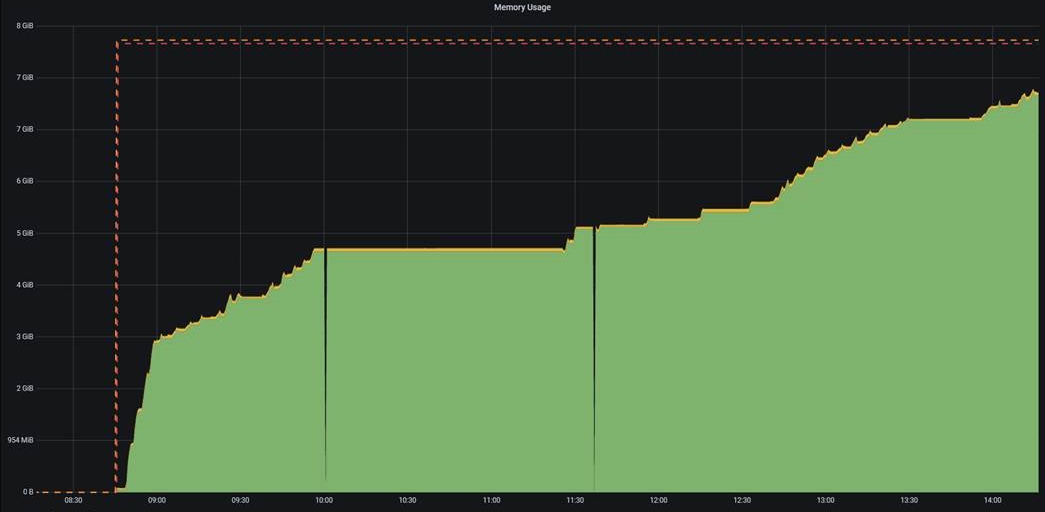
For us this problem is more critical, so it would be good if there was a solution

We also have a problem here that a memory leak occurs. We could now trace the problem back to the fact that the RAM is always slightly increased (~6MB) when printing (calling
write_pdf).
For us this problem is more critical, so it would be good if there was a solution
The best way you can help us to help you is to provide a simple script that shows the memory leak. As explained above, we currently can’t reproduce the memory leak by calling write_pdf in a loop.
Maybe the leak is caused by a specific HTML file, maybe it’s caused by a specific configuration. Please give us an example that would help us to reproduce a memory leak, and we’ll be able to find a solution.
Following #1555, here’s a small and simple script trying to reproduce the memory leak:
import gc
import os
from psutil import Process

from weasyprint import HTML

content = f"""
<svg xmlns="http://www.w3.org/2000/svg" width="100" height="100">
  {'<rect x="0" y="0" width="100" height="100" />' * 10_000}
</svg>"""
# content = '<div>abc</div>' * 1_000
# content = '<img src="image.jpg" />' * 100
print(f'Content size: {len(content) / 1_000:.2f} kB')

def do_print():
    HTML(string=content, base_url=os.getcwd()).write_pdf(target=os.devnull)

def memory():
    return f'{Process().memory_info().rss / 1_000_000:.2f} MB'

do_print()
gc.collect()
print(f'(burn) Current mem usage: {memory()}')

for j in range(1, 11):
    for i in range(1, 11):
        do_print()

    gc.collect()
    print(f'({i * j: 4}) Current mem usage: {memory()}')
We use the default cache (one cache per document) to only get "real" memory leaks.
Here’s what I get with the SVG file:
Content size: 450.08 kB
(burn) Current mem usage: 74.22 MB
(  10) Current mem usage: 83.98 MB
(  20) Current mem usage: 85.28 MB
(  30) Current mem usage: 86.62 MB
(  40) Current mem usage: 86.10 MB
(  50) Current mem usage: 86.63 MB
(  60) Current mem usage: 86.63 MB
(  70) Current mem usage: 86.89 MB
(  80) Current mem usage: 86.89 MB
(  90) Current mem usage: 87.15 MB
( 100) Current mem usage: 87.67 MB
With the HTML:
Content size: 14.00 kB
(burn) Current mem usage: 76.58 MB
(  10) Current mem usage: 85.74 MB
(  20) Current mem usage: 86.97 MB
(  30) Current mem usage: 86.96 MB
(  40) Current mem usage: 88.30 MB
(  50) Current mem usage: 88.06 MB
(  60) Current mem usage: 88.33 MB
(  70) Current mem usage: 88.09 MB
(  80) Current mem usage: 87.79 MB
(  90) Current mem usage: 88.13 MB
( 100) Current mem usage: 88.12 MB
With the JPG (content size doesn’t include the ~1MB image I used):
Content size: 4.10 kB
(burn) Current mem usage: 60.49 MB
(  10) Current mem usage: 77.68 MB
(  20) Current mem usage: 78.48 MB
(  30) Current mem usage: 77.96 MB
(  40) Current mem usage: 77.96 MB
(  50) Current mem usage: 77.96 MB
(  60) Current mem usage: 77.96 MB
(  70) Current mem usage: 77.70 MB
(  80) Current mem usage: 77.70 MB
(  90) Current mem usage: 77.70 MB
( 100) Current mem usage: 77.96 MB
I get really different results each time I launch the code. We can assume one thing (that’s actually well known and documented): memory management is really unreliable in Python, even when you manually collect the garbage. Rendering the document once and then a few times is not sufficient to detect memory leaks, as there’s a huge difference between "burn" and "10".
The conclusion I get from this script is that there’s a memory leak with SVG images. There’s nothing obvious for JPG images and for pure HTML (there are known but very small memory leaks with TODOs in the code).
@liZe could you please confirm if memory leak issue is fixed in Version 55?


This is really starting to affect our app's performance. I hope this is prioritized and addressed soon.

This is really starting to affect our app's performance. I hope this is prioritized and addressed soon.
Are you sure that your memory leak is this caused by this issue? It should only happen if you render a lot of big SVG images.
To be honest, this issue has a pretty low priority, as we’re currently more focused on implementing new features (such as forms, flex, grid…). If the use of WeasyPrint in your app is critical, professional support is the best way to get the work done quickly.
Our app generates a one-page PDF report for users. It contains a few small SVG and PNG icons, and 4 big textual tables. The PDF is generated once, after which it is put in a storage bucket for subsequent retrieval.
The app is Django 4.1.6, Weasyprint 57.2, running on Heroku (heroku-22). We're not having any issues retrieving previously-generated PDFs, but each time it generates a new PDF (filesize 38kb) the app's memory RSS increases by 20 - 40mb, as reported by Heroku. This memory usage doesn't go down until the server is restarted.
Even after removing all images, fonts, and CSS (filesize 32kb) each generation still increases the memory RSS by about 17mb.
If we remove everything from the report template, leaving just <!DOCTYPE html><html lang="en"><head><title>Test</title><body></body></html> (filesize 863b), each generation increases the memory RSS by about 1.3mb.
Unfortunately Heroku doesn't automatically restart the server until both memory RSS and swap exceed the 512mb limit, so once RSS is used up we start getting a lot of pings about OOM errors and have to manually restart it.
There probably isn't much you can diagnose from this, unless maybe it's something to do with the 4 big textual tables?
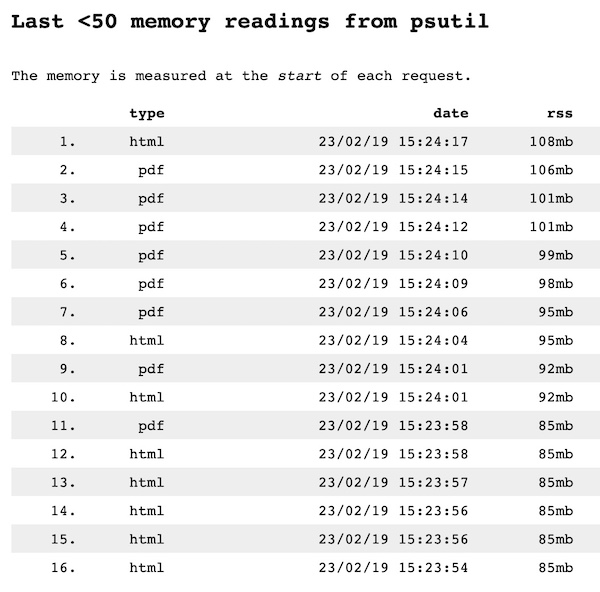
Alright, I deployed a little test app to show this in action, with a link to the source code: https://weasyprint-mem.herokuapp.com/
You can see that every time a PDF is generated it increases the memory usage, although not always consistently. I would expect the data for each PDF to be garbage-collected once it has rendered:
Hi!
Thanks for your example.
If we remove everything from the report template, leaving just
<!DOCTYPE html><html lang="en"><head><title>Test</title><body></body></html>(filesize 863b), each generation increases the memory RSS by about 1.3mb.
Then this memory leak is not caused by SVG.
I’m really sorry, but providing a web application doesn’t give us the possibility to easily find where this memory leak comes from. In order to debug WeasyPrint’s code, we’d need to find a way to reproduce the memory leak in a simple Python script only using WeasyPrint. Without this, there’s a possibility that the memory leak is caused by the app’s code, and not WeasyPrint’s.
We’ve not been able to write such a script so far. 😒
@liZe Darn. I'll go bang on Django's door and see if they can help. Thanks.
Edit: https://code.djangoproject.com/ticket/34356
@liZe I'm getting the same issue in Django:
https://weasyprint-mem.herokuapp.com/
...and in Flask:
https://weasyprint-mem-flask.herokuapp.com/
I've also tried:
- Using
waitressinstead ofgunicorn - Manually running
gc.collect()in between requests
...all with the same result. This says to me this is either an issue with Weasyprint itself, or something more fundamentally with Python, or something with Heroku. In any of those cases one would think this issue would have arisen before, which is what makes it so strange.
You can try to use the same code without using a web framework, so that we can find whether it’s related to WeasyPrint or to something else.
@liZe I ran this just as a little Python script on my machine (Macbook Pro) and get similar results. Note the increasing RSS:
| 23/02/25 21:09:47 | rss | vms | uss | swap |
|---|---|---|---|---|
| 23/02/25 21:09:47 | 64mb | 418865mb | 49mb | 0mb |
| 23/02/25 21:09:48 | 80mb | 418901mb | 62mb | 0mb |
| 23/02/25 21:09:49 | 86mb | 418902mb | 68mb | 0mb |
| 23/02/25 21:09:49 | 94mb | 418914mb | 76mb | 0mb |
| 23/02/25 21:09:50 | 104mb | 418916mb | 86mb | 0mb |
| 23/02/25 21:09:50 | 112mb | 418916mb | 94mb | 0mb |
| 23/02/25 21:09:50 | 117mb | 418917mb | 99mb | 0mb |
| 23/02/25 21:09:51 | 119mb | 418917mb | 95mb | 0mb |
| 23/02/25 21:09:51 | 121mb | 419051mb | 97mb | 0mb |
| 23/02/25 21:09:52 | 123mb | 419051mb | 100mb | 0mb |
| 23/02/25 21:09:52 | 125mb | 419051mb | 101mb | 0mb |
| 23/02/25 21:09:52 | 130mb | 419052mb | 106mb | 0mb |
| 23/02/25 21:09:53 | 133mb | 419052mb | 110mb | 0mb |
| 23/02/25 21:09:53 | 137mb | 419053mb | 113mb | 0mb |
| 23/02/25 21:09:53 | 139mb | 419053mb | 108mb | 0mb |
| 23/02/25 21:09:54 | 141mb | 419188mb | 110mb | 0mb |
| 23/02/25 21:09:54 | 146mb | 419196mb | 115mb | 0mb |
| 23/02/25 21:09:54 | 148mb | 419196mb | 118mb | 0mb |
| 23/02/25 21:09:54 | 157mb | 419206mb | 120mb | 0mb |
| 23/02/25 21:09:55 | 159mb | 419206mb | 122mb | 0mb |
| 23/02/25 21:09:55 | 160mb | 419206mb | 124mb | 0mb |
| 23/02/25 21:09:56 | 162mb | 419206mb | 121mb | 0mb |
| 23/02/25 21:09:56 | 164mb | 419207mb | 122mb | 0mb |
| 23/02/25 21:09:56 | 172mb | 419207mb | 128mb | 0mb |
| 23/02/25 21:09:56 | 176mb | 419207mb | 131mb | 0mb |
| 23/02/25 21:09:56 | 178mb | 419208mb | 130mb | 0mb |
| 23/02/25 21:09:57 | 181mb | 419208mb | 133mb | 0mb |
Here's a summary of the script:
def printmem():
    pid = os.getpid()
    mem = psutil.Process(pid).memory_full_info()
    now = datetime.datetime.now()
    print(delim.join((
        now.strftime(time_fmt),
        *[str(round(getattr(mem, field, 0) / 1000000)) + 'mb' for field in fields]
    )))

def generate_pdf(): # This is a contrived example. In our actual use-case we're rendering a Django template with context variables, so each regenerate yields a unique document
    file_template = open('pdf.html', 'r')
    template = file_template.read()
    file_template.close()

    pdf = weasyprint.HTML(
        string=template,
        encoding='utf-8'
    ).write_pdf(
        font_config=font_config,
    )

    now = datetime.datetime.now()
    file_output = open('pdfs/' + now.strftime('%y%m%d%H%I%s') + '.pdf', 'wb')
    file_output.write(pdf)
    file_output.close()

while True:
    if input().lower() != '':  # If anything other than Enter/Return is input, exit. Otherwise, generate a new PDF and then print memory usage
        break
    generate_pdf()
    printmem()
The full version is here: https://github.com/RobertAKARobin/weasyprint-mem-py
The only dependency here is weasyprint (and psutil), which would indicate the memory issue is either in Weasyprint or how it's being used.
Thanks a lot for your detailed report.
Unfortunately, your script doesn’t show that there’s a memory leak problem. Python’s memory management is highly unpredictable, you can’t detect memory leaks only with a few generations of a small document.
I’ve launched your script to generate 1000 documents, and here’s what I get:
0 23/02/26 08:08:00 | 67mb | 234mb | 54mb | 0mb
1 23/02/26 08:08:01 | 74mb | 241mb | 60mb | 0mb
2 23/02/26 08:08:01 | 74mb | 241mb | 60mb | 0mb
3 23/02/26 08:08:01 | 76mb | 243mb | 62mb | 0mb
4 23/02/26 08:08:01 | 83mb | 250mb | 69mb | 0mb
5 23/02/26 08:08:02 | 83mb | 251mb | 69mb | 0mb
6 23/02/26 08:08:02 | 83mb | 251mb | 69mb | 0mb
7 23/02/26 08:08:02 | 85mb | 253mb | 72mb | 0mb
8 23/02/26 08:08:02 | 88mb | 255mb | 74mb | 0mb
9 23/02/26 08:08:02 | 88mb | 256mb | 75mb | 0mb
10 23/02/26 08:08:03 | 90mb | 257mb | 76mb | 0mb
11 23/02/26 08:08:03 | 95mb | 263mb | 82mb | 0mb
12 23/02/26 08:08:03 | 96mb | 263mb | 82mb | 0mb
13 23/02/26 08:08:03 | 96mb | 264mb | 83mb | 0mb
14 23/02/26 08:08:04 | 99mb | 267mb | 85mb | 0mb
15 23/02/26 08:08:04 | 99mb | 267mb | 85mb | 0mb
16 23/02/26 08:08:04 | 99mb | 267mb | 85mb | 0mb
17 23/02/26 08:08:04 | 99mb | 267mb | 86mb | 0mb
18 23/02/26 08:08:05 | 100mb | 268mb | 87mb | 0mb
19 23/02/26 08:08:05 | 101mb | 269mb | 87mb | 0mb
20 23/02/26 08:08:05 | 102mb | 269mb | 88mb | 0mb
21 23/02/26 08:08:05 | 102mb | 270mb | 89mb | 0mb
22 23/02/26 08:08:05 | 103mb | 271mb | 90mb | 0mb
23 23/02/26 08:08:06 | 104mb | 272mb | 90mb | 0mb
24 23/02/26 08:08:06 | 108mb | 276mb | 94mb | 0mb
25 23/02/26 08:08:06 | 108mb | 276mb | 95mb | 0mb
26 23/02/26 08:08:06 | 109mb | 277mb | 96mb | 0mb
27 23/02/26 08:08:07 | 111mb | 279mb | 98mb | 0mb
28 23/02/26 08:08:07 | 111mb | 279mb | 98mb | 0mb
29 23/02/26 08:08:07 | 111mb | 279mb | 98mb | 0mb
30 23/02/26 08:08:07 | 112mb | 280mb | 99mb | 0mb
…
100 23/02/26 08:08:24 | 130mb | 297mb | 116mb | 0mb
101 23/02/26 08:08:24 | 130mb | 297mb | 116mb | 0mb
102 23/02/26 08:08:24 | 130mb | 297mb | 116mb | 0mb
103 23/02/26 08:08:24 | 130mb | 297mb | 116mb | 0mb
104 23/02/26 08:08:25 | 130mb | 297mb | 116mb | 0mb
…
300 23/02/26 08:08:11 | 130mb | 297mb | 116mb | 0mb
301 23/02/26 08:08:11 | 130mb | 297mb | 116mb | 0mb
302 23/02/26 08:08:11 | 130mb | 297mb | 116mb | 0mb
303 23/02/26 08:08:12 | 130mb | 297mb | 116mb | 0mb
304 23/02/26 08:08:12 | 130mb | 297mb | 116mb | 0mb
…
991 23/02/26 08:08:36 | 130mb | 298mb | 117mb | 0mb
992 23/02/26 08:08:36 | 130mb | 298mb | 117mb | 0mb
993 23/02/26 08:08:36 | 130mb | 298mb | 117mb | 0mb
994 23/02/26 08:08:37 | 130mb | 298mb | 117mb | 0mb
995 23/02/26 08:08:37 | 130mb | 298mb | 117mb | 0mb
996 23/02/26 08:08:37 | 130mb | 298mb | 117mb | 0mb
997 23/02/26 08:08:38 | 130mb | 298mb | 117mb | 0mb
998 23/02/26 08:08:38 | 130mb | 298mb | 117mb | 0mb
999 23/02/26 08:08:38 | 130mb | 298mb | 117mb | 0mb
At the beginning the memory increases, but it’s really stable after a while (~100 for this example), with a small oscillation (rss sometimes reaches 131mb in this table, for example).
@liZe Well darn. That's good to know. Frustrating that it's just the way Python is. Thanks for all your help.
For anyone else looking for a solution, using a subprocess seems to do the trick. It's a little slower but doesn't gobble up memory:
https://github.com/RobertAKARobin/weasyprint-mem-py/commit/355aab3d3b090ca37f78f13ff89b2518c0b59031
Has anyone able to solve this without using subprocess as I'm serving the write_pdf directly to the user without storing the file?

Has anyone able to solve this without using subprocess as I'm serving the write_pdf directly to the user without storing the file?
Unfortunately, there’s no evidence that there’s a memory leak in WeasyPrint, and I’m afraid there’s nothing we can really do here :/.
If someone can provide a script that shows a memory leak, we’ll be happy to help!