

 Kozea
Kozea
Unexpected float clear when wrapping a single word next to a float
I'm running into a bit of an odd situation: I have a fixed-width <div> that is floated to the left of another <div> with a sufficient margin and fixed width. Normally, this works fine. However, when putting a single (not normally breakable) word in the non-floating div that exceeds the width of that div, the whole word wraps below the floated div. This happens even with overflow-wrap: break-word, which makes the word "fit" in the box.
This only happens if the content of the second div is larger than its width without initially wrapping: simply repeating words won't cause the left float to be cleared.
The text description is a bit confusing, so a sample HTML document: (The outer wrapping div is not necessary to reproduce the issue, but it makes the example more clear.)
Too long to fit in the box:

<div style="clear: both; margin-bottom: 2em;">
  <div style="float: left; width: 1em; background-color: #abcdef;">a</div>
  <div style="max-width: 20em; margin-left: 2em; background-color: #cdefab;">bbbbbbbbbbbbbbbbbbbbbbbbbbbbbbbbb</div>
</div>

Too long with forced wrapping:

<div style="clear: both; margin-bottom: 2em;">
  <div style="float: left; width: 1em; background-color: #abcdef;">a</div>
  <div style="max-width: 20em; margin-left: 2em; background-color: #cdefab; overflow-wrap: break-word;">bbbbbbbbbbbbbbbbbbbbbbbbbbbbbbbbb</div>
</div>

Short enough to fit:

<div style="clear: both; margin-bottom: 2em;">
  <div style="float: left; width: 1em; background-color: #abcdef;">a</div>
  <div style="max-width: 20em; margin-left: 2em; background-color: #cdefab;">bbbbbbbbbbbbbbbbbbbbbbbbbbbbbb</div>
</div>

Words that can wrap:

<div style="clear: both; margin-bottom: 2em;">
  <div style="float: left; width: 1em; background-color: #abcdef;">a</div>
  <div style="max-width: 20em; margin-left: 2em; background-color: #cdefab;">foo foo foo foo foo foo foo foo foo foo foo</div>
</div>
This works without wrapping down in Chrome and Firefox (pictured):

But WeasyPrint (53.3) wraps content below the float:
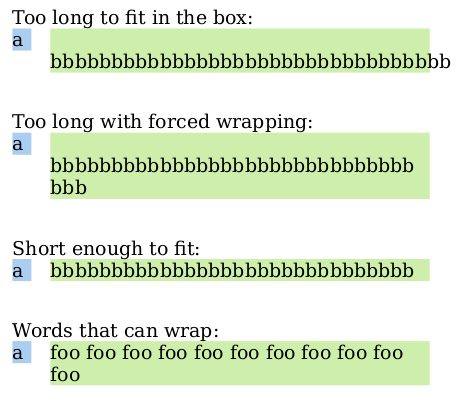
The generated PDF: wrapping.pdf

Thanks a lot for this bug report.
Putting bbbbbbb… on the next line would be OK if the a float was actually taking some place. But it’s not the case because of the left margin, so we can actually render the green block just as if there was no float.
