

 Kong
Kong
"A JavaScript error occured in the main processs" Error popup
Expected Behavior
Insomnia should start
Actual Behavior
A popup shows up, Insomnia does not start

Reproduction Steps
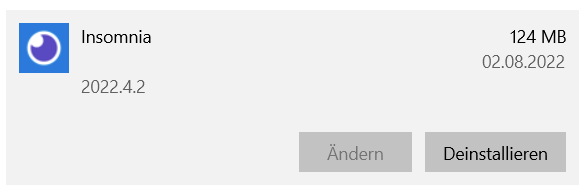
Try to start Insomnia, according to Windows installed programs this is the installed version:
Is there an existing issue for this?
- [X] I have searched the issue tracker for this problem.
Additional Information
No response
Insomnia Version
2022.4.2
What operating system are you using?
Windows
Operating System Version
Windows 10
Installation method
download from insomnia.rest
Last Known Working Insomnia version
No response

Hi @powtac thanks for reporting this!
- Do you still get this error if you attempt to run our latest release (2022.5.0) ?
Alternatively, I would also recommend you to for now delete (or rename) Insomnia's data folder, which might help with this issue.
Let us know if any of this helped.

It still occurs at 2022.05.0
Am 05.08.2022 um 10:33 schrieb Filipe Freire @.***>:
Hi @powtac thanks for reporting this!
Do you still get this error if you attempt to run our latest release (2022.5.0) ? Alternatively, I would also recommend you to for now delete (or rename) Insomnia's data folder, which might help with this issue.
Let us know if any of this helped.
— Reply to this email directly, view it on GitHub, or unsubscribe. You are receiving this because you were mentioned.
@powtac I noticed looking at your screenshot the error message says something like:
The operation could not be completed successfully because the file contains a virus or possibly unwanted software
I wonder - are you by any chance running any antivirus software AND/OR are trying to boot up Insomnia in a windows user account that perhaps doesn't have enough admin permissions?
Are you able to open Insomnia if you check Run as administrator in the properties of the Insomnia executable?
I'm getting this exact same issue trying to install/run the current version (2022.5.1) on Windows 11.

In my case I'm running Acronis Cyber Protect Home Office and it is blocking the generated tmp.node file that's getting created when it tries to start up and I can see it show up in the quarantine. I had an older version of Insomnia working fine on this system from a year or so ago and was trying to get the current version installed tonight but it is now very unhappy with something that has changed either with Insomnia or Acronis. Both clearing the Insomnia data directories and using the Run as Administrator option to run it don't seem to help at all unfortunately.

I have the same problem and also have Acronis Cyber Protect Home Office. I turned it off and switched back to Windows Defender. Now, it is working again.
