

 Komodo
Komodo Edit: Dialog box gets wider and wider
Short Summary
The dialog message: The file xxx is read-only. Would you like to save your changes under a different name or force the save?
Gets wider and wider every time you do a Save. The dialog box currently spans across 2 monitors. I am running on a Laptop, that has 2 attached monitors, one of the attached monitors being the main monitor. The file that is being saved is read-only.
Steps to Reproduce
Just doing a "Save" (using the Save icon) brings up the dialog box that gets wider each time it is brought up.
Expected results
The dialog box should not grow in width
Actual results
The dialog box grows wider every time a file is Saved.
Platform Information
Using this version:
Komodo Edit, version 11.0.2, build 18122, platform win32-x86. Built on Mon Dec 04 18:29:31 2017.

Additional Information


Can you reproduce this using Help > Troubleshooting > Restart in Safe-mode ?
Please verify that when restarting in safe-mode Komodo should be using the default UI (all your settings would be temporarily reset).
I restarted Komodo in Safe-mode. It changed the size of the dialog box back to a reasonable width. I did a few "Saves" (force save) on a read-only file and if you look closely, the dialog box width grows by a pixel or two on every Save.
When I run Komodo Edit in its normal mode, the dialog box has a very large width - spanning 2 monitors.
As a workaround I suggest to edit preference "chrome://komodo/content/dialogs/yesNoCancel.xul":{"dialog-yesnocancel":{"width":"TOO_BIG_NUMBER"}} in xulstore.json file in the user data directory of the Komodo Edit.

I have this issue too. All dialogs such as yes/no or new file have become so wide I can't see the window's buttons.

@RogerLevy, what version of Komodo are you using? I believe a fix went in 11.1.1 but I guess we didn't remember this open ticket. @Naatan i recall you fixing something to do with dialog window sizes. Should this issue have been addressed by that fix?
@RogerLevy could you share a screen shot of the dialog? Or share your OS as well. As a workaround I believe you can delete xulstore.json from your Komodo profile XRE folder.
@cgchoffman
Windows 10 Pro 64-bit
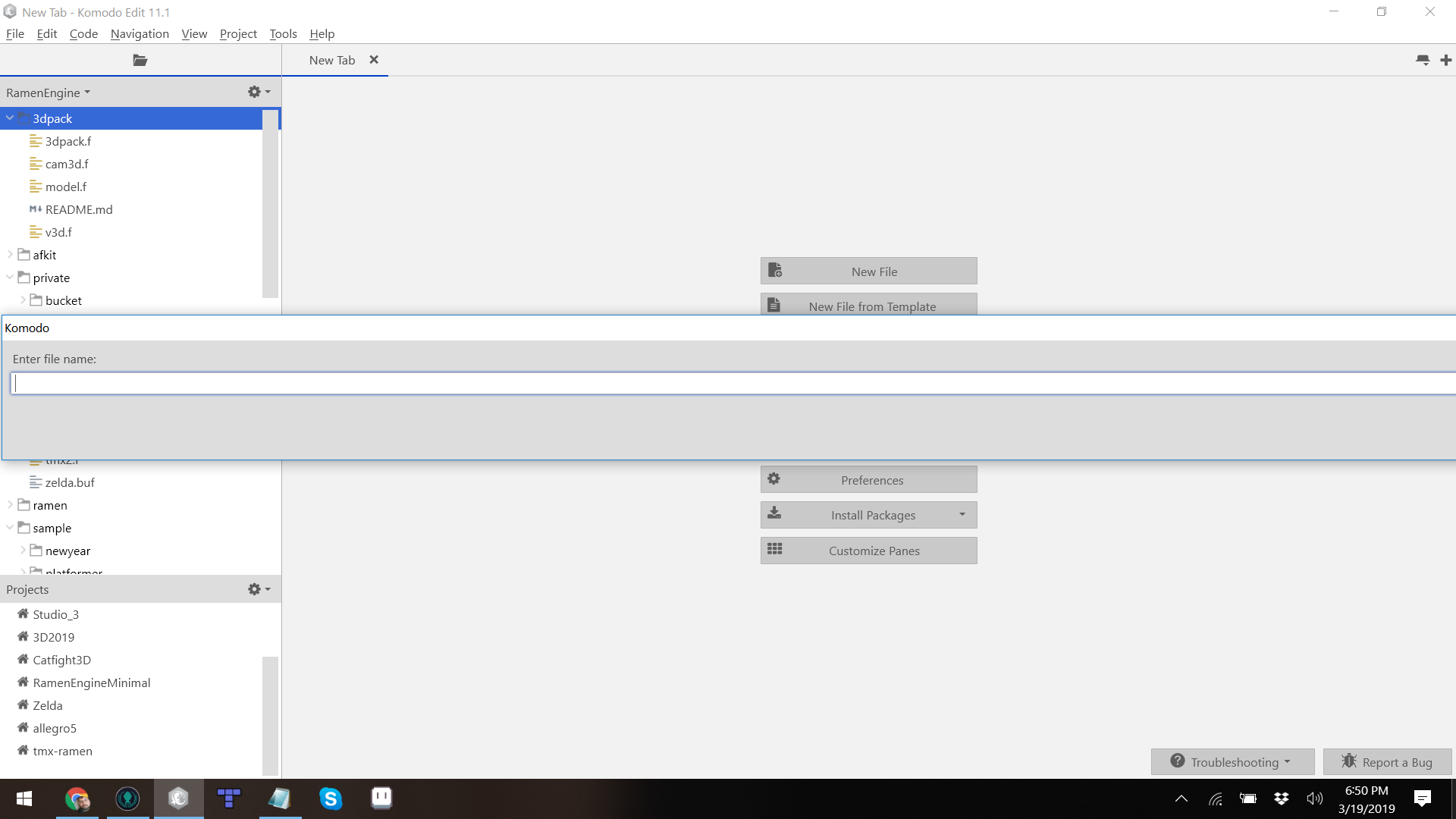
what side effects will deleting xulstore.json have?
@RogerLevy, the side effect will be that that dialog will go back to a normal size :). You shouldn't notice other side effects. I meant the About Komodo dialog but you answered my question despite my ambiguous wording and you're on Edit. Perfect. I'm guess a commit didn't make it over from the IDE repo. Having a look.
@cgchoffman Your workaround worked, though clearly it's a temporary measure since it does have side effects (View related) and will need to be done periodically. Thanks
@RogerLevy it's not. ActiveState has open sourced Komodo IDE and no longer supports it. More info here: https://www.activestate.com/blog/activestate-komodo-ide-now-open-source/
On the plus side, you can see all the code in GitHub and pull it down to muck around with if you like: https://github.com/ActiveState/OpenKomodoIDE