

 Koenkk
[New device support]: TUYA TS0601 _TZE200_yjjdcqsq
Link
https://nl.aliexpress.com/item/1005004838346776.html?spm=a2g0o.order_list.0.0.21ef79d23TQkYy&gatewayAdapt=glo2nld
Database entry
{"id":2,"type":"EndDevice","ieeeAddr":"0xa4c13802b5d7be5f","nwkAddr":23500,"manufId":4417,"manufName":"_TZE200_yjjdcqsq","powerSource":"Battery","modelId":"TS0601","epList":[1],"endpoints":{"1":{"profId":260,"epId":1,"inClusterList":[4,5,61184,0],"outClusterList":[25,10],"clusters":{"genBasic":{"attributes":{"65503":"�\u0019�*\u0019�\u0019�*\u0007\u0000\u0000\u0000\u0000\u0011","65506":56,"65508":1,"stackVersion":0,"dateCode":"","appVersion":72}}},"binds":[{"cluster":0,"type":"endpoint","deviceIeeeAddress":"0xe0798dfffe77ff5d","endpointID":1}],"configuredReportings":[],"meta":{}}},"appVersion":72,"stackVersion":0,"hwVersion":1,"dateCode":"","zclVersion":3,"interviewCompleted":true,"meta":{"configured":821693351},"lastSeen":1667649633218,"defaultSendRequestWhen":"immediate"}
Comments
I have tried a few things, looked for (very) similar devices in the tuya.js file, and tried a few things but never really succeeded. I admit that from enabling the Herdsman log I was only getting more confused in my inexperience working with z2m.
To the point. My device seems a clone from: https://zigbee.blakadder.com/Tuya_WL-TH02.html - Which I seem to find in the tuya.js file. However, i cannot get it working with the external converter of this device. The device itself seems to have a Model nr of ZTH01 - written on the back of the device. Many thanks in advance.
External converter
No response
Supported color modes
No response
Color temperature range
No response

Ok, after a few more rounds of trial and error. I got it working with the following converter file:
const fz = require('zigbee-herdsman-converters/converters/fromZigbee');
const tz = require('zigbee-herdsman-converters/converters/toZigbee');
const exposes = require('zigbee-herdsman-converters/lib/exposes');
const reporting = require('zigbee-herdsman-converters/lib/reporting');
const extend = require('zigbee-herdsman-converters/lib/extend');
const e = exposes.presets;
const ea = exposes.access;
const tuya = require("zigbee-herdsman-converters/lib/tuya");

const definition = {
    fingerprint: [
        {modelID: 'TS0601', manufacturerName: '_TZE200_yjjdcqsq'}
    ],
    model: 'TS0601_temperature_humidity_sensor',
    vendor: 'TuYa',
    description: 'Temperature & humidity sensor',
    fromZigbee: [fz.tuya_temperature_humidity_sensor],
    toZigbee: [],
    exposes: (device, options) => {
        const exps = [e.temperature(), e.humidity(), e.battery()];
        if (!device || device.manufacturerName === '_TZE200_yjjdcqsq') {
            exps.push(e.battery_low());
            exps.push(exposes.enum('battery_level', ea.STATE, ['low', 'middle', 'high']).withDescription('Battery level state'));
        }
        exps.push(e.linkquality());
        return exps;
    },
};

module.exports = definition;
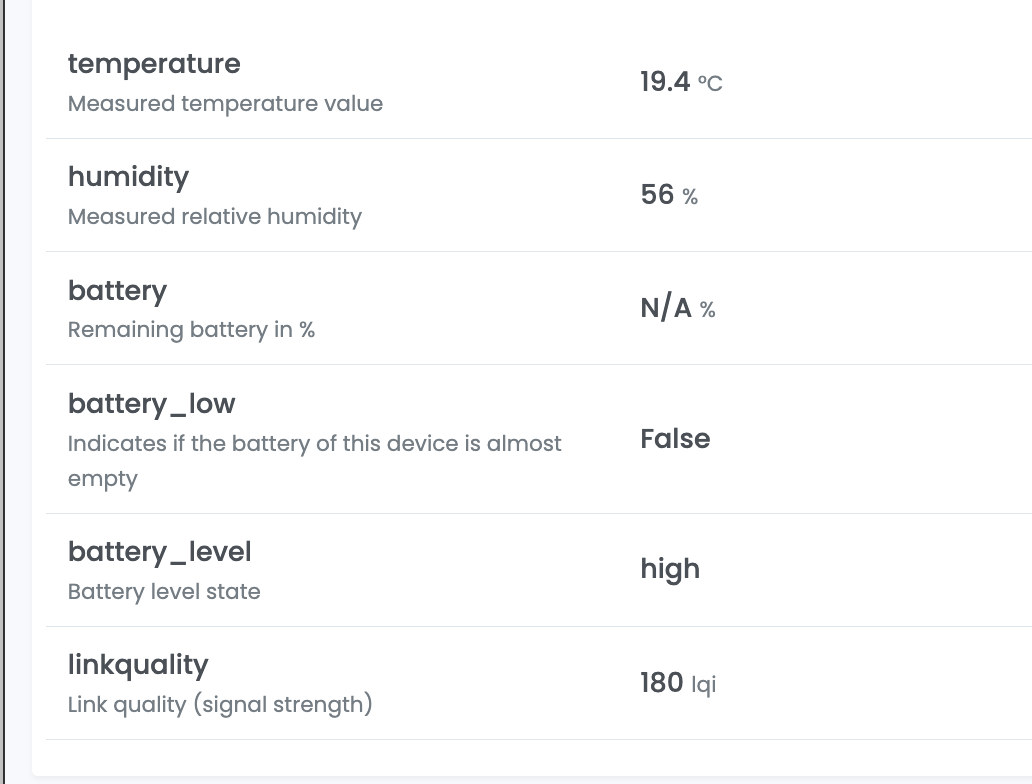
Only thing not working as of yet, is the battery value / percentage.
Log entries to go with this:
Zigbee2MQTT:info 2022-11-05 16:07:19: MQTT publish: topic 'zigbee2mqtt/temp_hum_sensor', payload '{"battery":null,"battery_level":"high","battery_low":false,"humidity":56,"linkquality":184,"temperature":18.9}' Zigbee2MQTT:debug 2022-11-05 16:07:19: Received Zigbee message from 'temp_hum_sensor', type 'commandDataReport', cluster 'manuSpecificTuya', data '{"dpValues":[{"data":{"data":[0,0,0,57],"type":"Buffer"},"datatype":2,"dp":2}],"seq":3072}' from endpoint 1 with groupID 0 Zigbee2MQTT:info 2022-11-05 16:07:19: MQTT publish: topic 'zigbee2mqtt/temp_hum_sensor', payload '{"battery":null,"battery_level":"high","battery_low":false,"humidity":57,"linkquality":184,"temperature":18.9}' Zigbee2MQTT:debug 2022-11-05 16:07:19: Received Zigbee message from 'temp_hum_sensor', type 'commandDataReport', cluster 'manuSpecificTuya', data '{"dpValues":[{"data":{"data":[2],"type":"Buffer"},"datatype":4,"dp":3}],"seq":3328}' from endpoint 1 with groupID 0 Zigbee2MQTT:info 2022-11-05 16:07:19: MQTT publish: topic 'zigbee2mqtt/temp_hum_sensor', payload '{"battery":null,"battery_level":"high","battery_low":false,"humidity":57,"linkquality":188,"temperature":18.9}' Zigbee2MQTT:debug 2022-11-05 16:07:19: Received Zigbee message from 'temp_hum_sensor', type 'commandDataReport', cluster 'manuSpecificTuya', data '{"dpValues":[{"data":{"data":[0],"type":"Buffer"},"datatype":4,"dp":9}],"seq":3584}' from endpoint 1 with groupID 0 Zigbee2MQTT:warn 2022-11-05 16:07:19: zigbee-herdsman-converters:maa_tuya_temp_sensor: NOT RECOGNIZED DP #9 with data {"dp":9,"datatype":4,"data":{"type":"Buffer","data":[0]}} Zigbee2MQTT:debug 2022-11-05 16:08:02: Saving state to file /config/zigbee2mqtt/state.json
Can confirm, your converter works for me except the battery level. I have a similar device to you: Link I also get the same warning in my logfiles.
warn 2022-11-08 21:27:12: zigbee-herdsman-converters:maa_tuya_temp_sensor: NOT RECOGNIZED DP #9 with data {"dp":9,"datatype":4,"data":{"type":"Buffer","data":[0]}}
While I don't know what exactly needs to be done, I would assume it would involve these files.
- https://github.com/Koenkk/zigbee-herdsman-converters/blob/26315a528c67b3f4bbe966c418b2de26c611d7dc/devices/tuya.js#L716
- https://github.com/Koenkk/zigbee-herdsman-converters/blob/26315a528c67b3f4bbe966c418b2de26c611d7dc/converters/fromZigbee.js#L1922
- https://github.com/Koenkk/zigbee-herdsman-converters/blob/26315a528c67b3f4bbe966c418b2de26c611d7dc/lib/tuya.js#L753
If nobody else wants to / is working on this I might be able to play around with it next week

@gh7531 My first question would be, does this device even report an exact battery level? I haven't found any conclusive evidence for this on the box, device, or manual. Nor can I find this info on the sellers page @ aliexpress..
Looking at the different DP's coming in, it looks to me like only one is not recognized. As per the Log:
Zigbee2MQTT:warn 2022-11-05 16:07:19: zigbee-herdsman-converters:maa_tuya_temp_sensor: NOT RECOGNIZED DP #9 with data {"dp":9,"datatype":4,"data":{"type":"Buffer","data":[0]}}
To me, the value of data in this request never changes from 0. Perhaps that's because the script doesn't know how to interpret it. I'm not sure and my knowledge of the matter is too shallow to determine that. But if you compare it to the other incoming request, the data is pretty clear.
For example, the incoming zigbee message for humidity looks like this:
"data":{"data":[0,0,0,57]
which comes from DP: 2, with Datatype: 2, and represents a humidity level of 57%.
Not sure if my reasoning is too simple, and the zero value doesn't mean anything at this point. But could it be that this device isn't supposed to report an exact battery level and instead only report a low, normal, high battery level (which works for me).
Perhaps if that's the case, the missing DP (9) could be some completely different value that we're overseeing right now?
Hi, I've a Tuya GW and this device doesn't show a battery level, only the battery status. Thanks for your job, I've now my devices joined to z2m

This issue is stale because it has been open 30 days with no activity. Remove stale label or comment or this will be closed in 7 days
![github-actions[bot] avatar](https://avatars.githubusercontent.com/in/15368?v=4 "Published by a pub.dev verified publisher")
Another issue that addresses this sensor : https://github.com/Koenkk/zigbee2mqtt/issues/15729

solved with this PR: https://github.com/Koenkk/zigbee-herdsman-converters/pull/5234
